The fastest way to automate customer follow-up messages is a 4-touch, trigger-driven sequence across SMS and email that fires the moment a quote goes out or a demo ends, pauses instantly on reply, and syncs back to your CRM.
You need four pieces to launch:
- A clear trigger (quote sent, demo completed, form submitted)
- A template set with a distinct purpose per touch
- Pause-on-reply logic
- CRM sync to log outcomes
Get those four right and reply and booking rates climb within the first week.
Key Takeaways
Automated follow-up sequences work when they combine a clear trigger, a short personalized cadence, hard exit rules, and CRM sync to prove the results.
| Point | Details |
|---|---|
| Start with one trigger | Launch a single 4-touch sequence, like quote follow-up, before expanding to others. |
| Build in hard stops | Any reply, booking, or opt-out must pause the sequence immediately across every channel. |
| Personalize with real fields | Use name, rep, product detail, and event reference to avoid generic-sounding messages. |
| Track four core metrics | Watch reply rate, meeting-booked rate, conversion, and time-to-next-step weekly. |
| Consider an all-in-one platform | Mediabloom bundles CRM sync, pause-on-reply, and multi-channel sequencing into one deployment. |
Table of Contents
- Why Automate Customer Follow-Up Messages in the First Place?
- Which Channels Should Carry Your Follow-Up Messages?
- How Do You Design an Automated Follow-Up Sequence?
- When Should Automation Pause and a Human Take Over?
- How Do You Personalize Follow-Ups Without Sounding Robotic?
- What Compliance Rules Apply to Automated Follow-Ups?
- Which Metrics Actually Prove the Automation Is Working?
- What Should You Require From a Follow-Up Automation Platform?
- How an AI-Powered Platform Covers the Whole Checklist
- Automation Should Amplify Sellers, Not Replace Them
- Get Automated Follow-Ups Running Without Building It Yourself
- Sources
- FAQ
Why Automate Customer Follow-Up Messages in the First Place?
Deals don’t die because your product is wrong. They die because nobody followed up on day three, day seven, and day fourteen. Manual follow-up depends on a rep remembering to check a spreadsheet, and reps forget, get busy, or deprioritize “cold” leads that are actually just untouched.
Automation fixes the timing problem, not the persuasion problem. It guarantees the touch happens even when your team is buried. An operator playbook from Automation Labz found that a focused 4-touch quote sequence spread over 14 to 21 days delivers the strongest return for most small and mid-sized businesses, beating higher-volume blasts that read as robotic.
Three revenue leaks automation typically plugs:
- Quotes that go cold because nobody circled back
- No-shows that never get rebooked
- Dormant customers who would reactivate with one well-timed nudge
Which Channels Should Carry Your Follow-Up Messages?
Email, SMS, phone, and social each solve a different problem. Picking the wrong one for the moment is why so many sequences underperform.
- Email carries detail: pricing breakdowns, case studies, contract terms. It’s the default for anything that needs a paper trail.
- SMS wins on immediacy. A step-by-step automation guide notes SMS sequences routinely see higher open and response rates than email, making them ideal for time-sensitive nudges like appointment reminders or same-day quote follow-ups.
- Phone/voice fits high-value accounts and anything requiring real negotiation or reassurance.
- LinkedIn/social works for slow-cycle B2B relationships where a direct pitch would feel premature.
SMS requires explicit opt-in consent before you send a single text, and email deliverability depends on list hygiene most teams ignore until it’s too late. Choose the channel by urgency and complexity, not by which one is easiest to automate. For a deeper breakdown of consent and cadence rules, see this SMS lead generation automation guide.
How Do You Design an Automated Follow-Up Sequence?
Every sequence needs six decisions made before you write a single message:
- Trigger — the event that starts the clock (quote sent, demo completed, cart abandoned)
- Goal — the one outcome you want (reply, booked call, purchase)
- Audience — who qualifies for this sequence and who’s excluded
- Cadence — how many touches, over what window
- Channel — which platform carries each touch
- Exit condition — what stops the sequence early
Example: Quote follow-up (4 touches, 14 to 21 days). Touch 1 (day 1, email): confirm receipt, restate value. Touch 2 (day 4, SMS): quick check-in, low-pressure. Touch 3 (day 9, email): address a common objection, add a case study. Touch 4 (day 18, email or call): final nudge with a soft deadline. This structure mirrors the cadence recommended in Automation Labz’s operator research, and each touch has a distinct job so the prospect never gets the same message twice.
Example: Post-demo sequence (5 touches). Immediate recap email, day 2 SMS nudge, day 5 resource share, day 9 objection-handling email, day 14 final call-to-action.
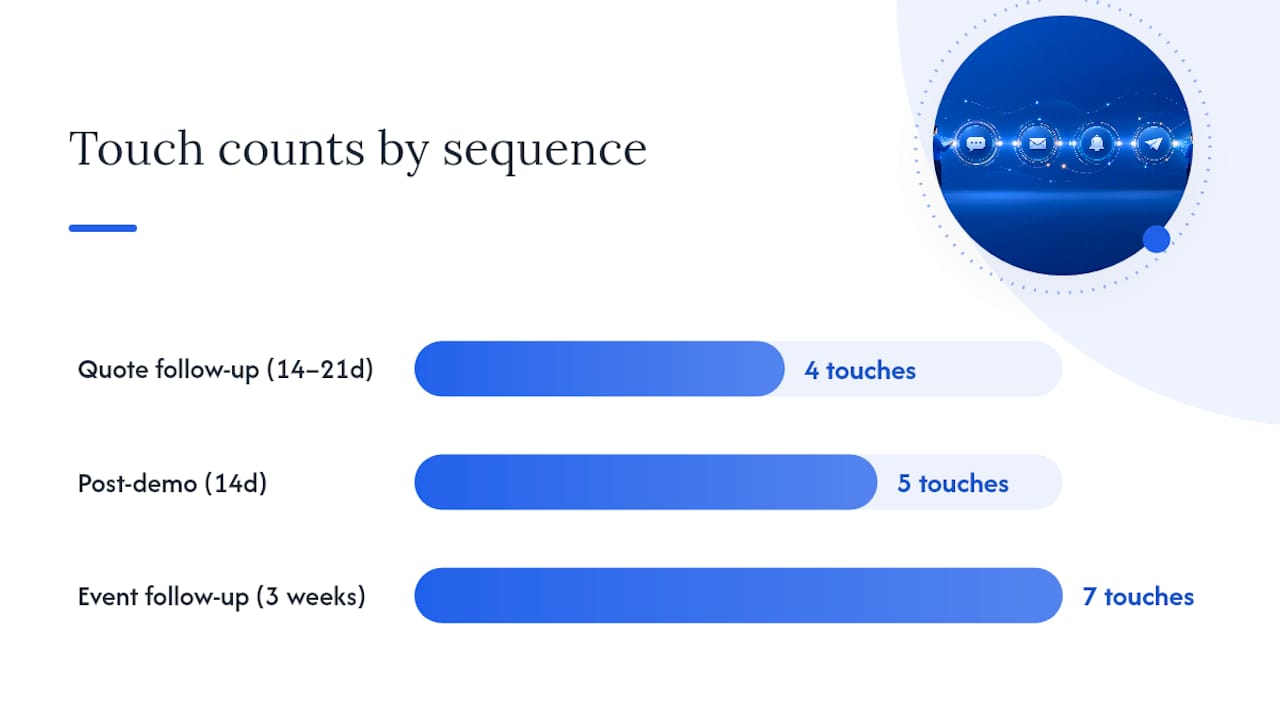
Example: Event follow-up (7 touches). Spread across three weeks, mixing thank-you, resource delivery, and a booking offer.
Subject lines should name the specific action, not tease it: “Your quote from Tuesday” beats “Following up!” Test subject line, call-to-action wording, and send time first. Those three variables move reply rates more than adding extra touches.
When Should Automation Pause and a Human Take Over?
Automation should never keep talking after the prospect has. Build your triggers around real signals: form submission, quote sent, demo completed, a no-show, or a product-usage event like a trial login.
Then build hard stops that override everything else:
- Any reply pauses the sequence immediately
- A booked meeting ends it
- An unsubscribe or spam complaint kills all future sends across every channel
When a stop fires, the workflow should hand off to a rep with a task reminder and a short context summary, not a blank “please follow up” note. Neuwark’s AI workflow framework calls this the “supervise” step, and it’s the one teams skip most often, usually because nobody assigned an SLA for how fast a rep has to act once the ball lands in their court.
Pro Tip: Set up reply parsing that flags ambiguous responses (“maybe next quarter”) for a human to review, rather than letting the AI guess whether that counts as interest or a soft no.
How Do You Personalize Follow-Ups Without Sounding Robotic?
Personalization only works if you capture the right fields at the trigger point: first name, rep name, the specific product or service discussed, and any event reference (“since our call Tuesday”). Drop those into every touch, and skip the generic “Hi [First Name]” template that fools nobody.
Cadence matters as much as wording:
- Four touches over 14 to 21 days is a solid baseline for most sales sequences
- Alternate channels rather than stacking three emails in a row
- Vary message angle touch to touch: value reminder, then objection handling, then urgency, never the same pitch reworded
Small variance in send time, sending at 9:23 AM instead of a flat 9:00 AM, makes automated timing feel less mechanical and can lift response rates slightly. When A/B testing, change the message angle or send-time window before you experiment with adding more touches. More volume rarely fixes a message that isn’t landing.
Pro Tip: If two touches in a row get similar reply rates, that’s often a sign the messaging angle didn’t change enough between them, not that the cadence is wrong.
What Compliance Rules Apply to Automated Follow-Ups?
Two laws govern most of this in the United States: the TCPA for SMS and calls, and CAN-SPAM for email. Both require a clear, working opt-out, and TCPA requires prior consent before you text a lead at all.
- Honor opt-outs immediately and permanently across every channel, not just the one they used to unsubscribe
- Keep your list clean; sending to dead or invalid addresses tanks your sender reputation
- Authenticate your domain with DKIM and SPF, and monitor bounce and complaint rates weekly
- Route pricing, contract, or high-value account messages through a human reviewer instead of a fully automated send
A Bizzby operator report links consistent list hygiene and opt-out handling directly to measurable lifts in repeat purchases and review volume, evidence that compliance and performance move together, not against each other.
Which Metrics Actually Prove the Automation Is Working?
Track four numbers first: reply rate, meeting-booked rate, quote-to-customer conversion, and time-to-next-step. These tell you whether the sequence is generating action, not just impressions.
Secondary metrics worth watching:
- Open and click rates (early warning signs, not the final verdict)
- Unsubscribe and spam-report rates (deliverability health check)
- Override rate, how often a rep edits or scraps an AI-drafted message before sending
Review experiment-level data weekly and program-level health monthly. If override rate climbs, that’s usually your first sign the automated drafts have drifted out of touch with how your reps actually talk to prospects.
What Should You Require From a Follow-Up Automation Platform?
Evaluate platforms on capability, not brand recognition. The must-haves:
- Native CRM sync so triggers reflect real deal stage, not a stale export
- Pause-on-reply logic built in, not bolted on
- Multi-channel support across email, SMS, and voice from one workflow
- A template library organized by sequence type
- Reporting on the KPIs above, out of the box
- Approval rules for high-risk or high-value messages
- Reply parsing that can distinguish interest from objection from rejection
Small teams should prioritize CRM sync and pause-on-reply first, then add voice and advanced reporting as volume grows. Confirm the platform connects to your calendar, support history, and product-usage data before you sign anything. For background on how workflow triggers actually get built, see this sales automation workflow guide.
How an AI-Powered Platform Covers the Whole Checklist
An all-in-one AI platform like Mediabloom maps directly onto the checklist above. CRM sync feeds accurate triggers instead of stale lead lists. Pause-on-reply logic protects sender reputation across every channel at once. AI drafting handles the repetitive first three touches while flagging anything ambiguous for sales-enablement review before it sends.

| Checklist Item | How It Gets Solved |
|---|---|
| CRM sync | Live integration keeps triggers tied to real deal stage |
| Pause-on-reply | Automatic halt across SMS, email, and voice on any reply |
| Multi-channel reach | Voice, SMS, chat, and email run from one workflow |
| Reply parsing | AI flags ambiguous replies for human review |
Clients including Miracle Ear and 1-800 Accountant have used this approach to generate over 10,000 monthly leads. The rollout pattern that works best: start with one narrow trigger, like post-demo or no-show recovery, measure reply and meeting rates for two to three weeks, then expand to a second sequence once results stabilize.
Automation Should Amplify Sellers, Not Replace Them
Automation exists to remove busywork, not judgment calls. The sequences in this guide handle the third quote check-in nobody has time for. They should never handle the moment a prospect asks a hard pricing question or pushes back on a contract term.
A workable rule: automate every repeatable touch, but require human approval before anything high-risk goes out. Track override rate closely. If reps keep rewriting the AI’s drafts, that’s the system telling you where it still needs tuning, not a reason to abandon it.
Get Automated Follow-Ups Running Without Building It Yourself
Every step in this guide, from trigger logic to pause-on-reply to CRM sync, takes weeks to build in-house and even longer to get right. Mediabloom skips that build phase entirely: it’s a done-for-you AI platform that deploys voice agents, chatbots, and SMS/email sequences with the compliance safeguards (TCPA, SOC 2, HIPAA-ready) already built in.
Three things it solves on day one:
- Done-for-you setup across email, SMS, chat, and voice so you’re not assembling five separate tools
- CRM integrations with 600+ platforms, so triggers reflect your actual pipeline from the start
- Built-in compliance safeguards that protect your sender reputation while you scale volume
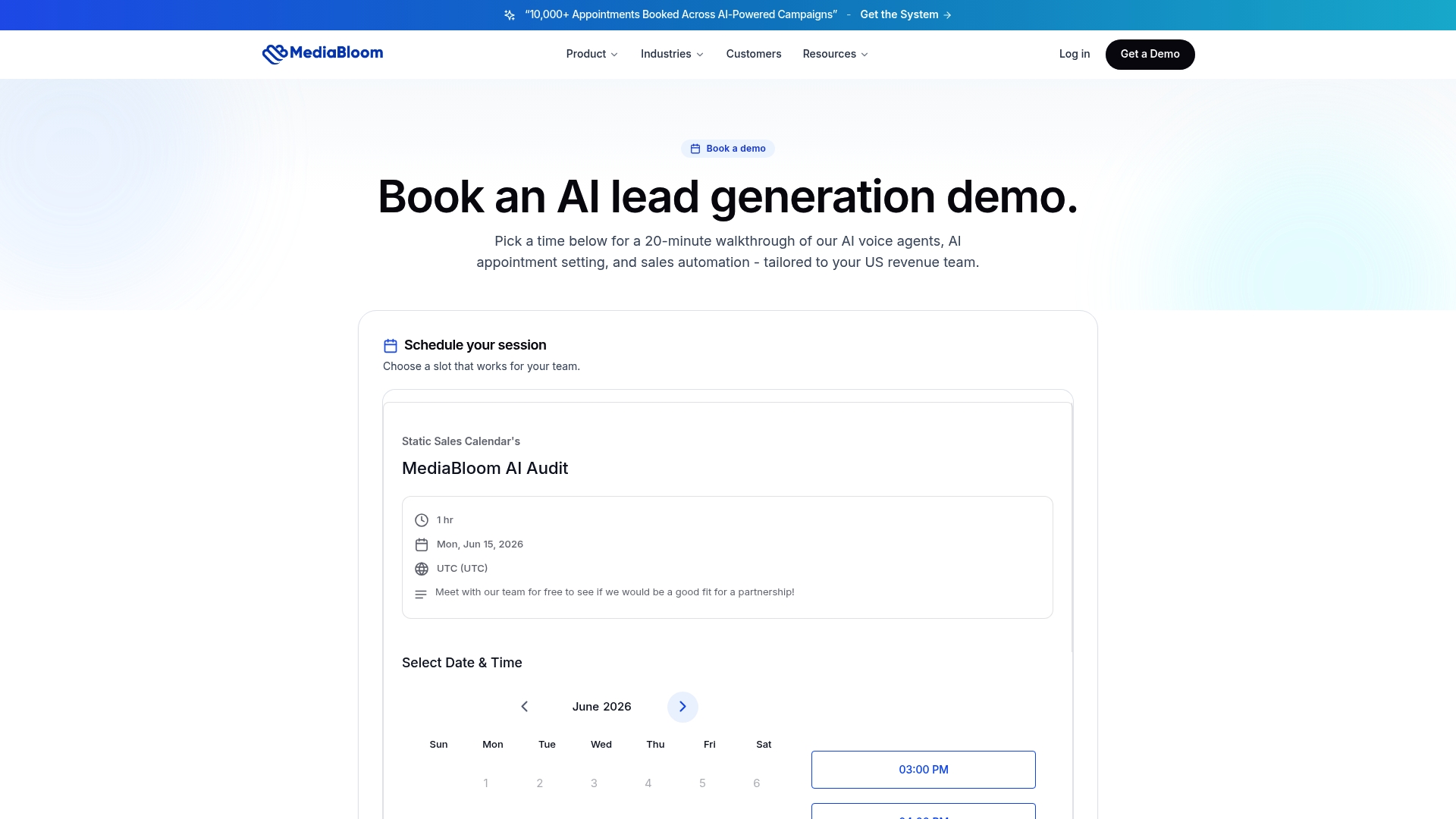
Companies like Miracle Ear have used this exact approach to generate more than 10,000 monthly leads. Review the case studies to see the results, then book a demo to scope a pilot sequence for your highest-value trigger, whether that’s a quote follow-up or post-demo recovery.
Sources
- Customer follow-up automation that isn’t robotic · Automation Labz
- How to Automate Customer Follow-Up (Set It Up in 45 Minutes)
- How to Start a How to Automate Customer Follow Up in 2026 | Complete Guide | Bizzby
FAQ
How Can I Automate Follow-Up Emails Effectively?
Set a single trigger (quote sent, demo completed), build a 3 to 4 touch sequence with a distinct purpose per email, and add pause-on-reply logic so the automation stops the moment a prospect responds.
What Is a Good Customer Follow-Up Message?
A strong follow-up names the specific prior interaction, states one clear next step, and avoids generic language like “just checking in.” Personalization fields like the rep’s name and the exact product discussed make it feel human rather than automated.
Can You Automate Follow-Up Emails in Outlook?
Outlook supports basic rule-based automated replies and scheduled sends, but it lacks native pause-on-reply logic, multi-channel sequencing, and CRM sync. Most sales teams pair it with a dedicated automation platform for anything beyond simple reminders.
What Is a Good Automatic Reply Message?
A good automatic reply confirms receipt, sets a clear expectation for when a human will respond, and offers an alternative contact method for urgent needs. Keep it under two sentences so it reads as helpful rather than robotic.
Does Mediabloom Handle Multi-Channel Follow-Up Sequences?
Yes. Mediabloom runs voice, SMS, chat, and email from a single platform with CRM sync and pause-on-reply logic built in, which covers the core requirements outlined in this guide.