The scripts that book meetings in 2026 follow one structure: a 15 second pattern-interrupt opener, a value hook tied to a real trigger, one or two qualifying questions, a pre-built objection pivot, and a close that offers exactly two time slots. Run well, the whole exchange takes 60 to 90 seconds before you ask for the meeting. Everything below breaks that structure into templates, rebuttals, and a measurement plan you can put to work today.
TL;DR:
- Scripts should be modular, with five interchangeable blocks—opener, value hook, qualifying questions, objection pivot, and close—to adapt to live caller interruptions.
- Personalization using recent triggers or peer examples significantly increases engagement, especially in quick research spots like funding announcements or leadership changes.
- Tracking key metrics such as connect rate, appointment rate, and pipeline conversion over at least 100 calls provides reliable insights into script effectiveness.
- AI voice agents excel in high-volume, after-hours qualification and automation, while live reps handle complex objections and relationship-driven calls.
- Compliance with TCPA and Do Not Call rules requires list scrubbing, documented consent, respecting calling hours, and clear identification during calls.
Table of Contents
- What Makes an Appointment Setting Script Actually Work?
- Copy-Ready Appointment Setting Script Examples for Every Situation
- How Do You Handle Common Objections in an Appointment Setting Script?
- What’s the Best Follow-Up Sequence After an Appointment-Setting Call?
- How Do You Customize a Script Without Sounding Robotic?
- Which Metrics Actually Tell You a Script Is Working?
- Where Does AI Fit Into Appointment Setting at Scale?
- What Legal Rules Apply to Appointment-Setting Calls?
- Building a Script Program That Actually Sticks
- Ready to Scale Beyond What Live Reps Can Cover Alone?
- Sources
- FAQ
What Makes an Appointment Setting Script Actually Work?
A high-converting appointment setting script is not a monologue. It’s five interchangeable blocks, each with a job and a time limit, built so a rep can skip or reorder them based on what the prospect actually says. That modularity is the difference between a script that reads well on paper and one that survives a live call where the prospect interrupts in the first four seconds.
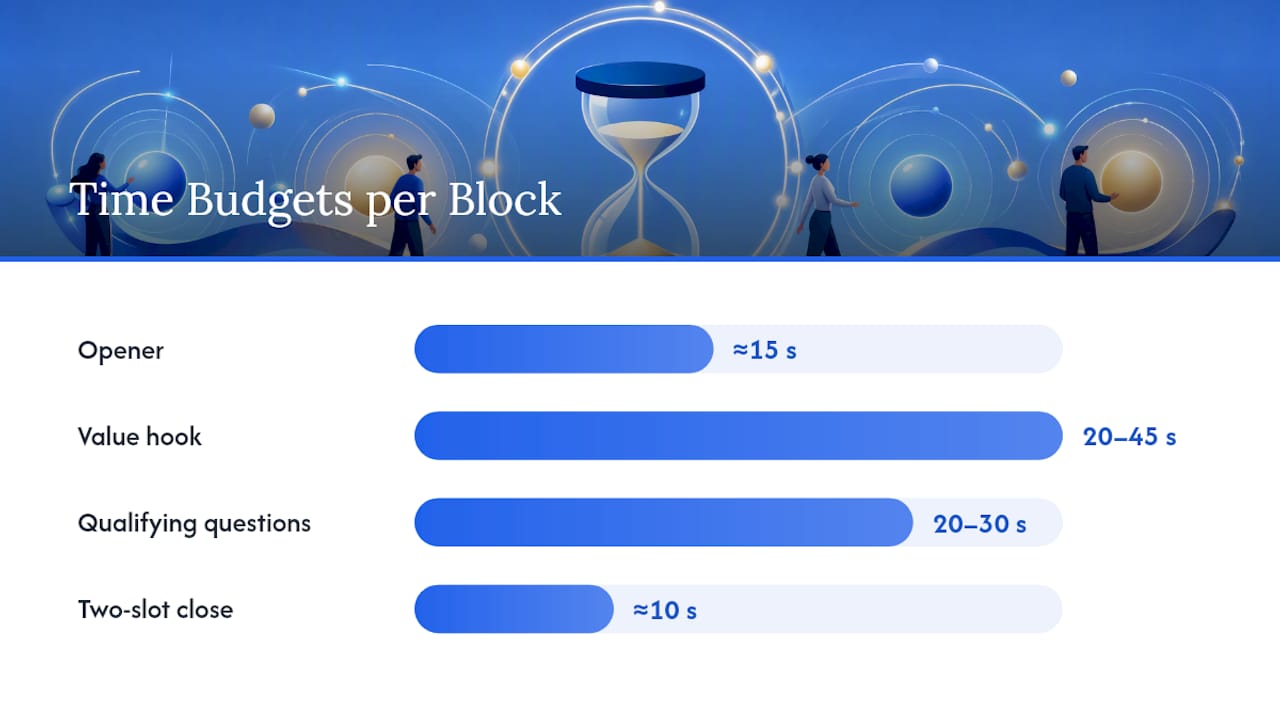
The five blocks, in order, with their ideal time budgets:
- Opener (about 15 seconds). State your name, company, and the reason for the call in one breath. Skip the “how are you today” filler.
- Value hook (20 to 45 seconds). One sentence connecting a specific trigger (a funding round, a new hire, a product launch) to a business outcome you help create.
- Qualifying questions (one or two, 20 to 30 seconds). Enough to confirm the prospect is a fit without turning the call into a discovery session.
- Objection pivot (as needed). A pre-written response that acknowledges the pushback, adds one clarifying question, and returns to the ask.
- Two-slot close (about 10 seconds). A direct request offering two specific times, never an open-ended “when works for you?”
This skeleton holds up across industries because it mirrors how the best cold call scripts get an appointment: pattern interrupt, tight value hook, one or two qualifiers, objection handling, then a direct close. Strip any of those parts out and the call either drags on too long or ends before the ask ever lands.
Opener example: “Hi, this is Jordan from Meridian Analytics. I’m calling because I saw your team just closed a Series B, and that usually means your reporting stack gets stretched fast.”
Value hook example: “We work with finance teams right after a raise to cut the time it takes to close monthly books, usually from twelve days down to five.”
Qualifying question example: “Are you still using spreadsheets to consolidate reports across departments, or have you already moved to a dedicated tool?”
Objection pivot example: “Totally fair, if now isn’t the right time, can I ask what would need to change for it to be?”
Close example: “I’d love to show you exactly how that works. Does Tuesday at 2 PM or Wednesday at 10 AM work better for a 15-minute call?”
Permission-based openers, where you ask for a specific and small amount of time up front, consistently keep more prospects on the line long enough to hear the value hook. That’s worth building into your opener language regardless of industry: “Do you have 30 seconds for me to explain why I’m calling?” performs better than launching straight into a pitch, according to cold calling script guidance from Zendesk.
Modular scripting means treating each block as a card you can play or hold depending on the prospect’s tone. If someone answers the phone rushed and short, you skip straight from the opener to the close and save the value hook for the follow-up email. If they’re engaged and asking questions, you extend the qualifying stage and hold the close a beat longer. Rigid, word-for-word scripts fail here because real conversations don’t follow a script’s assumptions about pacing.
Copy-Ready Appointment Setting Script Examples for Every Situation
Below are eight ready-to-use appointment setting script examples, each built for a specific calling scenario. Swap the bracketed tokens for your product, trigger, and prospect details, and keep delivery curious and low-pressure rather than pushy.
-
Cold call, no prior contact. Purpose: open a conversation with zero warm-up. Target buyer: a cold prospect who has never heard of you. “Hi, this is [Name] from [Company]. I know this call is out of the blue, so I’ll keep it short. We help [buyer type] solve [specific problem] usually within [timeframe]. Does that sound like something worth 15-minute to explore, maybe Thursday at 11 or Friday at 1?” When to use: pure outbound prospecting with no research trigger available.
-
Researched lead, trigger-based. Purpose: use a specific, recent event to justify the call. Target buyer: a prospect flagged by intent data or news. “Hi [Name], this is [Rep] from [Company]. I noticed [Company] just [trigger, e.g., launched a new product line]. That usually creates pressure on [specific function]. We’ve helped similar teams handle that without adding headcount. Worth a quick call Tuesday at 2 or Wednesday at 10?” When to use: whenever you have a funding announcement, hire, or public trigger less than 30 days old.
-
Gatekeeper navigation. Purpose: get past a receptionist or assistant respectfully. Target buyer: whoever answers before the decision-maker. “Hi, this is [Rep] from [Company]. I’m trying to reach [Decision-maker name] regarding [specific topic, e.g., their Q3 hiring plan]. Is now a bad time, or could you point me to the best way to get 10-minute on their calendar?” When to use: any outbound call routed through a front desk or executive assistant.
-
Referral opener. Purpose: borrow credibility from a mutual contact. Target buyer: a prospect connected to an existing client or referral source. “Hi [Name], [Referrer] suggested I reach out. They mentioned you’re dealing with [specific challenge], which is exactly what we helped their team with. Do you have 15 minutes this week, maybe Monday at 9 or Tuesday at 3?” When to use: immediately after receiving a warm introduction, ideally within 48 hours.
-
SaaS demo ask. Purpose: move a software prospect from interest to a scheduled demo. Target buyer: a technical or operational decision-maker evaluating tools. “Hi [Name], this is [Rep] from [Company]. We built [Product] specifically for teams dealing with [pain point], and most customers see [outcome] within the first month. Rather than explain it over the phone, can I show you a 15 minute walkthrough? Thursday at 1 or Friday at 11?” When to use: after a prospect has engaged with content, a free trial, or a chatbot conversation.
-
Industry-specific variant (insurance). Purpose: address regulatory and trust concerns common to insurance buyers. Target buyer: an agency owner or benefits manager. “Hi [Name], this is [Rep] with [Company]. We work with agencies to cut the time spent on policy renewals and follow-up calls. Given [trigger, e.g., open enrollment starting next month], would it help to walk through how that works? Tuesday at 10 or Wednesday at 2?” When to use: seasonal windows like renewal periods or open enrollment, when timing itself is the trigger.
-
Quick follow-up after no response. Purpose: re-engage a prospect who went quiet after an earlier touch. Target buyer: anyone who received a prior call or email without a reply. “Hi [Name], following up on my note from [day]. I know priorities shift fast, so no worries if now isn’t the time. If it’s still relevant, I’ve got Monday at 9 or Wednesday at 1 open, otherwise just let me know a better window.” When to use: 3 to 5 business days after the first outreach attempt, never sooner.
-
Voicemail drop. Purpose: leave a message brief enough to get a callback. Target buyer: any prospect who doesn’t answer live. “Hi [Name], this is [Rep] from [Company]. Quick reason for the call: [one-sentence value hook]. I’ll follow up with an email right after this, but if you’d rather just grab time directly, my number is [number]. Talk soon.” When to use: every unanswered call, paired immediately with a follow-up email or text.
Delivery matters as much as wording. Read each line like you’re genuinely curious about the answer, not like you’re reciting a script you memorized. Permission-based phrasing (“Do you have a minute?” rather than “I need a minute of your time”) keeps the tone collaborative instead of transactional, and that tone shows up in your close rate more than any single word choice.
How Do You Handle Common Objections in an Appointment Setting Script?
Every objection pivot follows the same three-step structure: acknowledge the objection without arguing, ask one clarifying question, and return to a low-commitment ask. That structure keeps you in control of the call instead of letting a scripted pushback end the conversation. Scripts with pre-built objection branches convert noticeably more calls into booked meetings than scripts that leave reps improvising, since role-play data on 2026 cold calling scripts shows meeting-booking rates rising by roughly 41% when reps use prepared pivots instead of winging it.
Here are pivots for the five objections that come up most often in appointment setting calls.
- “Send me some info.” Pivot 1: “Happy to. What specifically would be most useful, pricing, case studies, or how it works technically?” Pivot 2: “I’ll send that right over. While I have you, would it help to walk through the two or three points that matter most for your situation on a quick call instead?”
- “Not interested.” Pivot 1: “Understood; can I ask what you’re currently using to handle [problem], just so I’m not off base?” Pivot 2: “Fair enough. Most people say that before they’ve seen the specific numbers, is it the timing or the topic that’s not a fit right now?”
- “We don’t have the budget.” Pivot 1: “That’s common right now. Is this something planned for a future quarter, or is it off the table entirely?” Pivot 2: “Got it. A lot of teams start with a smaller pilot before committing budget. Worth 15 minutes to see if that model fits?”
- “This isn’t a good time.” Pivot 1: “No problem. Is there a better day this week, or is it more that the topic itself isn’t a priority right now?” Pivot 2: “Understood. Can I grab just 10 minutes later this week instead, maybe Thursday afternoon?”
- “Call me back in three months.” Pivot 1: “Happy to. What’s changing between now and then that makes that the right time?” Pivot 2: “I’ll follow up then. In the meantime, would it help if I sent one relevant example so you have context when I call back?”
The “send info” objection deserves special attention because it’s the one reps most often mishandle by simply complying and hanging up. A three-line exchange can turn it back into a meeting:
Prospect: “Just send me something over email.” Rep: “Absolutely, I will. Quick question so I send the right thing, is the bigger issue on your end speed of response or cost per lead?” Prospect: “Probably speed of response, we lose a lot of leads overnight.” Rep: “That’s exactly what we solve first for most clients. Rather than you sifting through a generic PDF, let me show you the actual before-and-after numbers on a 10 minute call, does Tuesday or Wednesday work better?”
Pro Tip: Never treat “send info” as a dead end. Asking one clarifying question before you send anything preserves the conversation and often converts the request into a scheduled call instead of an email that gets ignored.
What’s the Best Follow-Up Sequence After an Appointment-Setting Call?
A single call rarely books a meeting on its own. The strongest results come from a five-touch cadence across call, email, and LinkedIn spread over roughly two weeks, giving the prospect multiple low-friction ways to respond.
- Day 1, call plus voicemail. Deliver the core script; if no answer, leave the voicemail drop template and immediately send a same-day follow-up email.
- Day 2, email referencing the call. Subject line: “Following up on my call yesterday.” Body: “Hi [Name], tried reaching you yesterday about [trigger/value hook]. I’ve got Monday at 9 or Wednesday at 1 open if either works for a quick call, otherwise just reply with a better time.”
- Day 5, LinkedIn connection request. Send a short, no-pitch note: “Hi [Name], reached out by phone last week about [topic]. Connecting here in case it’s easier to chat.” No ask in this touch, just visibility.
- Day 8, second email with a different angle. Subject line: “One more idea for [Company].” Body: “Hi [Name], wanted to share a quick example of how [similar company] handled [problem] in under a month. If it’s relevant, I’ve got time Thursday at 11 or Friday at 2.”
- Day 12, final call attempt. Reference the full sequence briefly: “Hi [Name], I’ve sent a couple of notes over the past two weeks. Wanted to try you directly one more time before I step back, does this week or next work better?”
Each email should always offer exactly two specific time slots, the same two-slot close used on the call, so the prospect never has to do the work of proposing a time themselves. Pairing outbound calls with structured lead nurturing sequences keeps prospects warm between touches instead of going cold after a single unanswered call.
How Do You Customize a Script Without Sounding Robotic?
Personalization works best when it’s fast and specific, not exhaustive. Spend two minutes, not twenty, pulling one usable trigger before you dial.
Acceptable quick research triggers include recent leadership hires, a funding announcement, a new product launch, an office expansion, or a public org chart change. Any one of these gives you a legitimate reason for the call that a generic script can’t fake.
Three swaps change outcomes more than any other tweak:
- Swap the outcome, not just the pitch. Instead of “we help you save time,” name the specific metric a similar buyer improved, like “cut onboarding from three weeks to five days.”
- Swap in the trigger by name. Reference the actual event (“saw you just opened a Denver office”) rather than a vague “I know things are growing for you.”
- Swap in a peer example. Naming a comparable company or industry segment, without overclaiming results, builds more credibility than any adjective you could add to your pitch.
Practice matters as much as writing. Role-play a new script out loud with a colleague before it ever touches a live prospect, then record actual calls and listen back for where the pacing feels stiff. A workable loop is to run the same template through role-play roughly 20 times, record ten live calls, and adjust the opener based on what actually lands, a cadence recommended by QUOTA’s cold calling framework for teams testing new material.
Pro Tip: Read your script out loud before your first live call of the day. Scripts that look fine on paper often reveal awkward phrasing the moment you try to say them naturally.
Which Metrics Actually Tell You a Script Is Working?
Four numbers matter more than any others: connect rate, meeting rate per connected call, qualified meeting rate, and pipeline conversion from those meetings. Everything else is noise unless one of these four is moving.
| Metric | What it measures | Why it matters |
|---|---|---|
| Connect rate | Percentage of dials that reach a live person | Flags list quality or dialing time issues before you even blame the script |
| Meeting rate per connected call | Percentage of live conversations that end in a booked meeting | The core measure of whether the script itself is working |
| Qualified meeting rate | Percentage of booked meetings that meet your ICP criteria | Catches scripts that book meetings with the wrong buyers |
| Pipeline conversion | Percentage of booked meetings that turn into real pipeline | Confirms the meetings booked are actually worth having |
When testing a new script or opener, change one variable at a time, not the whole script at once, so you know exactly what caused any shift in results. A reasonable rule of thumb is to run each variant against at least 100 connected calls over a two-week window before drawing conclusions, since smaller samples get skewed easily by a handful of unusually good or bad days, per QUOTA’s testing guidance.
- Log every objection as a tagged category in your CRM, not just a free-text note.
- Review objection tags weekly and rewrite the relevant pivot if one objection is spiking.
- Track meeting rate separately for each script variant, not blended together.
Tagging objections systematically and reviewing them on a set cadence turns anecdotal frustration (“everyone says they have no budget”) into a specific, testable script revision.
Where Does AI Fit Into Appointment Setting at Scale?
Live reps and AI voice agents solve different parts of the same problem. A skilled SDR reads tone and improvises around objections in ways automation still struggles to match on nuanced, high-stakes calls. AI voice agents excel at scale, after-hours coverage, and enforcing a script exactly as written across thousands of calls without fatigue or drift.
Sales development stacks are consolidating around tools that combine outreach, practice, and analytics in one system, a trend documented in Gartner’s coverage of the sales development technology stack. That consolidation is exactly why teams increasingly pair live scripting with automated triage.
Real deployments show what that pairing looks like in practice. MediaBloom’s case studies document clients including Miracle Ear and 1-800 Accountant using integrated AI voice agents and automation to increase monthly lead volume and improve appointment-handling capacity. Other MediaBloom clients, including Commserve Connect and My Legal Coach, have used similar deployments to manage inbound and outbound call volume without adding headcount.
Practical dividing lines worth remembering:
- Use AI voice agents for after-hours coverage, first-pass qualification, and enforcing objection scripts consistently at high volume.
- Keep live SDRs on high-value accounts, complex objections, and relationship-driven referral calls.
- Use automation to triage speed-to-lead on inbound interest before a human ever picks up the phone.
…
What Legal Rules Apply to Appointment-Setting Calls?
Cold calling and appointment setting in the United States operate under the Telephone Consumer Protection Act (TCPA) and the National Do Not Call Registry, both enforced by the Federal Communications Commission and Federal Trade Commission. Calling a number on the Do Not Call Registry without an existing business relationship or documented consent can expose a company to real financial penalties, and those penalties apply per call, not per campaign.
A few practical rules belong in every script and call process:
- Scrub call lists against the Do Not Call Registry on a regular cycle, not just once at list purchase.
- Get documented consent before using autodialers or prerecorded messages, since TCPA rules are stricter for automated calls than for live-agent dialing.
- Honor internal do-not-call requests immediately and permanently, and log the request in your CRM the moment it happens.
- Respect state-level calling hour restrictions, generally limiting calls to between 8 AM and 9 PM in the prospect’s time zone.
- Train reps to identify themselves and their company by name early in the call, since concealing identity creates separate compliance exposure.
Compliance isn’t a one-time checklist. Any script rewrite, new industry vertical, or new automated calling tool should get a compliance review before it goes live, since rules vary meaningfully between consumer calls and B2B outreach and between manual dialing and automated systems.
Building a Script Program That Actually Sticks
Most teams write one good script, use it for a month, then let it rot. Here’s the adoption checklist we’d run if we were standing up a script program from scratch.
- Define your ICP first. No script survives contact with the wrong buyer, so lock down who you’re calling before you write a word.
- Centralize every script in one place. Scattered scripts in individual reps’ notebooks make it impossible to know what’s actually working.
- Role-play before live calls. Untested scripts fail in ways that are obvious in hindsight and invisible on paper.
- Score real calls against a rubric. Opinion about what “sounds good” is unreliable; a scored rubric isn’t.
- Iterate weekly, not quarterly. Objection patterns shift faster than most review cycles account for.
- Automate where it genuinely helps. After-hours coverage and high-volume qualification are strong candidates; nuanced negotiation calls are not.
- Measure outcomes, not activity. Dial counts feel productive; meeting rate and pipeline conversion tell you if the script works.
Run a small test before committing to a full rollout. Two weeks and 100 connected calls will tell you more than a month of debate in a conference room.
— MediaBloom
Ready to Scale Beyond What Live Reps Can Cover Alone?
Every template in this article works whether you’re dialing manually or running calls through automation. MediaBloom is built for teams that want the same modular script structure enforced consistently across thousands of calls, not just the ones a rep happens to have energy for at 4 PM on a Friday.
The platform combines AI voice agents for inbound and outbound calling, chatbots for web and SMS qualification, and managed cold outbound campaigns that apply the same objection pivots and two-slot close covered above, all connected to your CRM through 600 plus integrations. That means the script you just built doesn’t live in one rep’s head. It runs the same way on call one and call ten thousand, with qualifying questions and objection handling enforced automatically instead of depending on memory. For after-hours coverage or high-volume qualification, that consistency alone often closes the gap live teams can’t cover on their own.
If you want to see the structure in action before committing to anything, watch a live demo of an AI voice agent handling a real appointment-setting call end to end.
Sources
- Best cold call script to get an appointment (That works)
- Cold calling scripts that book meetings in 2026 — QUOTA Training
- Cold calling scripts: examples, templates, and tips
- Sales development technology: the stack emerges
FAQ
What Is a Good Phone Script for Setting Appointments?
A good phone script uses a 15 second opener, a value hook tied to a real trigger, one or two qualifying questions, a pre-built objection pivot, and a close offering two specific time slots. The full exchange should run under 90 seconds before the ask.
Can You Give an Example of an Appointment Setter Script?
Yes: “Hi, this is [Name] from [Company]. I saw [Company] just [trigger], and that usually creates pressure on [problem]. We help teams handle that within [timeframe]. Worth 15 minutes, maybe Tuesday at 2 or Wednesday at 10?” This follows the same opener, hook, and two-slot close structure used across every template in this guide.
What’s a Good Phone Script for Scheduling Medical Appointments?
Medical scheduling scripts follow the same core structure but swap the value hook for a care-related reason, such as a referral or a recall due date: “Hi [Name], this is [Rep] calling from [Practice] to schedule your follow-up with Dr. [Name]. I have an opening Tuesday at 9 AM or Thursday at 2 PM, which works better?” These calls also carry stricter privacy obligations under HIPAA that general sales calls don’t.
How Do I Write My Own Appointment-Setting Script?
Start with the five-block structure: opener, value hook, qualifying questions, objection pivots, and a two-slot close. Write each block separately, test it in role-play, then tighten the wording based on where real prospects hesitate or push back.
Is Cold Calling for Appointments Still Legal?
Cold calling remains legal in the United States when it follows Telephone Consumer Protection Act rules, respects the National Do Not Call Registry, and honors any documented do-not-call requests. Automated or prerecorded calls carry stricter consent requirements than live-agent calls.