Yes: automated SMS appointment reminders reliably reduce no-shows and rank among the highest-ROI features an appointment-driven business can turn on. Enable them through your booking platform or an integrated messaging system today, and confirm two things before you flip the switch: your reminder cadence and your compliance basics under TCPA and CTIA rules.
TL;DR:
- Automated SMS appointment reminders can improve attendance rates, with a relative risk increase of 1.11, and are supported by high open rates near 98%.
- Effective messaging cadence involves immediate confirmation, reminders at 5-7 days, 48-72 hours, and 2-4 hours before the appointment, with short, clear replies to confirm or reschedule.
- The best setup depends on your needs: use built-in booking software, calendar plugins, or custom API integrations, ensuring proper consent and timezone handling.
- Compliance requires prior express consent under TCPA, proper 10DLC registration, and secure, HIPAA-ready vendor infrastructure for healthcare providers.
- ROI can be quickly realized by reducing no-shows, with automated costs around $0.14 per contact versus manual outreach, especially when embedded in an omnichannel reminder system.
Table of Contents
- Does the Research Actually Support SMS Appointment Reminders?
- What Should an SMS Reminder Actually Say?
- Which Setup Path Fits Your Business?
- Is Text Message Reminders HIPAA Compliant and TCPA Legal?
- How Do You Measure ROI on Appointment Reminders?
- What We See Deploying These Systems for Clients
- Get Compliant, Two-Way SMS Reminders Without Building It Yourself
- Sources
- FAQ
Does the Research Actually Support SMS Appointment Reminders?
The evidence holds up. A systematic review and meta-analysis of randomized trials covering 8,236 patients across 10 studies found that appointment reminders improved attendance overall, with a pooled relative risk of 1.11 (95% CI: 1.05 to 1.19). That range gives operations managers a defensible planning number rather than a marketing promise.
Text also wins on sheer speed. Industry data compiled by Simplybook puts SMS open rates near 98%, with 80 to 90 percent of texts read within minutes of arrival.
By the numbers: SMS open rates are very high, and many messages get read within minutes, compared with email’s much slower and less predictable open pattern.
What this means practically:
- Reminders sent by text get seen fast enough to matter, even for same-day appointments.
- Attendance improvements aren’t uniform. Plan for a meaningful but variable reduction in no-shows, not a fixed guarantee.
- The bigger the reminder volume, the more the aggregate effect smooths out study-to-study noise.
What Should an SMS Reminder Actually Say?
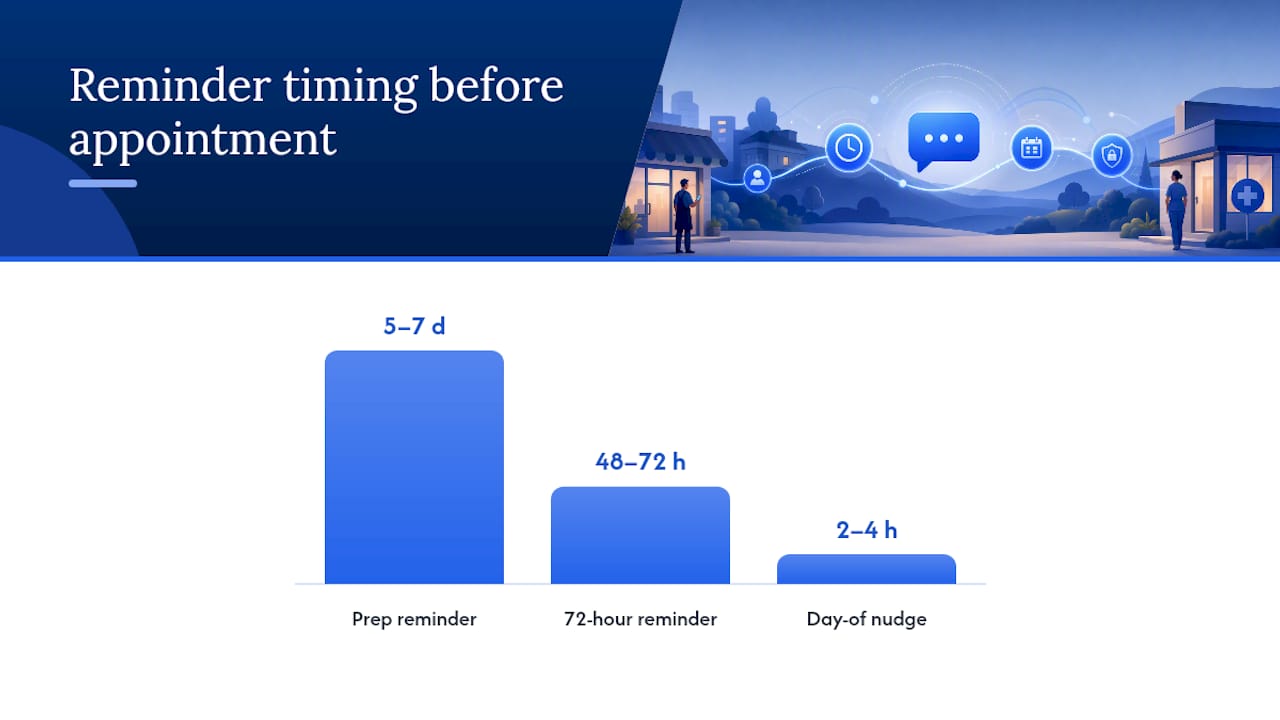
Timing matters as much as wording. A workable cadence for most appointment-driven businesses looks like this: a confirmation immediately after booking, a reminder 5 to 7 days out for anything requiring prep or travel, a second reminder 48 to 72 hours before, and a final nudge 2 to 4 hours ahead for same-day no-show risk.
Keep the copy short and personal:
- Confirmation: “Hi Maria, you’re booked with Dr. Lee on March 12 at 2:00 PM. Reply C to confirm.”
- Reminder (72 hours): “Reminder: your appointment is Thursday at 2:00 PM. Need to change it? Reply R to reschedule or tap [link].”
- Day-of: “See you today at 2:00 PM! Running late or need to cancel? Reply X or call us.”
Adding a reschedule or cancel link isn’t optional flourish — you can learn more about rezerwacje przez WhatsApp for additional messaging integrations to enhance reminders. SimplyBook.me’s booking data shows reminders with an action link reduce no-shows compared to plain-text versions, largely because patients convert a would-be no-show into a reschedule instead.
Pro Tip: Map short reply keywords (C for confirm, R for reschedule, X for cancel) directly to appointment IDs in your system so a one-letter text updates the calendar automatically, no staff intervention required.
Keep messages in plain language and avoid jargon. Someone scanning a text between meetings shouldn’t have to reread it twice.
Which Setup Path Fits Your Business?
Three routes cover almost every appointment-driven business, and the right one depends on how much customization and two-way interaction you need.
- Turn on built-in SMS reminders in your booking software. Most modern scheduling tools include this natively. Setup checklist: confirm your timezone settings, load your reminder templates, set the cadence (7 days, 72 hours, day-of), and send test bookings to a real phone before going live.
- Add a calendar plugin or integration. Google Calendar and similar tools support SMS add-ons that layer reminders on top of existing bookings. This works well for small teams already living in a shared calendar, though it usually lacks two-way replies and detailed reporting.
- Build on programmable SMS with API and CRM integration. Providers like Twilio offer the building blocks for custom two-way flows, appointment-ID mapping, and calendar sync. Choose this route when you need branded sender IDs, multi-location logic, or integration with a CRM that your booking tool doesn’t natively support.
Whichever path you pick, run the same minimum checklist before scaling: a timestamped consent record from booking, correct timezone handling, unique message IDs for tracking, and a batch of test sends to real numbers, including at least one international format if you serve clients outside the country.
Is Text Message Reminders HIPAA Compliant and TCPA Legal?
Compliance for U.S. business texting comes down to three layers, and skipping any one of them creates risk. The TCPA compliance framework requires prior express consent for informational messages like appointment reminders. The moment you add promotional content, such as a discount or upsell, that message reclassifies as marketing and needs express written consent instead, a distinction Nextiva’s compliance guide spells out clearly.
Layer two is CTIA guidance on message content and sending behavior, and layer three is 10DLC registration, which tells carriers who you are and what kind of traffic to expect from your number. Skip registration and your messages risk carrier filtering even when the content and consent are perfectly legal.
For healthcare providers, “are appointment reminders HIPAA compliant” isn’t a yes or no answered by the message alone. It depends on your vendor’s infrastructure and business associate agreement. A general SMS platform without HIPAA-ready configuration can expose protected health information; a HIPAA-compliant voice AI and messaging setup is built for that requirement specifically.
Practical steps to lock this down:
- Capture consent with a timestamped opt-in checkbox at booking, and store that metadata.
- Register your business number and campaign under 10DLC before sending volume.
- Keep reminder traffic on a separate number or stream from marketing texts.
- If you’re in healthcare, confirm your vendor offers a signed business associate agreement, not just “HIPAA-ready” language on a landing page.
Pro Tip: Deliverability problems almost always trace back to missing 10DLC registration or sloppy opt-in capture, not message wording. Fix the registration first before troubleshooting content.
How Do You Measure ROI on Appointment Reminders?
Track a small set of numbers: confirmed-by-text rate, no-show rate before and after rollout, messages sent, cost per message, and recovered revenue from filled slots that would have gone empty.
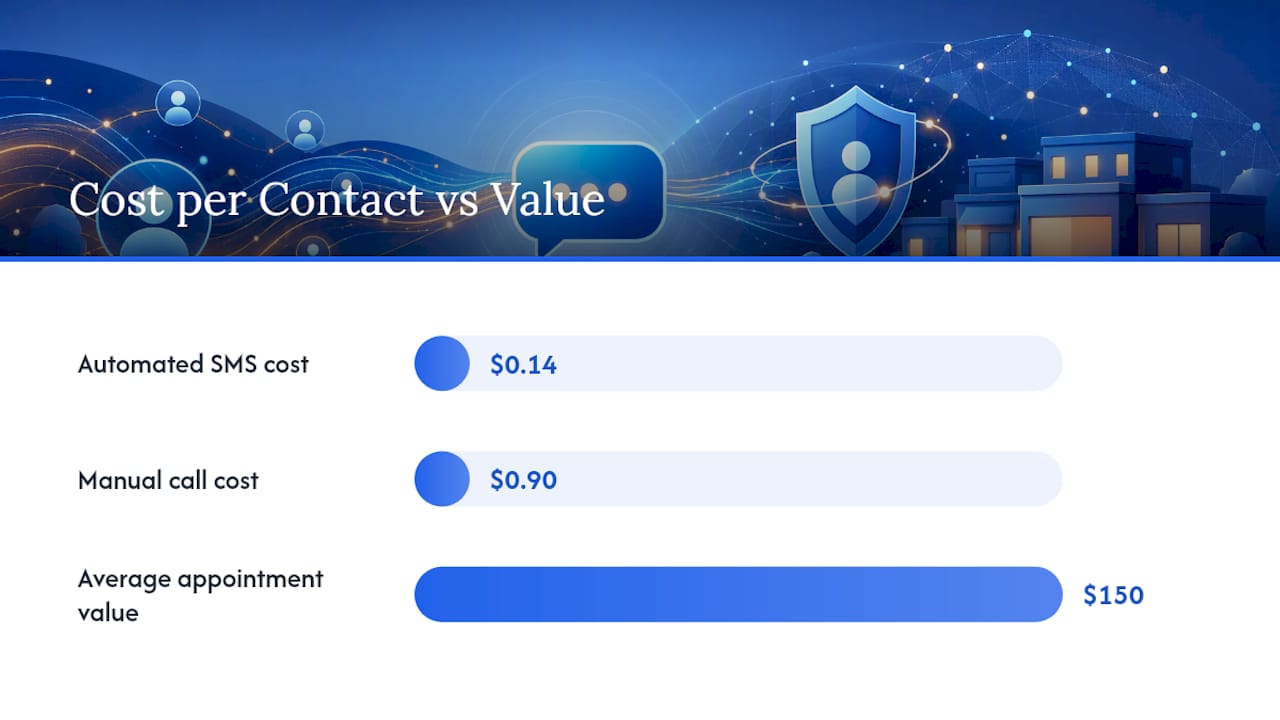
The math is simple. If your average appointment is worth $150 and reminders recover even a conservative slice of your no-show rate, the payback arrives fast. Cost favors automation heavily here: industry cost comparisons show automated reminders running around $0.14 per contact compared to $0.90 for manual phone calls.
- Per-message pricing: pay only for volume sent, good for low-volume practices.
- Monthly plan pricing: flat fee covering a message allotment, better once volume climbs.
- Two-way messaging fees: often priced separately since replies require more infrastructure.
Watch for vendors that bundle in unclear “platform fees” without disclosing per-message costs upfront.
What We See Deploying These Systems for Clients
The configuration that performs best isn’t a single SMS blast. It’s omnichannel: SMS paired with two-way reply handling and calendar sync, so a “R” reply actually moves the appointment instead of creating a support ticket. Mediabloom’s case study work with clients across healthcare, legal, and retail services consistently shows higher show rates and faster rebooking once reminders talk back to the calendar instead of just pushing text one direction.
Start small. Pilot the cadence on one location or service line, measure the no-show delta over two to three weeks, then scale the configuration that worked.
— MediaBloom
Get Compliant, Two-Way SMS Reminders Without Building It Yourself
There is a managed alternative for appointment-driven businesses that combines AI-driven appointment setting with two-way SMS, HIPAA-ready configurations for healthcare clients, and integrations across CRM platforms, so reminders sync directly with the calendar your team already uses.
Managed deployment matters most on the compliance side. Instead of researching 10DLC registration and carrier rules yourself, brand and campaign registration can be handled as part of onboarding, which cuts the time between signing up and sending your first compliant reminder. For healthcare practices specifically, the medical chatbot and messaging solution is built around the privacy requirements clinics can’t skip.
See how this plays out for businesses like yours in Mediabloom’s appointment-setting case studies, or head to the Mediabloom platform overview to request a demo and get your reminder system running.
Sources
- Effect of reminders on outpatient appointment attendance (systematic review & meta-analysis)
- Simplybook
- 35+ Patient Appointment Reminder Statistics Showcasing Their Effectiveness
FAQ
What Are SMS Reminders?
SMS reminders are automated text messages sent before a scheduled appointment to confirm attendance, reduce no-shows, and give patients or clients an easy way to reschedule or cancel.
Are Text Appointment Reminders HIPAA Compliant?
They can be, but only when the messaging vendor supports a signed business associate agreement and secure infrastructure for protected health information. A general-purpose SMS tool without that setup isn’t automatically compliant just because the message itself looks harmless.
How Do You Write a Reminder SMS?
Keep it short: name, date, time, and a clear action option. A working format is “Hi [name], reminder: your appointment is [day] at [time]. Reply R to reschedule or C to confirm.”
What Scheduling App Sends Text Reminders?
Most modern booking platforms include native SMS reminders, and businesses that need two-way replies, HIPAA-ready configuration, or CRM sync often move to integrated platforms offering such added functionality.
How Much Do No-Shows Actually Cost a Business?
The exact figure depends on your average appointment value and no-show rate, but automated reminders running near $0.14 per contact make the cost of prevention far lower than the cost of an empty slot.