Sales pipeline automation replaces repetitive admin work, follow-up chasing, and manual data entry with rule-based triggers that fire the moment a deal changes state. The fastest high-impact move is automating lead capture, routing, and instant rep notification, since speed-to-lead determines whether a prospect ever hears back before they lose interest. Automation only works as well as the process behind it, so clean data and defined stages come first.
TL;DR:
- Automating lead capture, routing, and immediate notification offers the highest return on investment, especially when built into an omnichannel capture system.
- Clear pipeline processes and clean data are essential; automating with poorly defined stages or dirty data results in confusion and inaccurate forecasts.
- Starting automation with capture, routing, and activity logging yields most quick wins and can be implemented within days using platforms like Mediabloom.
- Use stage-specific triggers, exit criteria, and guardrails to prevent auto-advancing deals and ensure forecast accuracy throughout the pipeline.
- Regularly monitor KPIs such as time-to-first-touch, stage conversion rates, and forecast accuracy to validate automation effectiveness and guide iterative improvements.
Table of Contents
- Why Sales Pipeline Automation Matters and Where Teams Go Wrong
- How Do You Automate Each Pipeline Stage Safely?
- What Should You Automate First for Quick Wins?
- Building a Sales Automation Stack That Won’t Break
- How Do You Test and Roll Out Automation Without Breaking the Pipeline?
- Which KPIs Prove Sales Automation Is Working?
- How Do You Personalize Automated Workflows Without Sounding Robotic?
- How Should You Segment Leads for Targeted Automation?
- Where Does AI Actually Improve Pipeline Performance?
- How Do You Get Sales Teams to Actually Adopt Automation?
- What Security and Compliance Rules Apply to Automated Sales Data?
- MediaBloom’s Perspective on Building Automation That Holds Up
- Get Automated Lead Capture and Routing Live Faster With MediaBloom
- Sources
- FAQ
Why Sales Pipeline Automation Matters and Where Teams Go Wrong
The payoff is concrete: faster outreach, less manual data entry, cleaner records, and forecasts that actually reflect what’s happening in the pipeline instead of what a rep remembers typing in three weeks ago. Teams that automate capture, routing, and activity logging first tend to see most of their return before they ever touch AI scoring or predictive layers.
The failures are just as predictable. Automating a process that was never clearly defined just scales the confusion faster. Feeding workflows dirty CRM data produces confident, wrong outputs. And task decay, where reps stop trusting or completing automated tasks, quietly kills adoption. Audits of failed automation projects point to undefined processes and messy data as the two most common root causes.
That’s why design comes before building:
- Document every pipeline stage and its exit criteria before writing a single workflow rule.
- Fix data hygiene issues (duplicate records, missing fields, stale owners) before automating anything downstream of capture.
- Treat automation as an amplifier: a broken process automated faster is still broken, just faster.
How Do You Automate Each Pipeline Stage Safely?
A stage-by-stage build keeps automation from outrunning human judgment. Each stage needs its own exit criteria, its own triggers, and its own guardrails, because a rule that works cleanly at the top of the funnel can wreck forecast accuracy near the bottom.
- Prospecting. Exit criteria: contact info verified, lead source logged, initial qualification score assigned. Trigger: form submission, chat capture, or inbound call. Safe actions: auto-create the record, deduplicate against existing contacts, assign an owner by territory or round robin, fire an instant notification. Guardrail: require source and score fields before the record can move forward.
- Qualification. Exit criteria: budget, authority, need, and timeline confirmed and logged. Trigger: discovery call completed or qualification form submitted. Safe actions: create a follow-up task, start an SLA timer, notify the manager if no update within 48 hours. Guardrail: never auto-advance to Demo without a rep confirming BANT fields are filled in.
- Demo. Exit criteria: demo held, next-step commitment captured. Trigger: meeting marked complete in the calendar or CRM. Safe actions: log the activity automatically, auto-send a recap email, schedule a proposal-prep task. Guardrail: require a human note on outcome before the deal can progress.
- Proposal. Exit criteria: proposal sent and viewed, pricing confirmed internally. Trigger: proposal document opened or e-signature tool activity. Safe actions: alert the rep the moment the prospect opens the document, start a stalled-deal timer if no view within 5 business days. Guardrail: require manager sign-off on discounts above a set threshold before the proposal generates.
- Negotiation. Exit criteria: terms agreed, contract routed for signature. Trigger: redline received or verbal agreement logged. Safe actions: auto-route the contract, notify legal or finance if required. Guardrail: keep final terms approval with a human, always.
- Close. Exit criteria: signed contract received, payment terms set. Trigger: signature completed. Safe actions: auto-update close date, trigger onboarding handoff, notify customer success. Guardrail: confirm payment or contract terms before marking closed-won.
HubSpot’s deal pipeline settings show how templated stage actions and auto-updated close dates work in practice, and stage-by-stage guardrail recommendations consistently warn against auto-advancing deals past qualification without a mandatory field or a rep’s explicit action.
Pro Tip: Set an SLA timer on every stage, not just the ones that feel risky. A deal sitting untouched for 10 days in “Demo” is often a bigger forecast threat than a deal stuck in “Negotiation,” because nobody’s watching it.
What Should You Automate First for Quick Wins?
A small set of automations covers most of the near-term return, and practitioner guidance suggests capture, routing, and activity logging alone deliver the bulk of the immediate ROI for small and mid-market teams. Start here before touching anything more elaborate:
- Instant lead acknowledgment and routing. The moment a lead comes in, route it and notify the owner. Convergent guidance across multiple sales automation playbooks treats this as the single highest-leverage automation available.
- Automatic activity capture. Log calls, emails, and meetings without manual entry, freeing reps from the CRM busywork that eats their afternoons.
- Follow-up task creation and stalled-deal alerts. Trigger a task the moment a stage changes, and flag deals that go quiet past a set number of days.
- Post-close onboarding handoff. Automatically notify customer success and populate onboarding fields the second a deal closes.
- Enrichment and deduplication at capture. Clean and enrich lead data before it ever reaches a rep’s queue, so nobody wastes time chasing a duplicate.
Building a Sales Automation Stack That Won’t Break
Native CRM workflows handle single-system logic well: stage changes, field updates, internal notifications. They start to strain once a workflow needs to touch a calendar, a Slack channel, an enrichment API, and an e-signature tool in the same sequence. That’s where an orchestration layer earns its place. Zapier’s pipeline automation tools exist specifically for stitching multi-app sequences together without custom code, and platforms like n8n or Make serve the same role for teams that want more control over logic branching.
A resilient stack tends to follow this order:
- CRM as the system of record. Every deal, contact, and stage lives here, full stop.
- A workflow or orchestration layer on top of the CRM for anything that spans multiple tools.
- Enrichment and scoring feeding clean, standardized data into the pipeline.
- AI drafting or scoring layers last, once the data feeding them is reliable.
Keep integrations centralized through one middleware layer instead of wiring tools point-to-point. Every direct connection you build is a connection someone has to maintain when an API changes. Favor native CRM integrations over custom webhooks wherever one exists, since they tend to survive vendor updates better than a workflow built on a fragile third-party hook.
How Do You Test and Roll Out Automation Without Breaking the Pipeline?
Before anything goes live, document the actual sales motion your team follows, not the idealized version in a slide deck. Map every trigger, condition, and action on paper first. Then run the workflow against sandbox or sample deals to confirm it behaves as expected before a single real prospect touches it.
Governance keeps automation from drifting once it’s live:
- Assign a named workflow owner responsible for every automation, not a shared inbox nobody checks.
- Use role-based permissions so only approved users can edit live workflows.
- Keep a workflow inventory listing what each automation does, who built it, and when it was last reviewed.
- Run monthly audits checking for re-enrollment loops, duplicate triggers, and task-expiration policies that quietly stopped working.
A governance checklist built around workflow ownership, sandbox testing, and monthly review catches the kind of silent breakage that otherwise surfaces three months later as a forecasting problem nobody can explain.
Pro Tip: Before rolling out a new automation company-wide, run it against last quarter’s closed deals. If the workflow had misfired on deals you already know the outcome of, it will misfire on the ones you don’t.
Which KPIs Prove Sales Automation Is Working?
Four metrics tell you almost everything: time-to-first-touch, stage conversion rates, idle or stuck-deal counts, and forecast accuracy. Win rate matters too, but it moves slower and reacts to more variables, so treat it as a lagging confirmation rather than a weekly signal.
- Time-to-first-touch should shrink immediately once routing and notification automations go live.
- Stage conversion rates show whether automation is actually moving deals forward or just relabeling them faster.
- Stuck-deal counts flag where SLA timers are catching (or missing) deals gone quiet.
- Forecast accuracy tells you whether the data feeding your pipeline reports reflects reality.
Baseline every one of these before you flip a workflow on. Check adoption weekly for the first month, and tie a monthly outcome review directly to revenue, not just activity volume. A jump in stage conversion paired with a jump in stuck deals usually means someone is gaming the automation, not improving the process. That distinction only shows up if you’re watching both numbers side by side.
How Do You Personalize Automated Workflows Without Sounding Robotic?
Automation and personalization aren’t opposites, but they clash the moment a workflow sends the same templated message to a CFO and a first-time buyer. The fix is segmenting your triggers, not just your messaging. A follow-up sequence should branch based on role, industry, deal size, or behavior (did they open the proposal three times or not at all?) rather than firing the same three emails at everyone who filled out a form.
Dynamic fields help, but they’re the shallow end of personalization. The deeper version uses behavioral triggers: a prospect who watches a demo video to the end gets a different next step than one who closed the tab after ten seconds. Partner guidance on lead nurturing frames this well, showing how sequencing based on actual engagement outperforms fixed-interval drip campaigns.
Keep a human checkpoint on anything that reads as high-stakes personalization, like a message referencing a specific pain point from a call. Automated systems are good at inserting a first name and a company; they’re bad at nuance unless someone reviews the template regularly. Refresh templates quarterly, because a personalization token that felt clever in January reads as stale and generic by summer.
Rep-level personalization matters too. Automated task reminders that show up in a rep’s own workflow style (a Slack ping versus an email digest) get completed more often than a one-size-fits-all notification setting imposed from the top.
How Should You Segment Leads for Targeted Automation?
Not every lead deserves the same automation path, and treating them identically is one of the fastest ways to burn goodwill with your best prospects while under-serving the ones who need more nurturing.
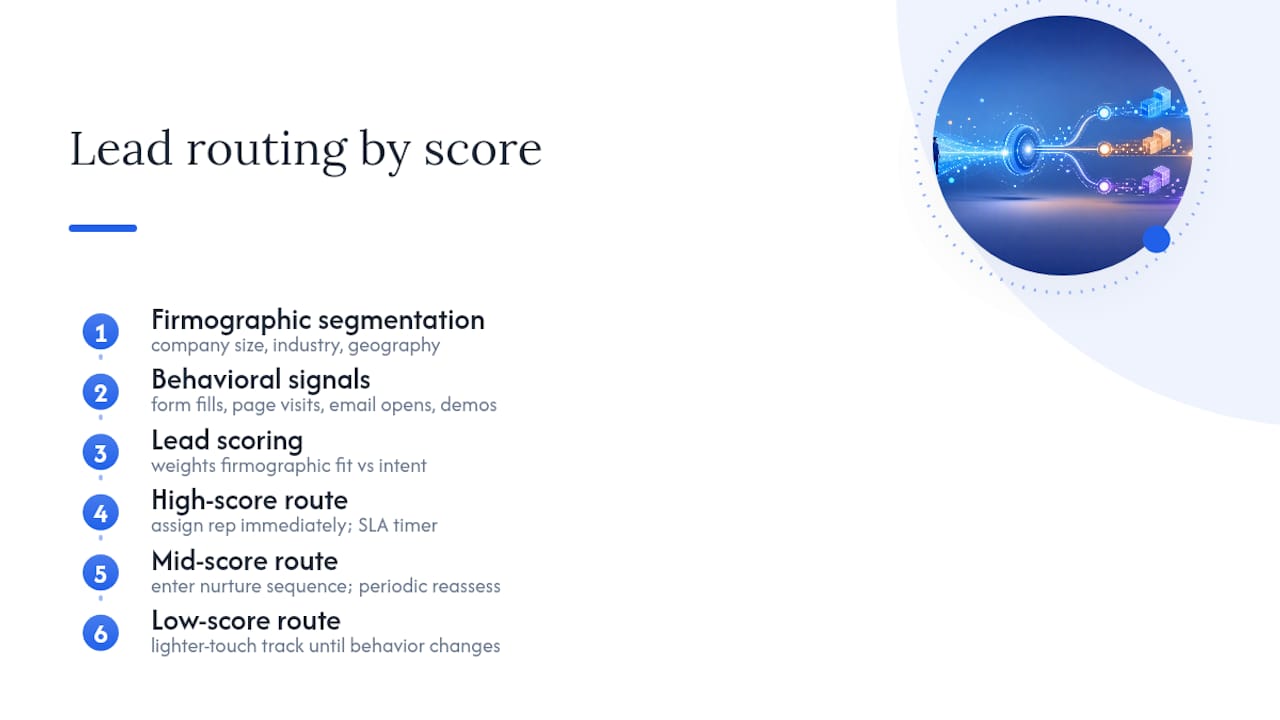
Start with firmographic segmentation: company size, industry, and geography determine which sequence, which rep, and often which product messaging applies. Layer behavioral segmentation on top: form fills, page visits, email opens, and demo requests all signal intent level, and intent should determine automation speed. A lead requesting a demo needs a notification within minutes; a lead who downloaded a whitepaper can wait for a nurture sequence.
Lead scoring ties these signals together into a number a workflow can act on. A simple model weighting firmographic fit against behavioral intent is usually enough to start; overengineering the scoring model before you have enough data to validate it wastes more time than it saves. Route high-score leads directly to a rep with an SLA timer attached. Route mid-score leads into a nurture sequence with periodic reassessment. Let low-score leads sit in a lighter-touch track until behavior changes their score.
Revisit segmentation quarterly. Buyer behavior shifts, your product changes, and a scoring model built a year ago on last year’s ideal customer profile will misroute leads without anyone noticing until conversion rates quietly drop.
Where Does AI Actually Improve Pipeline Performance?
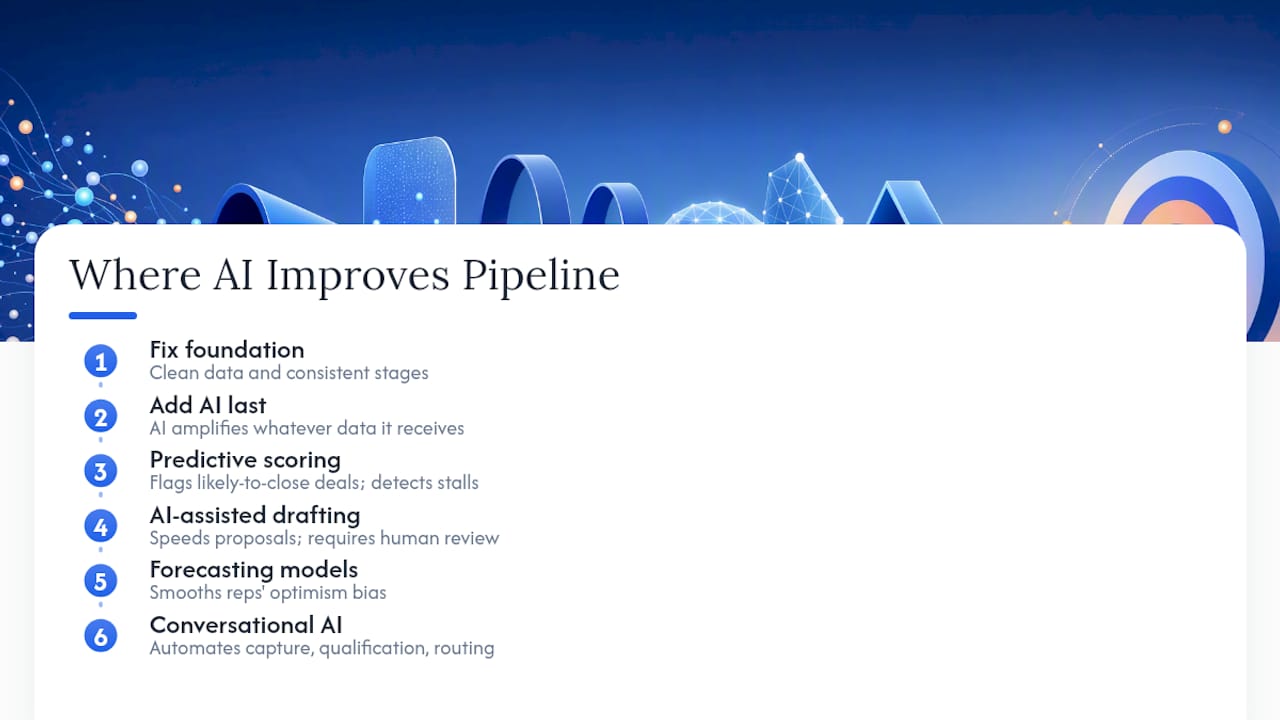
AI adds real value in a pipeline, but only once the data underneath it is clean and the stages are consistent. Implementation guidance for mid-market teams is direct about this: AI should be the last layer added to a stack, not the first, because it amplifies whatever data it’s given. Feed it messy stage definitions and inconsistent field entries, and it will produce confident, wrong predictions at scale.
Once the foundation is solid, AI earns its place in a few specific spots. Predictive scoring can flag which deals are actually likely to close based on historical patterns, often catching signals a rep would miss, like a slowdown in email response time that historically precedes a stall. AI-assisted drafting can speed up proposal and follow-up creation, though it still needs a human pass before anything goes to a prospect. Forecasting models can smooth out the natural optimism bias reps bring to their own pipeline reviews.
Conversational AI tools, including voice agents and chatbots, extend automation into the capture and qualification stages directly, handling initial contact and routing before a human ever steps in. That’s a meaningfully different move from bolting AI onto an existing broken workflow. It’s building a capture layer that’s automated by design. MediaBloom’s guide to AI sales agents covers how these agents handle qualification tasks that used to sit entirely with an SDR.
The mistake to avoid: treating AI as a fix for a process problem. If deals are stalling because nobody defined what “qualified” means, no scoring model will patch that. Fix the definition first.
How Do You Get Sales Teams to Actually Adopt Automation?
The best-designed workflow fails if reps route around it, and reps route around anything that feels like it’s watching them instead of helping them. Change management for automation starts with framing: this removes their data entry, it doesn’t replace their judgment on the calls that matter.
Involve a handful of frontline reps in the design phase before rollout, not after. They’ll catch friction points a RevOps team building in isolation won’t see, like a required field that makes sense on paper but takes three extra clicks on a mobile CRM app during a client meeting. Roll out one workflow at a time instead of flipping the whole stack on at once. A single automation that visibly saves ten minutes a day builds more trust than five automations launched simultaneously that nobody fully understands.
Training needs to be role-specific. A rep needs to know what happens when they move a deal to “Proposal,” not the technical logic behind the trigger. Managers need visibility into where automations are firing so they can coach around stuck deals instead of chasing them manually. Keep a short internal reference document (not a technical spec) that explains what triggers what, in plain language.
Expect a dip in reported activity numbers right after rollout. That’s usually the automation working as intended (fewer manual logs needed) rather than reps disengaging, but it will look alarming on a dashboard if nobody’s told managers to expect it.
What Security and Compliance Rules Apply to Automated Sales Data?
Automated workflows move customer data across more systems, faster, which raises the stakes on access control and consent tracking. Every integration point (CRM, orchestration layer, AI tool, communication channel) is a place data can leak or get mishandled if permissions aren’t scoped tightly.
Role-based access control matters more once automation is running than it did when a human was manually checking every record. Limit who can edit live workflows, and separate “can view pipeline data” from “can modify automation logic.” An automation misconfigured by someone without the full context can silently mis-route sensitive deal data for weeks before anyone notices.
Communication compliance deserves specific attention. Automated outbound calling and texting fall under TCPA rules in the United States, and consent tracking needs to be built into the automation itself, not handled as an afterthought. If a workflow triggers an automated call or text, the record needs a documented, current consent basis attached to it. For businesses handling health-related lead data, HIPAA considerations apply to how that information moves through chat, voice, and CRM systems alike.
Data retention policies should extend to automation logs, not just customer records. If a workflow is later found to have misfired, an audit trail showing what triggered it and when is often the only way to diagnose the failure and demonstrate the mistake was caught and corrected.
MediaBloom’s Perspective on Building Automation That Holds Up
The stack advice in this guide (stages first, data hygiene second, AI last) mirrors how we approach implementation with clients. We map the sales motion and validate the data before a single workflow goes live, because a fast automation on top of a broken process just produces bad outcomes faster.
Where our platform differs is in the capture layer itself: omnichannel voice, chat, and SMS handling means the speed-to-lead automation this article opens with isn’t bolted onto an existing CRM, it’s built into how leads enter the pipeline. That shortens time-to-value considerably compared to stitching capture together after the fact. Readers weighing a managed deployment against a DIY build can request specific case studies or a working demo to see how the sequencing plays out in practice.
— MediaBloom
Get Automated Lead Capture and Routing Live Faster With MediaBloom
Most of the blueprint above (mapping stages, cleaning data, building capture and routing) still takes weeks to implement manually, even with a solid plan. The timeline can be shortened by building the speed-to-lead layer directly into an omnichannel capture system, so instant routing and rep notification are live from day one rather than added later.
The platform covers the exact quick wins this article recommends starting with: AI voice agents and chatbots handle inbound capture and qualification around the clock, speed-to-lead automation routes and notifies reps within seconds of a new lead, and integrations with more than 600 CRM platforms mean the workflows described in the stage-by-stage blueprint plug into whatever system of record you already run. Stalled deals get a second chance too, through reactivation workflows built for pipelines that already have leads sitting cold.
If you want to see how the capture-to-close sequence actually runs before committing to anything, watch a live demo or reach out for a discovery call to map your specific pipeline stages against what a managed deployment would look like.
Sources
- Set up deal pipeline automation - HubSpot Knowledge Base
- Sales Pipeline Automation: What to Automate (and Not) — FitSmallBusiness
- Sales pipeline automation solutions - Zapier
- Why Sales Automation Fails in 2026 (and How to Fix It)
FAQ
What Are the 5 Stages of a Sales Pipeline?
Most pipelines run through Prospecting, Qualification, Demo or Proposal, Negotiation, and Close. Some teams split Demo and Proposal into separate stages, making six. Each stage needs its own exit criteria and automation guardrails, since the risk of auto-advancing a deal without a human check grows as the deal nears close.
What Is an Automation Pipeline in Sales?
An automation pipeline is a set of rule-based workflows that trigger actions (like notifications, task creation, or record updates) whenever a deal meets a defined condition, such as moving stages or going idle. It removes manual, repetitive steps while leaving judgment calls like negotiation and final approval to a person.
What Is the Pipeline Method of Sales?
The pipeline method tracks deals through defined stages from first contact to close, giving teams visibility into where revenue is stuck and how likely it is to land. Automation layers onto this method by triggering actions at each stage transition rather than requiring reps to manually update records and follow up.
How Do You Generate a Sales Pipeline With Automation?
Generating pipeline starts with automated lead capture across channels (forms, chat, calls), instant routing to the right rep, and immediate follow-up task creation, which is the combination most guides agree delivers the fastest ROI. Some platforms extend this further with AI voice agents and chatbots that qualify leads at the point of capture instead of waiting for manual triage.
Does Mediabloom Replace My CRM or Work Alongside It?
Mediabloom works alongside your existing CRM rather than replacing it, integrating with more than 600 platforms to handle capture, routing, and qualification while your CRM remains the system of record. Pricing details are available directly on the Mediabloom site.