Outlook calendar sync is automatic when your calendar lives in a Microsoft 365 or Outlook.com mailbox. There is no sync button to press. Add the account on each device and every change shows up everywhere. Sync breaks in a few predictable places: the wrong account type, a Google calendar that was never really connected, or a CRM that books appointments without checking the calendar. For a business that sells by appointment, the last one costs the most. This guide covers all three, then shows how we connect calendars to booking systems at MediaBloom so leads land on a calendar that is actually free.
TL;DR
- Outlook syncs calendars automatically through Exchange, the Microsoft server behind Microsoft 365 and Outlook.com accounts. IMAP and POP accounts sync email only, never the calendar.
- If meetings are missing on your phone, check the account type first, then reset or re-add the account.
- Google and Outlook calendars do not offer a native two-way link. Pick one two-way connection, not two one-way ones, to avoid duplicates.
- A CRM calendar connection (HubSpot or GoHighLevel) decides whether leads can book a slot that is already taken. Settings matter more than the tool.
- We build and run the CRM, automations and appointment booking for you, so the calendar rules are set once and tested before leads arrive.
Table of Contents
- How Outlook calendar sync works
- Sync Outlook with your phone’s built-in calendar
- Why Outlook meetings stop syncing
- Syncing Google and Outlook calendars
- One-way vs. two-way: the booking test
- HubSpot calendar integration with Outlook
- GoHighLevel calendar sync with Outlook
- Calendar conflicts: what to check before you go live
- Our view: the calendar is part of the lead system
- Where MediaBloom fits
- FAQ
- Sources
How Outlook calendar sync works
Microsoft explains that with an Exchange account, calendar events synchronize automatically and continually with the Exchange server. Outlook.com accounts run on Exchange too, so mail, contacts and calendar sync the same way. IMAP and POP accounts sync email only.
That has a practical meaning. Your calendar is not a file on your laptop. It sits in one cloud mailbox, and Outlook on Windows, Mac, the web, iPhone and Android are all views of it. Edit a meeting on your phone and the desktop shows it within moments. Nobody needs to “turn sync on” for a Microsoft 365 account.
To set it up on a new device:
- Open Outlook and add your Microsoft 365 or Outlook.com account. In classic Outlook that is File, then Add Account. In the new Outlook it is Settings, Accounts, Email accounts, Add account. In the mobile app it is the Add Account option.
- Sign in with the work or school address that owns the calendar.
- Confirm the calendar is checked under that account in the app.
If your calendar is stored with an IMAP or POP provider, move it to an Exchange-based mailbox first. Otherwise it will never sync across devices.
Sync Outlook with your phone’s built-in calendar
Many owners and field staff live in the phone’s default calendar app rather than Outlook. On Android, Microsoft says Outlook can export calendars to the default calendar app: go to Settings, then Calendar, and switch on Sync calendars. Two-way export is supported for Microsoft 365 and Outlook.com accounts, so a new or edited event moves in both directions.
This matters for a roofing crew lead or an HVAC dispatcher. If the technician checks the phone calendar and the office books in Outlook, the two must agree, or someone drives to a job that was moved.
Why Outlook meetings stop syncing
When a meeting is missing, work through these checks in order. Most problems end at the first or second.
- Check the account type. Microsoft states that IMAP and POP cannot sync calendar or contacts. Use an account that supports Exchange ActiveSync.
- Check the calendar is ticked. In the Outlook mobile app, open the account and make sure each calendar you need is checked.
- Reset the account. In the app’s account settings, use Reset Account.
- Delete and re-add the account. This clears a stale connection and takes a few minutes.
- Check the device. The same Microsoft page notes that from March 1, 2026, devices running ActiveSync versions lower than 16.1 can no longer connect to Microsoft services. An old phone or tablet that quietly stopped syncing may be the reason.
Two habits prevent most repeat problems. Keep Outlook and the operating system updated, and do not switch off cached mode on desktop Outlook in the hope of forcing a sync. Sync is handled by the server, so the fix is usually the account, not a setting on your machine.
Syncing Google and Outlook calendars
Many small businesses run two calendars: a Google calendar for one person or location, and Outlook for the rest of the team. The expectation is a two-way link where an event created on either side appears on the other. In practice, Google and Outlook both let you subscribe to the other’s calendar as a read-only feed, and those feeds refresh on a delay of hours rather than instantly. A subscription also cannot send changes back.
True two-way sync between the two needs a connector that signs in to both calendars. Three rules keep it clean:
- Use one two-way pair. Two one-way connections running in opposite directions are a common cause of duplicate events.
- Decide what carries over. Privacy flags, attachments and invitation settings do not always transfer, so check what each side shows before you rely on it. Private appointments can appear as ordinary events.
- Test with one event each way. Create a meeting on each calendar and confirm it appears, once, on the other.
If the only goal is to stop people booking over each other, you may not need to merge calendars at all. You need your booking system to read the calendar that holds your real availability. That is the next section.
One-way vs. two-way: the booking test
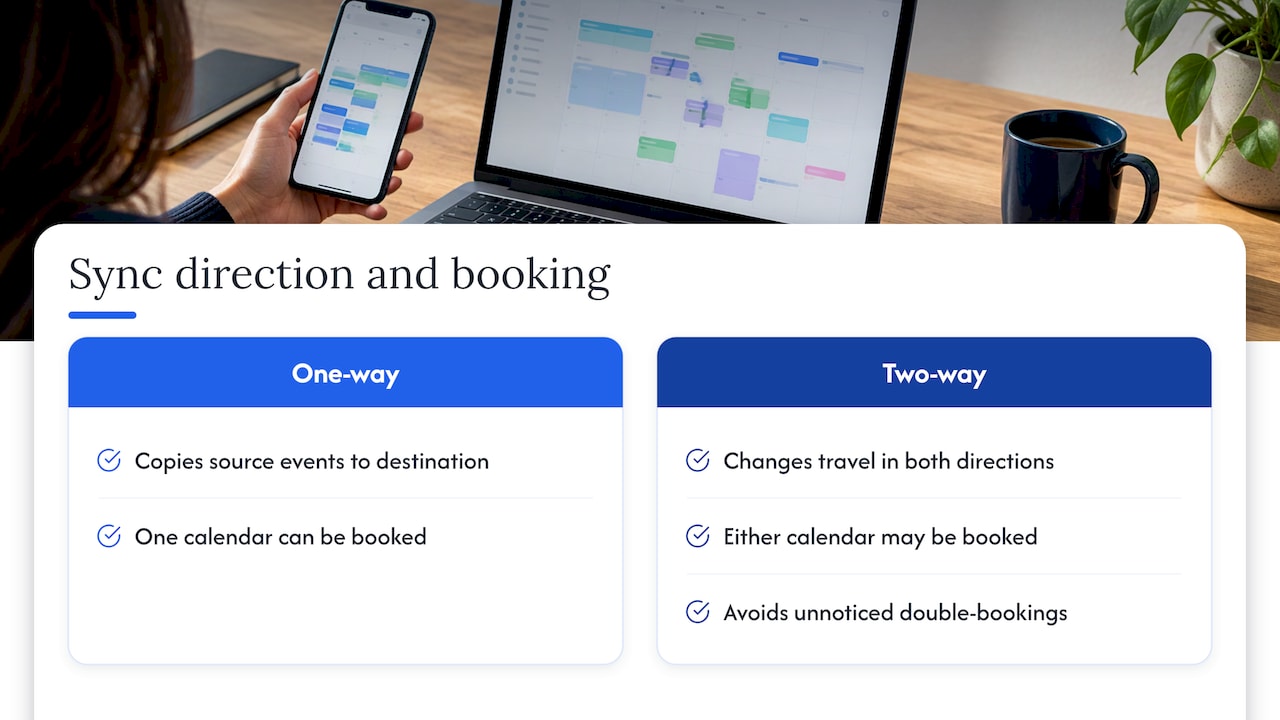
One-way sync copies events from a source calendar to a destination and nothing comes back. Two-way sync carries changes in both directions. A simple rule decides between them: ask which calendar someone might book a meeting on. If it is only one, one-way is enough. If it could be either, you need two-way, or a double-booking appears that nobody notices until someone books over something.
For a personal injury firm, the intake call that lands on an attorney’s busy block is a lost first impression. For a home services company, the estimate booked on top of a install is a no-show. Our guide to calendar settings that prevent double bookings goes through the checks one by one.
HubSpot calendar integration with Outlook
HubSpot gives you two separate calendar connections, and teams often mix them up.
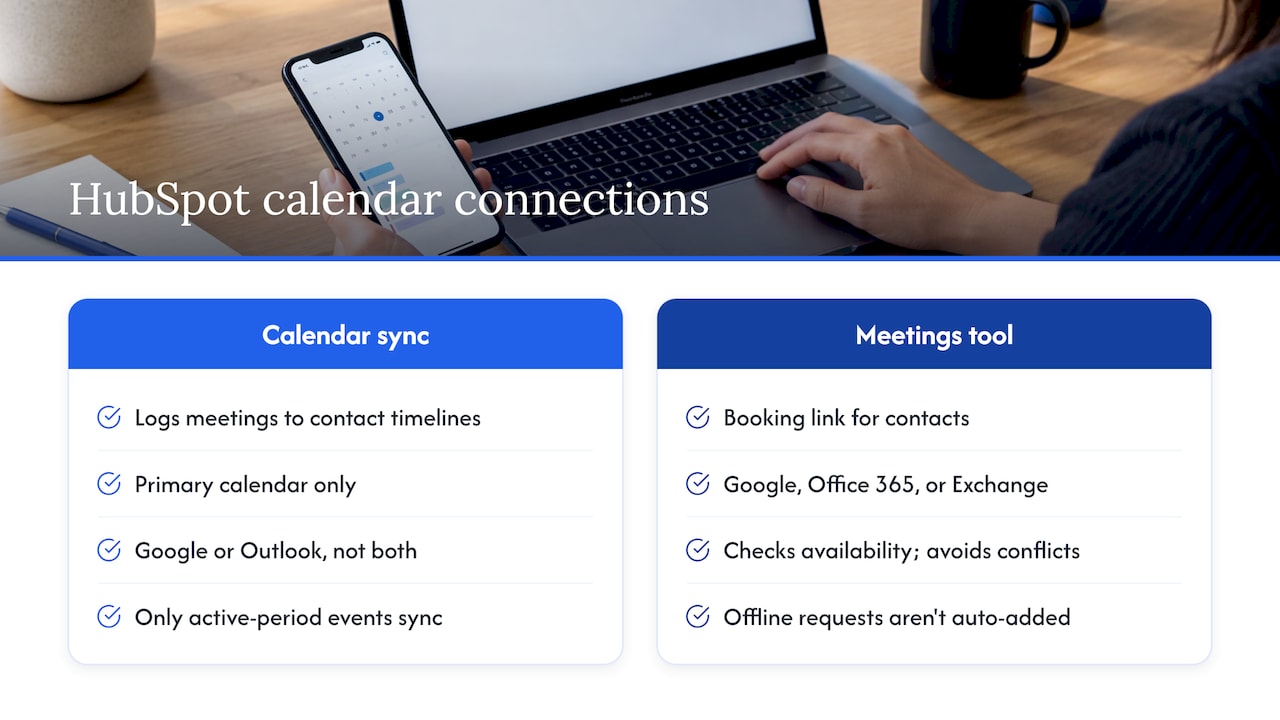
Calendar sync logs meetings to contacts. HubSpot’s documentation says it syncs only with a user’s primary calendar. You can connect Google Calendar or Outlook Calendar, but not both at once. Events created before you connected do not sync, and only events created while the integration is active appear on contact timelines. Edits and deletions in the calendar update the timeline meeting, and cancelling a meeting in Outlook removes it from the timeline. Recurring meetings sync the next five upcoming events, up to a year ahead. Outlook meetings with an event body over 65,536 characters will not sync.
The meetings tool is the booking link. HubSpot says you can connect one Google, Office 365 or Exchange calendar so contacts can book without double-booking. Without a connected calendar, the scheduling page runs in offline mode: people can request a meeting, but it is not added to the calendar automatically. Connecting needs personal email access permissions and an assigned Core, Sales, Service or Revenue seat. A shared inbox cannot have its calendar connected, only an individual work email.
The takeaway for a team of several reps: each person connects their own work calendar, and the shared sales inbox cannot be the one that holds availability. If you are weighing HubSpot against GoHighLevel for appointment-heavy work, our comparison of GoHighLevel vs. HubSpot lays out where each fits.
GoHighLevel calendar sync with Outlook
For home services contractors, insurance agencies and law firms running their pipeline in GoHighLevel, calendar settings decide whether a lead can book a taken slot. HighLevel’s help center describes three connection types under Settings, Calendars, Connections:
- Connected Calendars authorize access to Google, Office 365 or Outlook.com.
- Linked Calendars import events and availability.
- Conflict Calendars block booking slots that overlap busy events.
By default, external events are treated as blocked slots with no contacts or workflows attached. Two-Way Sync creates appointments, creates contacts for guests and can trigger automations, which is what you want when follow-up depends on the booking.
The same page lists the failures we would check first:
| Symptom | Likely cause | Fix |
|---|---|---|
| Red banner, integration broken | Expired or revoked token | Reconnect |
| External events not appearing | No Linked Calendar selected, or sync disabled | Select a Linked Calendar and enable sync |
| Slots bookable during external events | Conflict Calendar toggle off | Turn it on |
| Appointments not appearing in Outlook | Write-Back toggle off | Turn it on |
| Duplicate external events | Write-back enabled on several calendars | Keep write-back on one |
A few limits to know before you plan. HighLevel’s Outlook sync supports Office 365, Outlook.com, live.com and Hotmail calendars, not on-premise Exchange or Outlook Desktop. Only one Outlook account can connect to one user in a single location. It works for Group Calendars, not Event calendars, though Round Robin, Collective and Service Calendars are supported. If appointments are not syncing, the documented fix is to edit the Primary calendar in Calendar Configuration, choose “Do not sync events to the primary calendar,” save, then reselect the same calendar. You can confirm success by checking the events show in Outlook online.
One more detail for multi-service bookings. HighLevel says each service pushes as a separate event and two-way sync is not supported for those. Changes made on the third-party calendar are not synced back, so rescheduling and cancellations must happen in HighLevel. Single-service bookings do support two-way sync with Google, Outlook or iCal. Tell your staff which rule applies, or someone will drag an event in Outlook and wonder why the system never noticed.
Calendar conflicts: what to check before you go live
Whatever tool you use, run this short pre-launch check:
- One source of truth. Name the calendar that holds real availability for each person.
- Conflict checking on. Every booking page or AI agent must read that calendar before offering a slot.
- Travel and buffer time. Field teams need gaps between jobs, not back-to-back blocks.
- Round robin or collective rules. Decide who gets the next lead when two people are free.
- Cancellation path. Decide where rescheduling happens, and make it the same place every time.
- A real test. Book, move and cancel one appointment from the lead’s side and the staff side.
Settings are the cheap part. Finding out on Monday that a calendar toggle was off, after a weekend of paid ads, is the expensive part.
Our view: the calendar is part of the lead system
Most of the calendar problems we see described by owners are not sync problems at heart. They are handoff problems. A lead fills a form, a text goes out, someone books, and the calendar is the last link in the chain. If that link reads the wrong calendar, the whole chain fails at the moment of truth.
That is why we treat the calendar as part of the system, not an afterthought. We are a done-for-you agency: we build the ads, the AI agents and the CRM, and our team books the appointments. One partner covers lead generation, AI follow-up and CRM, so nothing falls through the cracks between vendors. When we set up a GoHighLevel pipeline, linked calendars, conflict checking and automations are configured as one piece of work rather than handed between separate vendors.
For personal injury and MVA firms, the same thinking applies to intake. Our pay-per-signed-retainer model means firms pay only for signed retainers, not leads, so a booked consultation that never happens helps nobody. We want the calendar right as much as you do.
MediaBloom
Where MediaBloom fits
If your CRM follow-up is leaking leads or booked appointments keep colliding, the fix is usually in the setup rather than another app. Our CRM automation and GoHighLevel setup covers pipelines, automations and follow-up so each lead is routed and booked without manual chasing. For fast response, Speed to Lead AI contacts new leads and books them, and our AI voice agents handle inbound and outbound calls around the clock. If you want to understand the role first, read how an AI appointment setter works. We have served 300+ businesses since 2022 from Tampa, Florida, and hold a 4.8-star Google rating.
To have us build and run it, start at mediabloom.us.
FAQ
Does Outlook sync my calendar automatically?
Yes, if the calendar is in a Microsoft 365, Exchange or Outlook.com mailbox. Microsoft says those events sync automatically and continually with the server. IMAP and POP accounts do not sync calendars.
Why isn’t my Outlook calendar syncing with my phone?
Start with the account type, since IMAP and POP cannot sync calendars. Then confirm the calendar is checked in the Outlook app, reset the account, and delete and re-add it if needed. Very old devices running ActiveSync below version 16.1 can no longer connect to Microsoft services as of March 1, 2026.
Can I sync Google and Outlook calendars in both directions?
Not with a built-in feature. Both apps offer read-only subscriptions that refresh slowly. Two-way sync needs a connector that signs in to both. Use one two-way pair rather than two one-way pairs to avoid duplicate events.
Can HubSpot connect to both Google and Outlook calendars?
Not at the same time for calendar sync. HubSpot says you can connect Google Calendar or Outlook Calendar, and it syncs only the primary calendar. Events created before you connect do not sync.
How do I stop leads booking over busy times in GoHighLevel?
Add the Outlook calendar as a Conflict Calendar so overlapping busy events block slots. Turn on Write-Back so new appointments appear in Outlook, and keep write-back on one calendar to avoid duplicates.
Sources
- Microsoft: Sync basics, what you can and cannot sync
- Microsoft: Sync your Outlook calendar to the default Android calendar app
- Microsoft: Can’t sync calendar and contacts with my phone or tablet
- HubSpot: Calendar sync with Google Calendar or Outlook
- HubSpot: Connect your calendar to HubSpot
- HighLevel: Setting up linked calendars and conflict calendars
- HighLevel: How to sync HighLevel calendars with Outlook
- HighLevel: Third-party calendar sync with services
- One-way vs. two-way calendar sync explained