A working human handoff chatbot fires on multiple combined signals, not one trigger, hands the agent a structured context packet instead of a raw transcript, routes by skill and urgency with a defined fallback, and gets measured on time-to-human and repeat-handoff rate. Get those four pieces right and escalations stop feeling like a dead end. Everything below shows you exactly how to build each piece.
TL;DR:
- Combining multiple signals such as explicit requests, confidence scores, sentiment, and topic category prevents false escalations and ensures the right cases are escalated.
- Building a structured context packet that includes the transfer reason, customer goal, verified fields, and attempted actions improves agent understanding and reduces resolution time.
- Routing escalations based on issue category, account tier, locale, and urgency ensures cases reach the appropriate agent level without unnecessary delays or misclassification.
- Using a copilot workspace with suggested replies, summaries, and quick actions helps agents respond efficiently and improve first-contact resolution quality.
- Tracking KPIs like repeat-handoff rate, time-to-human, and context completeness guides continuous system calibration and optimizes escalation effectiveness.
Table of Contents
- What Is a Human Handoff Chatbot, and When Should It Escalate?
- Building the Context Packet Your Agents Actually Need
- Routing Rules: Who Gets the Handoff, and What Happens When Nobody’s Available
- Designing the Agent Workspace Around an AI Copilot
- Warm Transfer vs. Cold Ticket: Choosing the Right Handoff Mechanic
- Measuring Handoff Quality: The KPIs That Actually Matter
- The Implementation Checklist: Stack, Primitives, and Test Matrix
- What Production Handoff Looks Like Inside Mediabloom’s Platform
- Why Most Teams Get Handoff Backwards
- Get Handoff Right Without Building It From Scratch
- Sources
- FAQ
What Is a Human Handoff Chatbot, and When Should It Escalate?
A human handoff chatbot is a conversational AI system engineered to detect when a conversation exceeds its competence or authority, then transfer that conversation, along with its context, to a live agent. The industry term for this discipline is “bot to human handoff” or “AI human handoff,” and it covers everything from the trigger logic to the agent-side workspace. Gartner projects that agentic AI will autonomously resolve a large share of common customer-service issues by 2029, which sounds like handoff will matter less over time. The opposite is true: as bots absorb more routine volume, what reaches a human is disproportionately the hard, sensitive, or emotionally charged case. Escalation stops being a rare event and becomes the moment your whole support operation gets judged on.
Relying on one trigger, a single low-confidence score, say, produces false escalations on questions the bot could have answered and misses real ones where the bot was confidently wrong. Effective systems combine several signal types:
- Explicit request: the user types “talk to a person” or equivalent phrasing, which should always win regardless of other scores.
- Confidence threshold: the natural language model’s intent-match score drops below a set floor, commonly in the 60 to 75% range depending on domain risk.
- Sentiment and frustration: repeated negation, all-caps, or a frustration classifier crossing its threshold, especially after a failed resolution attempt.
- Topic or risk category: billing disputes, account security, legal language, or anything touching health data gets routed to a human by policy, not by confidence score.
- Time or message-count rules: a conversation running past three or four unresolved turns, or past a set duration, escalates automatically.
- Customer tier overrides: enterprise or VIP accounts can skip lower tiers and land directly with a senior agent.
Calibrate these in stages. Launch with conservative thresholds, log every escalation decision for two weeks, then tighten or loosen based on how many escalations were actually necessary. Azure Bot Service provides the scoring and hook infrastructure most teams build this logic on top of.
Building the Context Packet Your Agents Actually Need
The single biggest failure in dialogue transfer chatbot design is dumping a raw transcript on the agent and calling it context. Agents don’t have time to read twenty scrolled-back messages while a customer waits. Design guides increasingly recommend a structured briefing model over a transcript dump, precisely because a queryable summary paired with a clear next step cuts repeat-explanation and time-to-first-action dramatically.
Build the packet as a fixed schema, populated automatically at the moment of handoff:
- Reason for transfer: the specific trigger that fired (explicit request, confidence, sentiment, topic).
- One-line goal: what the customer is actually trying to accomplish, in plain language.
- Verified fields: account ID, order number, or ticket reference, only after confirming these against your system of record.
- Actions attempted: what the bot already tried or offered, so the agent never repeats a failed step.
- Uncertainty flags: anything the bot inferred but didn’t confirm.
- Attachments and transcript link: a link to the full history, not the history itself, for agents who need to dig deeper.
Never include payment credentials, authentication tokens, full card numbers, or social security numbers in the packet body. Azure Conversational Language Understanding and similar structured-extraction tools help pull verified fields cleanly instead of copying raw user text that might contain sensitive strings.
Pro Tip: Write the summary field with a ten-second read test in mind: if an agent can’t grasp the reason for transfer and the one-line goal in under ten seconds, the template is too dense.
Routing Rules: Who Gets the Handoff, and What Happens When Nobody’s Available
Skill-based routing depends on stable keys, not guesswork. Map every escalation to a route using:
- Issue category (billing, technical, security, sales) drawn directly from the trigger that fired.
- Account tier, so enterprise customers reach senior agents without waiting in a general queue.
- Locale, matching language and time zone to available agent pools.
- Urgency, elevating security and legal-risk topics above routine questions regardless of queue position.
Every route needs a primary owner queue, a fallback queue, and a service-level target. If billing support is closed for the night, the fallback might be a general queue with an extended response window rather than a dead end. Sentiment-aware routing adds one more layer: a customer who has already escalated once and remains frustrated should route directly to a senior or de-escalation-trained agent, skipping the standard queue entirely. Insurance and other regulated sectors often formalize this further, routing by policy type or claim severity in addition to sentiment, a pattern worth studying in adjacent industries even if your product isn’t insurance.
Designing the Agent Workspace Around an AI Copilot
Agents receiving a handoff need three things visible immediately: the packet top line, a suggested next step, and one-click quick actions (refund, reset, escalate further). Bury any of these under tabs or scrolling, and agents default back to asking the customer to repeat themselves, the exact failure the context packet was built to prevent.
A copilot layer earns its place when it does work the agent would otherwise do manually:
- Suggested replies drawn from the packet and knowledge base, editable before sending.
- Auto-summary of the bot’s failed attempts, so agents don’t ask the customer to reexplain.
- Pre-populated resolution fields for common ticket types, cutting data entry to a review step.
- A live transcript link for agents who want the full history without receiving it by default.
The feedback loop matters as much as the interface. Every time an agent edits a suggested summary or overrides a routing decision, log it as a QA signal. Patterns in those corrections, an intent category the bot keeps misclassifying, a routing rule that keeps misfiring, are the cheapest source of model and rule improvement you have.
Pro Tip: Review agent correction logs weekly for the first month after launch, then monthly after that. The first month reveals structural gaps; later reviews mostly catch drift.
Warm Transfer vs. Cold Ticket: Choosing the Right Handoff Mechanic
A warm transfer connects the customer to a live agent in real time, with context already visible, functioning like a synchronous phone transfer. A cold ticket closes the chat session and creates an asynchronous ticket the customer hears back on later, typically by email. Warm transfer preserves momentum and feels personal, but it requires an agent available right now. Cold tickets scale better outside business hours and for non-urgent issues, but they cost you the conversational thread.
Use synchronous warm transfer when urgency is high, sentiment is negative, or the customer is already mid-task and stopping would cause real friction. Default to an asynchronous ticket for informational requests, off-hours contact, or anything that doesn’t need a live response.
Failure modes are predictable, so plan the fallback in advance:
- Queue closed: automatically convert to a ticket with an honest wait-time estimate.
- No agent available: offer a callback option instead of leaving the customer in an open, unanswered chat.
- Transfer fails technically: retry once, then fall back to a ticket with the full context packet still attached.
Measuring Handoff Quality: The KPIs That Actually Matter
Handoff quality is measurable, and vague satisfaction surveys don’t cut it. Best-practice benchmarks converge on a core set of metrics:
- Handoff CSAT: satisfaction specifically for the escalated portion of the conversation, tracked separately from bot-only interactions.
- Time-to-human: elapsed time from trigger firing to first agent response.
- Context completeness: whether the agent’s first reply shows they understood the packet, versus asking the customer to repeat information.
- Repeat-handoff rate: how often the same customer gets escalated again within a short window for the same issue.
- Net resolution rate: whether the handoff actually closed the issue, not just transferred it.
- Abandoned transfers: customers who leave before an agent connects.
Watch this number closely: a repeat-handoff rate above roughly 1.3 escalations per resolved issue signals your context packet, routing rule, or agent training has a gap somewhere in the chain.
Build a dashboard that tracks these weekly, then use trend lines, not single data points, to decide whether to tighten a confidence threshold, add a routing rule, or retrain agents on a specific category.
The Implementation Checklist: Stack, Primitives, and Test Matrix
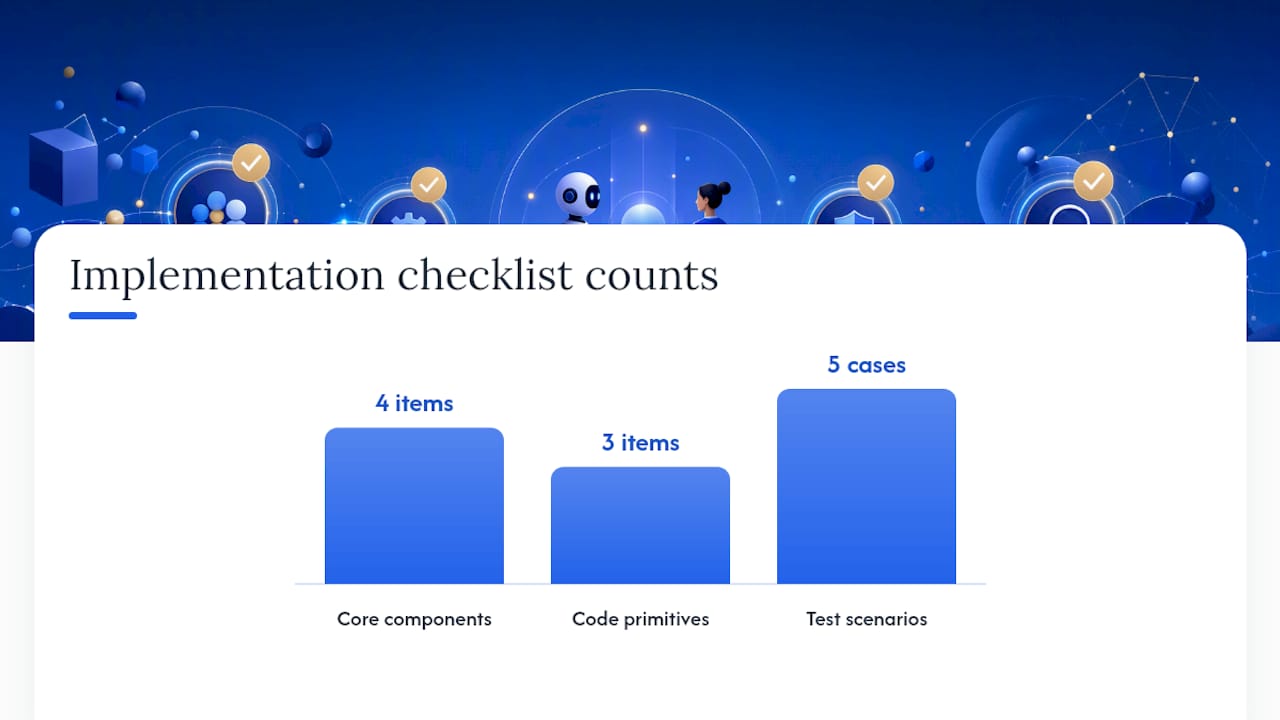
A production-ready human handoff chatbot needs four components working together: a conversational AI layer with confidence and sentiment scoring, a routing engine keyed on the fields above, an agent desktop with the copilot features described earlier, and an analytics layer feeding your KPI dashboard.
At the code level, three primitives matter most:
- A structured handoff object, often implemented as a
handoff()call, that carries the packet schema as data rather than formatted text, so it survives being passed between systems. - An input filter or narrative recast step, stripping internal planning artifacts or raw model reasoning before anything reaches the agent screen, a pattern documented in current handoff design guides.
- Durable checkpoints or event replay, so a conversation that waits ten minutes for an agent doesn’t lose state if a session times out. Production tutorials on webhook-based assignment flows show this pattern well for both live and ticket-based paths.
Before launch, run every conversation through a fixed test matrix rather than ad hoc spot checks:
- Live transfer with an agent immediately available.
- Closed-queue fallback outside business hours.
- Low-confidence answer that should trigger escalation but might not.
- High-frustration conversation with negative sentiment building over several turns.
- Data-sensitivity scenario, confirming no prohibited field leaks into the packet.
This matrix, recommended across handoff design literature, catches most of the failure modes that only surface once real customers hit them.
What Production Handoff Looks Like Inside Mediabloom’s Platform
Mediabloom runs human handoff across omnichannel deployments, chat, SMS, voice, and email, on a single platform, so the context packet and routing rules stay consistent no matter which channel the conversation started on. That matters because a customer who starts on chat and follows up by SMS shouldn’t have to reexplain anything to a new agent.
Clients including Miracle Ear and 1-800 Accountant run this handoff logic at meaningful volume, generating over 10,000 monthly leads across their combined deployments, with agent teams working from the same structured packet described earlier rather than raw transcripts. Full outcome detail lives in Mediabloom’s case studies.
The calibration advice that comes up most often in onboarding: launch triggers conservatively, review the first two weeks of escalation logs by hand, and adjust confidence thresholds before touching anything else. Agent training should focus first on reading the packet’s one-line goal and uncertainty flags, since that’s where most first-response quality gets won or lost.
Why Most Teams Get Handoff Backwards
Most teams treat handoff as a fallback feature, something to build once the “real” bot logic works. That ordering is backwards. The escalation path handles your hardest, highest-stakes conversations by definition, since anything the bot could resolve confidently never reaches a human at all. Under-engineering the handoff path means your weakest system design meets your most difficult cases.
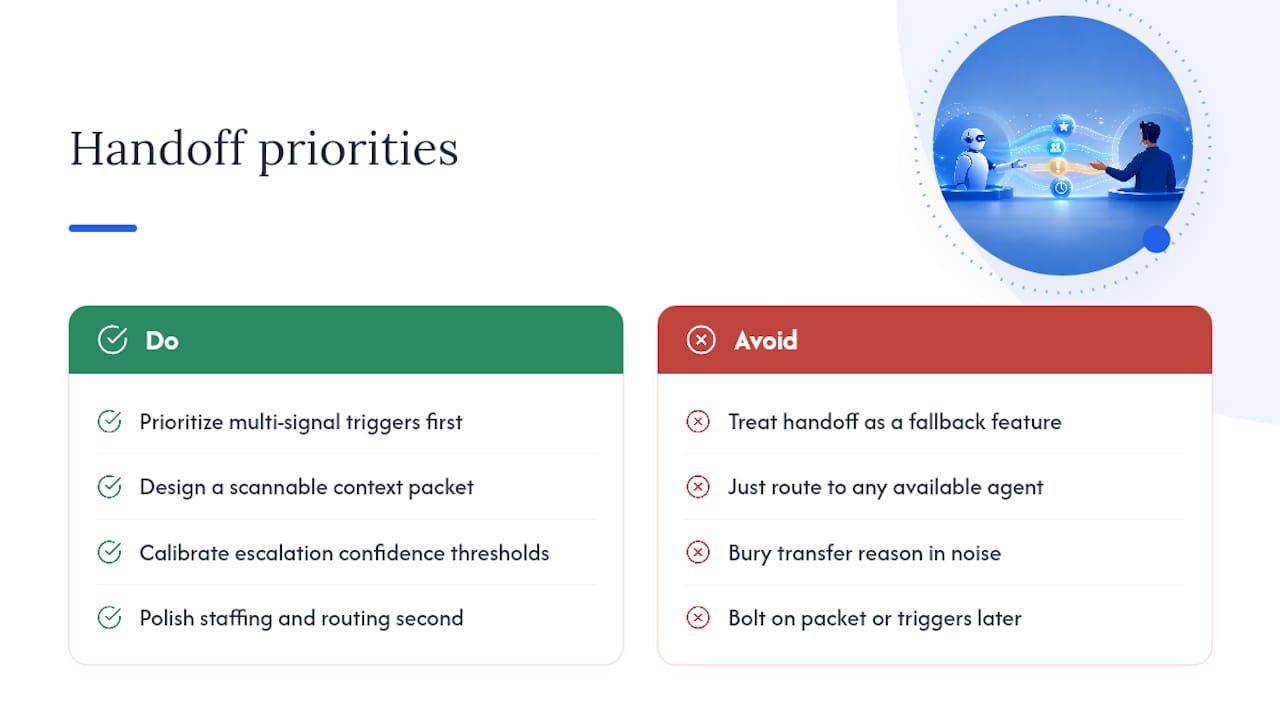
The conventional advice to “just route to an available agent” also undersells how much of handoff quality is decided before the agent ever sees the conversation. A perfectly staffed queue still fails if the context packet buries the reason for transfer under noise, or if the confidence threshold triggers escalation on questions the bot could have handled. Fix the packet schema and the trigger calibration first. Staffing and routing polish come second.
If there’s one place to prioritize effort, it’s the combination of multi-signal triggers and a genuinely scannable context packet. Everything downstream, routing accuracy, agent speed, repeat-handoff rate, inherits from whether those two pieces were built with real care or bolted on as an afterthought.
— MediaBloom
Get Handoff Right Without Building It From Scratch
Building the trigger logic, routing engine, agent copilot, and KPI dashboard described above from scratch takes months most support teams don’t have. Mediabloom gives you all of it in one platform: chatbots built for on-brand automation across chat, SMS, voice, and email, with copilot-assisted agent workspaces, skill-based routing, and SLA tracking already wired together instead of stitched from separate tools.
Compliance matters too. If your handoff touches health information or other regulated data, Mediabloom’s medical and healthcare chatbot solutions are built with those data-protection requirements in mind from the start, not added later. SaaS support teams get a purpose-built version through the SaaS chatbot solution, tuned for technical escalation patterns rather than generic retail flows.
If you’re ready to see the packet schema, routing rules, and copilot workspace running on real conversation volume, request a demo and Mediabloom will walk through a deployment mapped to your own escalation categories.
Sources
- Gartner press release: agentic AI prediction (2025)
- Customer Service Escalation in 2026: 9 AI-to-Human Handoff Best Practices
FAQ
What triggers a chatbot to hand off to a human agent?
The most reliable systems combine several triggers at once: an explicit request, a confidence score below a set threshold, negative sentiment, a high-risk topic like billing or security, and message-count limits, rather than relying on any single signal.
What should a context packet include when transferring a conversation?
A complete packet includes the reason for transfer, a one-line customer goal, verified account fields, actions the bot already attempted, uncertainty flags, and a link to the full transcript, while excluding payment credentials and authentication tokens entirely.
What is the difference between a warm transfer and a cold ticket?
A warm transfer connects the customer to a live agent in real time with context already visible, while a cold ticket closes the session and creates an asynchronous follow-up, typically handled later by email.
What KPIs show whether a handoff system is working?
Track handoff CSAT, time-to-human, context completeness on first agent response, repeat-handoff rate, and net resolution rate; a repeat-handoff rate above roughly 1.3 per resolved issue signals a gap in the packet or routing rules.
How does Mediabloom support human handoff across different channels?
Mediabloom runs chatbots and routing on one omnichannel platform covering chat, SMS, voice, and email, so context and packet data carry over consistently no matter which channel the conversation started on.