The confirmation sequence that works best combines several messages: an instant booking confirmation, a reminder sent one or two days before, a day-before check-in, and a same-day recovery text if the client goes quiet. Each message should ask for a one-word reply, “C” or “YES” to confirm, tied to automation that updates the calendar the moment someone answers. Businesses that pair this cadence with two-way replies consistently see fewer empty slots than those sending a single, one-way reminder.
TL;DR:
- Sending two well-timed SMS reminders, including a day-before check-in, further reduces no-shows compared to a single reminder, especially for high-value appointments.
- Confirmations that ask for active replies like “C” or “YES” significantly improve attendance rates and streamline scheduling updates automatically.
- Including clear, concise details such as appointment time, location, and a direct call to action in under 160 characters increases reply rates and reduces confusion.
- Proper scheduling of reminders between 9 AM and 7 PM local time minimizes opt-outs and compliance issues, avoiding early-morning or late-night texts.
- Automating reply routing with a limited keyword set and manual review of unmatched responses enhances reliability and prevents missed or misinterpreted confirmations.
Table of Contents
- Why SMS Confirmations Reduce No-Shows
- Appointment Confirmation Text Templates You Can Copy Today
- When to Send Each Message (and What It Must Include)
- How Two-Way Reply Automation Should Actually Work
- Rolling Out SMS Confirmations Without the Mess
- What Real Implementations Look Like at Scale
- What Businesses Get Wrong About Confirmation Texts
- Turn Confirmations Into a System, Not a Chore
- Sources
- FAQ
Why SMS Confirmations Reduce No-Shows
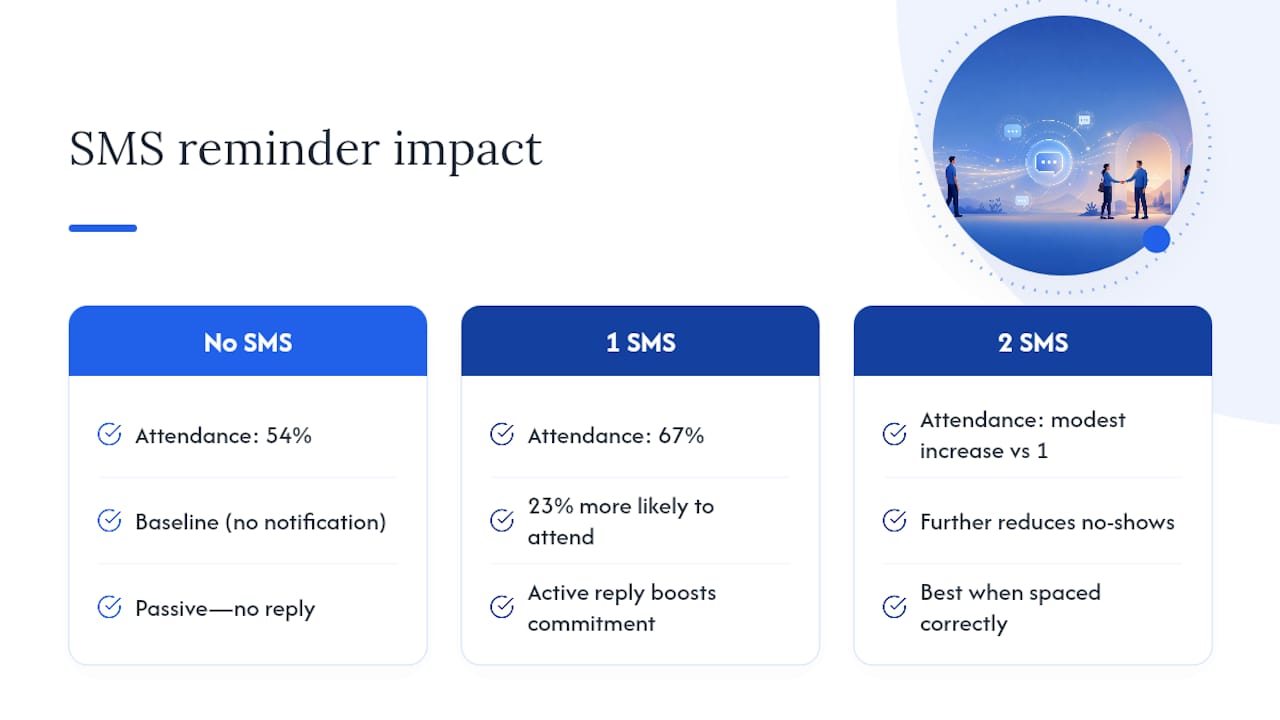
The evidence on this is not thin. A systematic review and meta-analysis covering multiple clinical settings found that patients receiving electronic text notifications were 23% more likely to show up for appointments than those who received none, with attendance rates of 67% versus 54%. Those numbers hold up across different types of practices, from primary care to specialty clinics, which is a rare thing in behavioral research.
A more recent randomized study of primary care visits, covering more than 125,000 visits between February and September 2019, tested something more specific: what happens when you add a second reminder on top of the first. The answer was a further modest reduction in no-shows and same-day cancellations. That is the number that should shape your cadence decision. One reminder helps. Two reminders, spaced correctly, help more.
The numbers that matter: Notifications lift attendance notably on their own. A second, well-timed reminder further reduces no-shows compared to sending just one message.
Older research backs the same direction. A 2011 meta-analysis of randomized controlled trials found SMS reminders substantially increased attendance and noted that automated reminders were often cheaper to run than staff phone calls, even at that era’s per-message costs.
None of this means every business will see identical results. A dermatology clinic with $200 procedures and a two-week booking lag behaves differently than a barbershop with same-week openings. The heterogeneity across settings in the research is real, and it is why the templates below come in variations rather than a single universal script. What stays constant is the mechanism: a text that asks for a reply converts a passive reminder into an active commitment, and active commitments show up more often than passive ones. For most businesses, the cost of sending four short texts is a rounding error next to the revenue lost to one missed appointment.
Appointment Confirmation Text Templates You Can Copy Today
The templates below cover the moments that matter most: the instant booking confirmation, the advance reminder, the day-before nudge, and recovery messages for no-shows or changes. Swap in your own variables, but keep the structure. Every one of these is built to fit inside a single SMS segment (roughly 160 characters) so it doesn’t split into two messages and confuse the reply thread.
Immediate booking confirmation (general business):
- “Hi [Name], this confirms your appointment with [Business] on [Date] at [Time]. Reply C to confirm or R to reschedule. Questions? Call [Phone].”
Healthcare-friendly version (no diagnosis or condition named):
- “Hi [Name], your appointment with [Provider/Clinic] is set for [Date] at [Time]. Reply C to confirm. To reschedule, call [Phone]. Reply STOP to opt out.”
Salon or personal-service booking:
- “You’re booked with [Stylist/Business] on [Date] at [Time]. Reply C to confirm your spot. Running late? Text us and we’ll hold it 10 minutes.”
Virtual appointment or telehealth:
- “Your virtual appointment with [Business] is confirmed for [Date] at [Time]. Join link: [URL]. Reply C to confirm you’ll be online.”
Field service or in-home appointment:
- “[Business] is scheduled to arrive [Date] between [Time Window]. Reply C to confirm access to [Address]. Text R to reschedule.”
The 24 to 48 hour reminder needs less detail than the original booking message and a single clear action:
- “Reminder: your appointment with [Business] is [Date] at [Time]. Reply C to confirm or R to reschedule.”
- “Hi [Name], just checking in. Your visit with [Provider] is coming up [Date] at [Time]. Reply C to confirm you’re still on.”
Day-before confirmations should feel more urgent without sounding pushy:
- “See you tomorrow! [Business] appointment at [Time]. Reply C to confirm or call [Phone] if plans changed.”
- “Tomorrow at [Time]: your appointment with [Business]. Reply C now to lock it in. We’ll follow up if we don’t hear back.”
Missed appointment recovery matters as much as the confirmation itself, since a no-show is a lost slot and a customer relationship worth repairing.
- “We missed you today, [Name]. No worries, life happens. Reply R to rebook or call us at [Phone].”
- “Sorry we missed connecting, [Name]. Want to grab a new time? Reply with a day that works and we’ll find a slot.”
Reschedule and cancellation confirmations close the loop so nobody shows up to an empty slot or misses a moved appointment.
- “Confirmed: your appointment is now [New Date] at [New Time]. Reply C to lock it in.”
- “Your appointment on [Date] has been canceled as requested. Reply anytime to rebook.”
Keep personalization tokens simple: first name, business name, date, time, and one action verb. Overloading a text with location details, parking instructions, and a full cancellation policy pushes it into a second SMS segment, which increases delivery cost and dilutes the one thing you actually need the recipient to do: reply.
When to Send Each Message (and What It Must Include)
Cadence discipline is what separates a confirmation system that reduces no-shows from one that trains customers to ignore your texts. The sequence below reflects both the research on additional reminders and common industry practice for spacing messages far enough apart to feel helpful rather than repetitive.
- At booking. Send within minutes of the appointment being scheduled, whether that happens online, by phone, or in person. This message sets expectations and gives the client a paper trail.
- 24 to 48 hours before. This is the reminder that catches people who forgot or need to adjust plans while there’s still time to fill the slot if they cancel.
- The day before, or morning-of for same-day bookings. A shorter, more urgent nudge. This is the message most likely to catch a scheduling conflict before it becomes a no-show.
- Same-day, after a missed appointment. Sent within an hour or two of the missed slot, framed as recovery rather than reprimand.
Every message in that sequence needs seven elements to function as a real confirmation rather than a vague notice: the recipient’s name, your business name, the date and time, a location or virtual link, one clear call to action, a callback number, and an opt-out instruction. Skip any of these and you either confuse the recipient or create a compliance gap.
Pro Tip: Send reminders between 9 AM and 7 PM in the recipient’s local time zone. Late-night or early-morning texts drive complaints and opt-outs even when the content is fine, and TCPA guidance treats time-of-day as part of good-faith compliance.
Keep each message under 160 characters when possible. Cap total appointment-related texts at four per booking unless the client’s replies force additional exchanges, and never bundle a promotional offer into a confirmation message. Under TCPA guidance, mixing marketing content with an informational reminder raises the required consent standard to prior express written consent, which is a heavier legal lift than most businesses want for a routine reminder. Keep the two message types separate, always.
How Two-Way Reply Automation Should Actually Work
A confirmation system only earns its name once the reply gets routed correctly. The standard keyword set is small on purpose: C or YES to confirm, R to reschedule, X to cancel, and STOP to opt out. Each keyword should trigger an immediate automated receipt, something as simple as “Thanks, you’re confirmed for [Date] at [Time],” so the customer knows the system actually caught their reply.
From there, routing matters more than the reply itself:
- A confirm reply should mark the calendar slot and, ideally, notify staff automatically.
- A reschedule reply should either drop a self-service booking link or route to a staff member for a callback.
- A cancel reply should free the slot immediately and trigger a notification so it can be rebooked.
- A stop reply must be honored instantly and added to a suppression list shared across every channel you use, not just SMS.
The harder problem is the reply that doesn’t match any keyword. Someone types “can we do 3 instead of 2” or “who is this.” The safest design routes that reply directly into a human inbox rather than answering with a generic “sorry, I didn’t understand that” bot message, which frustrates people and often ends the conversation entirely. If nobody responds to the day-before reminder, a follow-up 4 hours later and a final check on the morning of the appointment give you two more chances before you write the slot off. A direct phone call still outperforms text at that point, especially for high-value appointments.
Pro Tip: Log every unmatched reply for a week after launch and read them manually. That list tells you more about how real customers text than any planning document will.
Rolling Out SMS Confirmations Without the Mess
Getting the system running cleanly takes a short, specific checklist rather than a long project plan.
- Sync your booking calendar with an SMS platform that supports two-way messaging and webhooks, not just outbound blasts.
- Map fields between your CRM or EHR and your messaging tool so names, times, and locations populate correctly, and secure a signed BAA if healthcare data is involved.
- Capture consent at intake with a clear checkbox, timestamp the record, and store it alongside a shared suppression list for opt-outs.
- Run a sandbox test of every keyword path, then pilot with a small cohort before turning it on for your full client list.
- Track confirmation rate, no-show rate, and opt-out rate weekly; a rising opt-out rate almost always means you’re sending too often.
What Real Implementations Look Like at Scale
Mediabloom builds this kind of two-way confirmation flow into a broader AI-driven platform that combines voice agents, chatbots, and sales automation across SMS, email, and chat. Companies like Miracle Ear and 1-800 Accountant have deployed the platform and generated more than 10,000 monthly leads through its omnichannel automation. The pattern that emerges from that scale of deployment is consistent with the research: when confirmation replies feed directly into a calendar and CRM without manual entry, no-show recovery improves because staff spend their time on the appointments that actually need a human, not on chasing every booking by hand.
What Businesses Get Wrong About Confirmation Texts
The biggest mistake isn’t skipping automation, it’s overusing it. Businesses bolt promotions onto reminder threads, send five texts when two would do, or let unrecognized replies vanish into a bot loop with no human backstop. The fix isn’t more technology, it’s discipline: a fixed cadence, one suppression list across every channel, and a real person watching the inbox for anything the automation can’t safely handle. Confirmation systems fail on edge cases, not on the happy path.
— MediaBloom
Turn Confirmations Into a System, Not a Chore
Manually texting every client, or hoping a generic reminder tool catches replies correctly, leaves gaps that cost you appointments. The alternative is two-way SMS confirmations that route replies into calendar updates automatically, supported by AI voice agents and chatbots for conversations that need more than a keyword.
The platform connects to CRM and calendar systems across more than 600 integrations, and healthcare businesses can deploy HIPAA-ready messaging without rebuilding their intake process from scratch. Case studies like Fifth Avenue Leads show what happens when confirmation automation is paired with lead qualification instead of running as a separate, disconnected tool. If your team is still manually tracking replies in a shared inbox, the fix is a platform that does the routing for you. Request a demo to see how a two-way confirmation flow would run against your actual booking volume.
Sources
The evidence and legal guardrails in this guide draw on a systematic review of SMS reminder effectiveness, a randomized trial on additional reminder impact, and practical TCPA compliance guidance for informational text messages. For healthcare-specific messaging, Mediabloom’s HIPAA-compliant voice AI overview covers secure communication practices in more depth, and Canty Digital’s patient engagement guide offers additional context on healthcare communication channels.
- Effect of SMS reminders on appointment attendance (systematic review and meta-analysis) - PubMed
- Effect of additional SMS reminders on appointment attendance — PMC
FAQ
How Do You Confirm an Appointment by Text Message?
Send a short message that includes the date, time, business name, and a single reply option, such as “Reply C to confirm.” Two-way confirmation, where the recipient actively replies, works better than a one-way notice because it turns a passive reminder into a commitment.
What Is a Good Message to Confirm an Appointment?
A strong confirmation message is short, specific, and asks for one action: “Hi [Name], this confirms your appointment with [Business] on [Date] at [Time]. Reply C to confirm or R to reschedule.” It names the business, states the exact time, and gives a clear next step.
How Do You Politely Confirm an Appointment?
Use the person’s name, state the appointment details plainly, and give them an easy way to change plans without friction, such as “Reply R to reschedule.” Avoiding pressure language and offering a real alternative keeps the tone respectful even in a reminder.
How Do You Reply to Confirm an Appointment by Text?
Most systems are built around single-letter or single-word replies like “C” or “YES,” which trigger an automatic receipt and update the calendar. If a business hasn’t specified a keyword, a simple “Yes, confirmed” or “Confirmed” works with most automated systems.
Does Adding a Second Reminder Actually Reduce No-Shows Further?
Yes. A randomized study of more than 125,000 primary care visits found that adding a second text reminder reduced no-shows by about 7% and same-day cancellations by 6%, compared to sending just one reminder.