AI for Process Automation: A Decision-Maker’s Guide
AI for process automation means deploying AI to interpret, route, decide, and act across multi-step business workflows, replacing the manual glue work that sits between systems. The recommended next step: map one cross-system workflow with high document volume and frequent handoffs, then design a contained pilot around it. Analysts at Gartner, BearingPoint, and Deloitte all point to the same inflection point: AI is no longer a reporting layer. It is becoming the operational conductor.
The industry term for this is intelligent process automation (IPA), which combines robotic process automation, machine learning, and large language models into a coordinated operating model. The BPM Pulse Survey 2026 found that 42% of companies are already using generative AI in their processes, and 16% have deployed AI agents that prepare decisions and autonomously steer workflows. That shift from analytics to active orchestration is what separates modern IPA from the rule-based automation most enterprises built in the prior decade.
Key Takeaways
AI for process automation delivers its largest gains when deployed as an orchestration operating model, not as a collection of isolated tools, with governance built in from the first pilot.
| Point | Details |
|---|---|
| Define before you deploy | Intelligent process automation combines RPA, ML, LLMs, and orchestration into one coordinated operating model. |
| Pilot on high-handoff processes | Choose a cross-system workflow with document load and clear KPIs; map and redesign it before adding AI. |
| Expect 30–50% efficiency gains | Early adopters report this range, driven by fewer handoffs and reduced exception rework. |
| Governance is structural | Audit trails, RBAC, confidence thresholds, and human-review gates must be built in from day one, not retrofitted. |
| Mediabloom for pipeline automation | Mediabloom’s AI voice agents, chatbots, and omnichannel orchestration generate over 10,000 qualified leads per month for clients. |
Table of Contents
- What powers AI process automation?
- What business outcomes can you realistically expect?
- Where does AI process automation deliver the fastest ROI?
- How does AI process automation differ from traditional BPA and RPA?
- How do you implement AI process automation from pilot to production?
- What are the operational risks, and how do you govern them?
- What does a production-grade AI automation stack look like?
- Mediabloom’s AI orchestration in practice
- How do you measure success and calculate ROI?
- How do you evaluate vendors and avoid bad buys?
- What operations leaders actually learn from deploying AI automation
- Mediabloom delivers AI orchestration for lead generation and appointments
- Sources
- FAQ
What powers AI process automation?
The architecture behind intelligent process automation is not a single product. It is a stack of specialized components, each handling a distinct layer of the workflow. Understanding what each one does, and where it fits, is the fastest way to map your capability gaps.
- Orchestration layer (agentic conductor). This is the control plane. It sequences tasks, routes decisions, calls other components, and manages state across a workflow. Best fit: any process that spans multiple systems or requires conditional branching. Trade-off: adds architectural complexity and requires careful state management.
- Workflow engine / BPM. Defines the process model, SLAs, escalation paths, and human task assignments. Works alongside the orchestration layer rather than replacing it. Best fit: structured, auditable processes with defined swim lanes.
- RPA (execution layer). Executes deterministic UI interactions and API calls where no native integration exists. Best fit: legacy system interactions, screen scraping, and rule-based data entry. Trade-off: brittle when UI changes; not suited for ambiguous inputs.
- ML / MLOps. Trains and serves predictive models for classification, scoring, and anomaly detection. Best fit: lead scoring, fraud detection, demand forecasting. Trade-off: requires labeled training data and ongoing retraining pipelines.
- LLMs / NLP / document AI. Interprets unstructured text, extracts entities from documents, generates responses, and handles conversational inputs. Best fit: invoice processing, contract review, customer triage, email classification. Trade-off: probabilistic outputs require confidence thresholds and validation layers.
- Retrieval / embeddings. Grounds LLM outputs in enterprise knowledge bases using vector search. Reduces hallucination risk by anchoring responses to verified content. Best fit: policy lookup, compliance Q&A, knowledge-intensive routing.
- Connectors / APIs / iPaaS. The integration fabric that moves data between ERP, CRM, ticketing, and communication systems. Best fit: every deployment. Trade-off: connector maintenance is often underestimated in pilot budgets.
- Observability and governance layer. Logs model decisions, tracks confidence scores, enforces role-based access, and surfaces anomalies. Non-negotiable for regulated industries. Best fit: all production deployments.
These components combine into four core capabilities: classification (what is this?), decision support (what should happen?), action execution (do it), and feedback loop (was it right?). The agentic loop pattern of perception, reasoning, action, and feedback is what makes modern IPA adaptive rather than merely fast.
What business outcomes can you realistically expect?
The headline number from early adopters is a 30–50% efficiency gain, driven primarily by two factors: fewer manual handoffs between systems and a sharp reduction in exception-handling rework. Those are not abstract percentages. They translate directly into measurable KPIs.
Cycle time drops when AI handles the interpretation and routing steps that previously waited for a human to open a queue. An invoice that took three days to match and approve can reach a decision in minutes when document AI extracts the fields, ML validates the match, and the orchestration layer routes exceptions to the right approver automatically.

Error rates fall because AI applies the same logic consistently at scale, without the variability that comes from manual data entry or inconsistent judgment calls.
Cost per case compresses as throughput scales without proportional headcount growth. The 24/7 handling capability is particularly valuable for customer-facing workflows: a qualification or triage process that runs overnight captures demand that would otherwise wait until morning.
Customer experience improves when response times shrink from hours to seconds. For customer service automation, faster first-contact resolution is the most direct driver of satisfaction scores. Lead conversion rates also respond to speed: a qualified response delivered within minutes of an inquiry consistently outperforms one delivered hours later.
Stat to anchor your business case: BearingPoint’s BPM Pulse Survey 2026 found that 83% of respondents consider process management business-critical, yet only 16% have deployed AI agents. That gap is where competitive advantage currently lives.
SLA adherence improves because orchestration platforms enforce escalation timelines automatically. The model does not forget to follow up. It does not deprioritize a case because another arrived. That consistency is what makes AI-driven workflows more reliable than human-managed queues at scale.
Where does AI process automation deliver the fastest ROI?
The highest-value pilots typically involve workflows crossing multiple systems, handling significant document or unstructured data loads, and featuring frequent exception handoffs. Here are the function-level use cases that consistently meet those criteria.
- Finance: invoice processing and P2P exceptions. Document AI extracts line items, ML matches against POs, and the orchestration layer routes mismatches to the right approver. Outcome: cycle time from receipt to approval drops from days to hours; exception volume handled without adding AP headcount.
- Customer service: triage and first-pass response. NLP classifies inbound contacts by intent and urgency, routes to the right queue or agent, and generates a draft response for agent review. Outcome: first-contact resolution rate improves; average handle time falls. For a deeper look at AI in customer service workflows, the operational KPIs are well-documented.
- HR: onboarding and document validation. Document AI validates identity documents, ML flags discrepancies, and the workflow engine tracks completion status across systems. Outcome: onboarding cycle time cut by 50–70% in documented pilots; compliance risk reduced.
- Sales and marketing: lead qualification and appointment setting. Conversational AI qualifies inbound leads via voice or chat, scores them against ICP criteria, and books appointments directly into the sales calendar. This is one of the most measurable pilots available because conversion rate and cost per lead are already tracked. Chatbots in the sales pipeline have become a standard qualification layer for revenue teams.
- Supply chain: claims and exception handling. ML detects shipment anomalies, NLP processes carrier communications, and the orchestration layer initiates claims or escalations. Outcome: exception resolution time cut; fewer disputes escalate to manual review.
- IT ops: incident triage. NLP classifies alerts, ML predicts severity, and the orchestration layer routes to the right on-call team or triggers automated remediation. Outcome: mean time to resolution drops; alert fatigue decreases.
Suggested pilot candidates for a first deployment: invoice processing (finance), lead qualification (sales), or customer triage (service). All three have clear before/after metrics, manageable data requirements, and defined human handoff points that make governance straightforward.
How does AI process automation differ from traditional BPA and RPA?
The distinction matters because choosing the wrong approach wastes budget and creates technical debt.
Traditional BPA (business process automation) executes fixed, rule-based sequences. It is deterministic: if condition A, do action B. It handles structured data well and is cheap to maintain when processes do not change. The failure mode is rigidity. When inputs vary, exceptions multiply, and the automation breaks or routes everything to a human queue.
RPA adds the ability to interact with UI layers that lack APIs, but it is still deterministic. It reads a screen, clicks a button, enters data. It does not interpret. An invoice with an unusual format, a customer email with ambiguous intent, a contract clause that requires judgment: RPA cannot handle any of these without a human in the loop.
Intelligent process automation adds the interpretation layer. ML classifies ambiguous inputs. LLMs extract meaning from unstructured text. Agents reason across steps and adapt to context. The orchestration layer coordinates all of it. The result is a system that handles variation, not just repetition.
Decision rules:
- Use RPA when the process is deterministic, the UI is stable, and no interpretation is needed.
- Add ML or LLMs when inputs are unstructured, variable, or require classification and scoring.
- Design an agentic orchestration layer when the process spans multiple systems, requires conditional reasoning across steps, or needs to handle exceptions autonomously.
The trade-offs are real. Agentic orchestration is more complex to build, govern, and maintain than RPA. It requires ML engineering, prompt engineering, observability tooling, and governance policies that RPA deployments do not. The Moxo guide to AI in business process automation makes the case clearly: human-in-the-loop gates and audit trails are not optional additions for agentic systems. They are structural requirements.
How do you implement AI process automation from pilot to production?
A structured pilot approach reduces risk and builds the organizational evidence needed to justify production investment. The steps below apply to a first deployment.
- Select the process. Choose a workflow with high volume, frequent handoffs, measurable cycle time, and a defined success metric. Avoid processes with regulatory complexity or ambiguous ownership for a first pilot.
- Map handoffs and decision points. Document every step where a human interprets, decides, or routes. These are the AI insertion points. Redesign the workflow before adding AI; do not automate a broken process.
- Define success metrics. Set specific targets: cycle time reduction percentage, error rate, cost per case, SLA adherence rate. Agree on these with the process owner before building.
- Gather and label sample data. Collect 3–6 months of historical process data. Label exception types, decision outcomes, and routing logic. Data quality at this stage determines model quality at deployment.
- Design review gates. Identify which decisions require human approval. Build confidence thresholds: below a set score, the model routes to a human reviewer rather than acting autonomously.
- Build and test the pilot. Assemble the component stack, integrate connectors, and run the pilot against a subset of live traffic. Shadow mode (AI decides, human validates) is the safest first phase.
- Iterate and measure. Compare pilot metrics against baseline. Identify failure modes, retrain where needed, and adjust routing logic before expanding scope.
- Production rollout. Expand to full volume with observability dashboards active, escalation paths defined, and a rollback plan documented.
Timeline and cost guidance
| Phase | Duration | Primary cost drivers |
|---|---|---|
| Discovery and process mapping | 2–4 weeks | Process owner time, consultant fees |
| Pilot build | 4–8 weeks | Integration engineering, model setup, connector licensing |
| Pilot run and iteration | 4–6 weeks | Human review labor, observability tooling, retraining |
| Production rollout | 6 weeks | Infrastructure scaling, security review, change management |
Pilot budgets concentrate in integration engineering and human review labor, not model licensing. Production costs shift toward infrastructure, observability, and ongoing model governance. Plan for both.
Team roles: executive sponsor (decision authority and budget), process owner (defines success and owns redesign), data/ML engineer (model training and MLOps), integration engineer (connectors and APIs), QA lead (test cases and regression), and human reviewers (validation during shadow mode and ongoing exception handling). Deloitte’s State of AI research documents that organizations scaling AI are creating new roles specifically for this work: AI operations managers and human-AI interaction specialists.
Pro Tip: Run the first two weeks of your pilot in shadow mode, where the AI makes decisions but humans execute them. This generates a labeled dataset of AI errors before any autonomous action occurs, and it builds reviewer confidence in the model’s judgment faster than any documentation will.
What are the operational risks, and how do you govern them?
Governance is not a compliance checkbox. It is what separates a pilot that scales from one that fails in production.
Main risks:
- Model hallucination. LLMs generate plausible but incorrect outputs. Mitigation: retrieval-augmented generation (RAG) to ground responses in verified data; confidence thresholds that route low-confidence outputs to human review.
- Prompt injection. Malicious inputs manipulate model behavior. Mitigation: input sanitization, prompt hardening, and output validation layers before any action is executed.
- Data quality and access. Poor training data produces poor models. Mitigation: data profiling before pilot build; access controls that limit what data the model can read or write.
- Privacy and compliance gaps. AI systems that process PII without proper controls create regulatory exposure. Mitigation: data minimization policies, encryption in transit and at rest, and jurisdiction-specific compliance mapping (HIPAA, TCPA, GDPR as applicable).
- Shadow AI. Teams deploy unapproved AI tools outside the governed stack. Mitigation: a sanctioned AI tool catalog, usage monitoring, and a clear policy on approved models and connectors. Customer service AI integration challenges frequently surface shadow AI as a leading governance failure mode.
- Observability gaps. Automated decisions that cannot be audited create liability. Mitigation: structured logging of every model decision, input, output, and confidence score.
Governance checklist:
- Audit trail for every automated decision (input, model version, output, confidence score, human override if any)
- Role-based access control (RBAC) on all model endpoints and data sources
- Model versioning with rollback capability
- Confidence thresholds with defined human-review gates
- Regular bias audits on classification and scoring models
- Incident response plan for model failure or unexpected behavior
- Policy-as-code enforcement for compliance rules (TCPA, HIPAA, SOC 2 as applicable)
Moxo’s governance guidance is direct: platforms with role-based access and audit trails measurably reduce operational risk compared with ad hoc automations. Build the governance layer before you scale, not after.
What does a production-grade AI automation stack look like?
The AGIX Technologies five-layer framework is the most practical reference architecture for stable deployments. It separates concerns cleanly and prevents the production fragility that comes from collapsing layers.
The five layers:
- Data ingestion. Collects inputs from email, APIs, document uploads, voice, and web forms. Normalizes format and routes to the next layer.
- Semantic parsing. OCR, document AI, NLP, and embeddings extract meaning from unstructured inputs. This is where invoices become structured data, emails become intent signals, and voice becomes text.
- Agentic orchestration. The control plane sequences tasks, calls models and tools, manages state, and applies business rules. This layer decides what happens next at every step.
- Action execution. Writes to CRM, triggers RPA, sends communications, updates ERP records, or books appointments. Connects to enterprise systems via APIs, iPaaS connectors, or RPA bridges.
- Governance and observability. Logs decisions, enforces policies, monitors model performance, and surfaces anomalies. Feeds back into the orchestration layer to trigger human review when confidence drops.
Tool categories to assemble:
- Orchestration platforms (workflow engines with agent support)
- Model runtimes and LLM APIs (hosted or self-managed)
- Document intelligence tools (OCR, form extraction, contract AI)
- RPA bridges for legacy system interaction
- iPaaS or connector platforms for ERP/CRM/API integration (platforms like Microsoft Power Automate illustrate the category)
- Observability and logging infrastructure
- Policy engines for compliance-as-code
Integration patterns to watch: synchronous calls work for real-time decisions but create latency risk at scale. Asynchronous event-driven patterns handle volume better but require careful state management. Memory policies for agentic systems (what the agent retains across steps) need explicit design; unmanaged memory creates both privacy risk and unpredictable behavior. An AI-powered workflow that cuts research time by 60% illustrates how the same layered pattern applies across industries, not just enterprise back-office.
Mediabloom’s AI orchestration in practice
A mid-market services company faced a familiar problem: inbound leads arrived across voice, chat, and web form simultaneously, qualification was inconsistent, and appointment booking required manual coordination between three systems. Response times averaged four hours.
The orchestration stack assembled for this deployment followed the five-layer pattern:
- Ingestion: voice calls, SMS, web chat, and email all routed into a unified intake layer
- Semantic parsing: NLP classified intent and extracted qualification signals (service type, urgency, budget range) from conversational inputs
- Orchestration: an agentic conductor applied ICP scoring logic, routed qualified leads to booking, and escalated edge cases to a human agent
- Action execution: CRM records created automatically, appointments booked directly into the sales calendar, confirmation messages sent via the originating channel
- Human handoff: leads below the confidence threshold or with complex requirements routed to a live agent with full context pre-populated
Performance indicators from this deployment: response time from inquiry to qualification dropped from hours to under two minutes. Monthly lead volume handled without adding headcount scaled to over 10,000 qualified contacts. Appointment booking conversion improved materially from the pre-automation baseline.
The architecture relied on conversational AI across voice and chat channels, with CRM integrations handling downstream pipeline management. The human handoff design was the governance element that made the deployment viable for a compliance-aware client: no autonomous action on high-value leads without a confidence score above the agreed threshold.
For appointment-setting workflows, the measurable outcome is straightforward: more qualified appointments booked per dollar of operational cost, with faster response times than any human-staffed team can sustain at equivalent volume.
How do you measure success and calculate ROI?
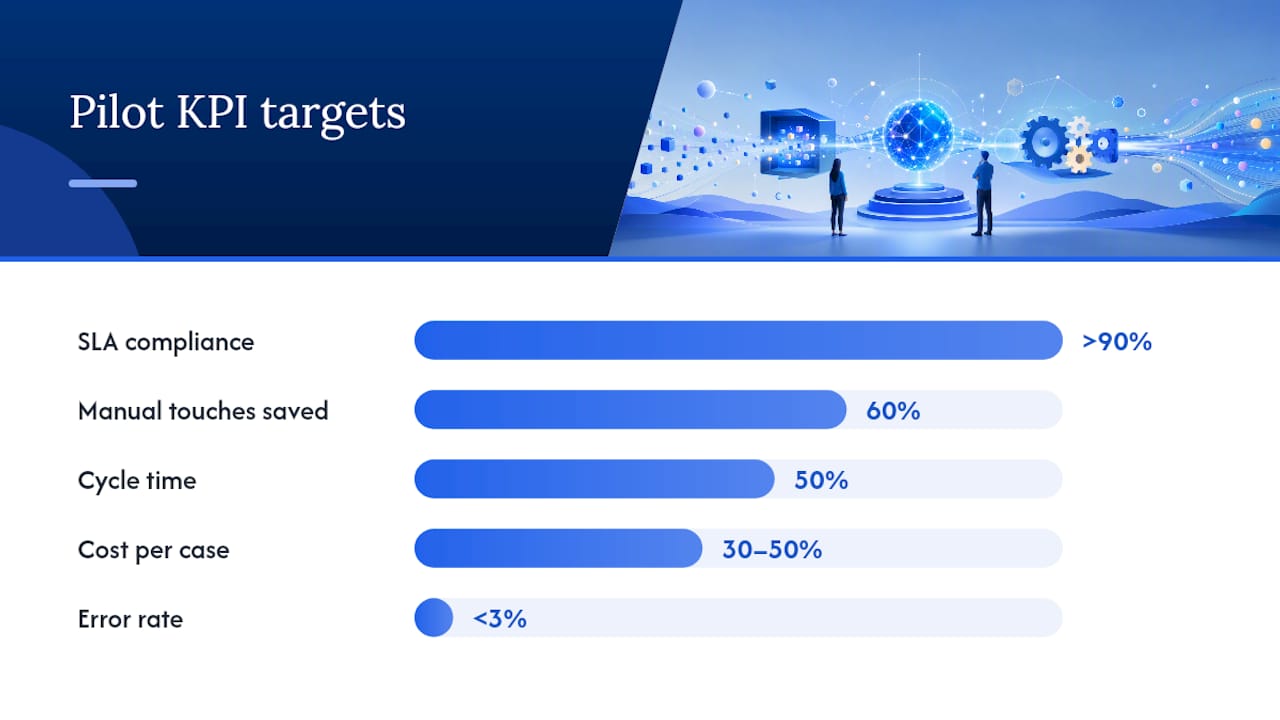
Track these KPIs from day one of the pilot. Baseline them before deployment; measure them weekly during the pilot run.
| KPI | Definition | Sample target threshold |
|---|---|---|
| Manual touches saved | Reduction in human interventions | 60% reduction vs. baseline |
| Cycle time | Average time from process start to completion | 50% reduction vs. baseline |
| Error rate | Incorrect outputs or routing decisions | Below 3% in production |
| SLA compliance | Percentage of cases resolved within defined SLA | Above 90% |
| Cost per case | Total operational cost divided by cases processed | 30–50% reduction vs. baseline |
| Model confidence / override rate | Percentage of decisions routed to human review | Low in steady state |
| Lead conversion rate | Qualified leads converted to booked appointments | Tracked against pre-automation baseline |
Simple ROI example: assume a team of four handles 2,000 invoice exceptions per month at a fully loaded cost of $8,000/month. If the remaining 600 require one FTE at $4,000/month, plus $1,500/month in platform costs, the net saving is $2,500/month. Annualized: $30,000. Against a pilot build cost of $40,000–$60,000, payback occurs in 16–24 months. Production scale typically compresses that payback further as volume grows without proportional cost increase.
For outreach automation and lead generation workflows, the ROI calculation anchors on cost per lead and conversion rate rather than exception handling, but the arithmetic is the same: measure the baseline, measure the delta, divide by the investment.
How do you evaluate vendors and avoid bad buys?
The vendor market for intelligent process automation ranges from point solutions to full-stack platforms. The evaluation criteria below apply regardless of category.
Vendor checklist:
- Integration breadth: how many native connectors does the platform offer, and what is the process for adding custom connectors?
- Governance features: does the platform provide audit trails, RBAC, model versioning, and confidence-threshold configuration out of the box?
- Observability: can you monitor model decisions, latency, error rates, and override rates in a single dashboard?
- Security certifications: SOC 2 Type II, HIPAA-readiness, and TCPA compliance support are baseline requirements for regulated industries.
- SLA and support: what uptime guarantees does the vendor offer, and what is the escalation path for production incidents?
- Onboarding support: does the vendor provide done-for-you setup, or does deployment require significant internal engineering?
- Customization vs. configuration: how much of the platform is configurable without code, and where does customization require engineering resources?
Red flags:
- No audit trail or logging of model decisions
- Weak integration story (few native connectors, no iPaaS support)
- No human-in-the-loop support or confidence threshold configuration
- Claims of full autonomy without governance controls
- No rollback capability for model or workflow changes
Procurement questions to ask:
- How does your platform handle connector failures mid-workflow?
- What is the process for rolling back a model version in production?
- How do you support model lineage and audit log retention for compliance purposes?
- Does your governance layer support policy-as-code or compliance rule enforcement?
- What does your human-review gate configuration look like, and can it be adjusted per process?
Sales AI integration best practices for revenue teams consistently identify integration breadth and governance depth as the two criteria that separate platforms that scale from those that stall after the pilot. A vendor with 600+ CRM and platform integrations and built-in compliance support (TCPA, SOC 2, HIPAA-ready) covers both. An AI ROI analysis across agency deployments found 3.2x returns where governance and integration were treated as first-class requirements from the start.
What operations leaders actually learn from deploying AI automation
The lesson most teams learn too late: AI does not improve a broken process. It accelerates it. The organizations that see durable gains from intelligent process automation are the ones that redesigned the workflow before they added the model.
A few hard-won observations:
- Start small, measure everything. A pilot on one process with clear KPIs generates more organizational learning than a broad deployment with vague success criteria.
- Model governance is not a phase two task. Teams that defer audit trails, RBAC, and confidence thresholds until after launch spend months retrofitting controls that should have been structural from day one.
- Pair AI with redesigned workflows. The efficiency gain comes from removing handoffs, not from automating them. Map the process, cut the unnecessary steps, then automate what remains.
- Build cross-functional teams early. A deployment owned entirely by IT or entirely by operations rarely succeeds. The process owner, the data engineer, and the compliance lead all need a seat at the table from discovery onward.
- Over-automation is a real failure mode. Automating decisions that require human judgment, without adequate review gates, creates liability and erodes trust in the system. The goal is augmentation, not replacement, for high-stakes decisions.
- Skipping measurement is the most common adoption pitfall. Without a baseline and a defined success metric, there is no way to know whether the pilot worked, and no evidence to justify the production investment.
Deloitte’s enterprise AI research confirms the organizational pattern: companies that scale AI successfully create dedicated roles for AI operations and human-AI interaction. That is not a luxury. It is the structural requirement for sustaining what the pilot proved.
Mediabloom delivers AI orchestration for lead generation and appointments
For revenue teams that need AI process automation applied directly to pipeline growth, Mediabloom operates the full orchestration stack: AI voice agents (inbound and outbound), AI chatbots, multi-channel automation across voice, SMS, email, and chat, lead qualification and scoring, appointment booking, and CRM integrations with 600+ platforms. Compliance is built in: TCPA, SOC 2, and HIPAA-ready configurations are available for regulated industries.
The platform handles the entire lead-to-appointment workflow autonomously, with human handoff gates configured to your qualification thresholds. Clients including Miracle Ear and 1-800 Accountant have deployed Mediabloom to generate over 10,000 qualified leads per month without proportional headcount growth. The done-for-you setup and onboarding model means your team does not carry the integration engineering burden.
To see the orchestration in action, watch an AI voice agent demo or review the appointment-setting case studies to evaluate real deployment outcomes before committing to a pilot.
Sources
- Gartner says 30 percent of enterprises will automate more than half of their network activities by 2026
- The definitive guide to AI in business process automation in 2026: Trends, challenges, and the future of work | Moxo
- AI Business Process Automation Guide for 2026 | AGIX Technologies
FAQ
What is AI for process automation in plain terms?
It is the use of AI components (ML, LLMs, agents, and orchestration) to interpret, route, decide, and act across multi-step business workflows, handling the variation and judgment that rule-based automation cannot. The industry term is intelligent process automation (IPA).
How is intelligent process automation different from RPA?
RPA executes deterministic, rule-based tasks on stable UIs. Intelligent process automation adds interpretation: ML classifies ambiguous inputs, LLMs extract meaning from unstructured text, and an orchestration layer coordinates decisions across systems. RPA is a component within IPA, not a substitute for it.
What efficiency gains should a pilot realistically target?
Cycle time and error rate are the most reliable pilot metrics; cost per case and SLA adherence confirm production-scale value.
What governance controls are non-negotiable for production deployment?
Audit trails for every model decision, role-based access control, confidence thresholds with human-review gates, and model versioning with rollback capability. Moxo’s governance guidance identifies these as the controls that separate low-risk production deployments from ad hoc automations.
How does Mediabloom apply AI process automation for lead generation?
Mediabloom deploys AI voice agents, chatbots, and omnichannel orchestration to qualify leads, score them against ICP criteria, and book appointments automatically across voice, SMS, email, and chat, with CRM integrations to 600+ platforms and built-in TCPA and SOC 2 compliance.