A sales qualified lead (SQL) is a prospect who has been vetted against your ideal customer profile (ICP) and is showing clear buying intent — ready for direct sales outreach right now. Not “someday maybe.” Now. Two examples make this concrete:
Example 1: A VP of Operations at a mid-sized SaaS company submits a demo request, confirms a Q3 budget window, and names herself as the purchase decision-maker. Example 2: A procurement manager at a target-account manufacturer visits your pricing page multiple times within a short period, then downloads your ROI calculator.
Both prospects meet fit criteria and have signaled intent through high-touch actions. That combination is what separates an SQL from every earlier stage in the funnel.
TL;DR checklist — three gates every SQL must clear:
- Fit: The prospect matches your ICP (company size, industry, role, tech stack).
- Intent: They have taken a concrete buying action (demo request, pricing inquiry, trial signup).
- Route: They are assigned to a rep with a defined SLA and a complete lead record.
Table of Contents
- Where does a sales qualified lead fit in the lead lifecycle?
- How do MQL, SAL, and SQL actually differ?
- What criteria actually qualify a lead as an SQL?
- How do you qualify and hand off leads in practice?
- How does automation improve SQL verification and speed?
- What metrics should you track for SQLs?
- What mistakes undermine SQL quality — and how do you fix them?
- SQL templates: scoring rubric, checklist, and verification script
- Key Takeaways
- The case for treating SQL qualification as a revenue system, not a label
- How Mediabloom cuts time-to-SQL and automates routing
- Useful sources and further reading
- FAQ
Where does a sales qualified lead fit in the lead lifecycle?
Every lead starts as a raw contact. Most never become revenue. The lifecycle below shows how qualification filters the funnel at each stage and who owns the record at each gate.
The standard flow:
- Lead (raw contact): Name and email captured via form, ad, or event. Marketing owns it.
- MQL (Marketing Qualified Lead): Lead meets basic fit criteria and has engaged enough to warrant nurture. Marketing owns it and continues scoring.
- SAL (Sales Accepted Lead): An optional but valuable formal handoff stage. Sales reviews the record and either accepts it for follow-up or rejects it with a reason code. Ownership transfers to sales during this window.
- SQL: Sales confirms the prospect is ready for a direct conversation. Sales owns it fully.
- Opportunity: A deal is created in the CRM. The rep is working toward a close.
- Closed/Won or Lost: The pipeline stage resolves.
The critical distinction between lead scoring and the SQL gate is this: scoring ranks leads by engagement; the gate makes a binary yes/no decision about whether a lead goes to a rep today. A lead can score 85 points and still fail the SQL gate if no buying intent signal is present. Lead qualification should answer two questions — does this look like accounts you win, and are they buying now?
Ownership and routing rules at a glance:
| Stage | Owner | Routing trigger |
|---|---|---|
| Lead → MQL | Marketing | Score threshold + fit match |
| MQL → SAL | Marketing submits / Sales reviews | Formal handoff notification |
| SAL → SQL | Sales | Acceptance within SLA window |
| SQL → Opportunity | Sales rep | Discovery call confirms deal potential |
| Opportunity → Close | Account Executive | Proposal, negotiation, contract |
How do MQL, SAL, and SQL actually differ?
The confusion between MQL and SQL costs revenue teams real pipeline. Leads get routed too early, reps waste time on unqualified contacts, and marketing gets blamed for “bad leads” that were never SQLs to begin with.
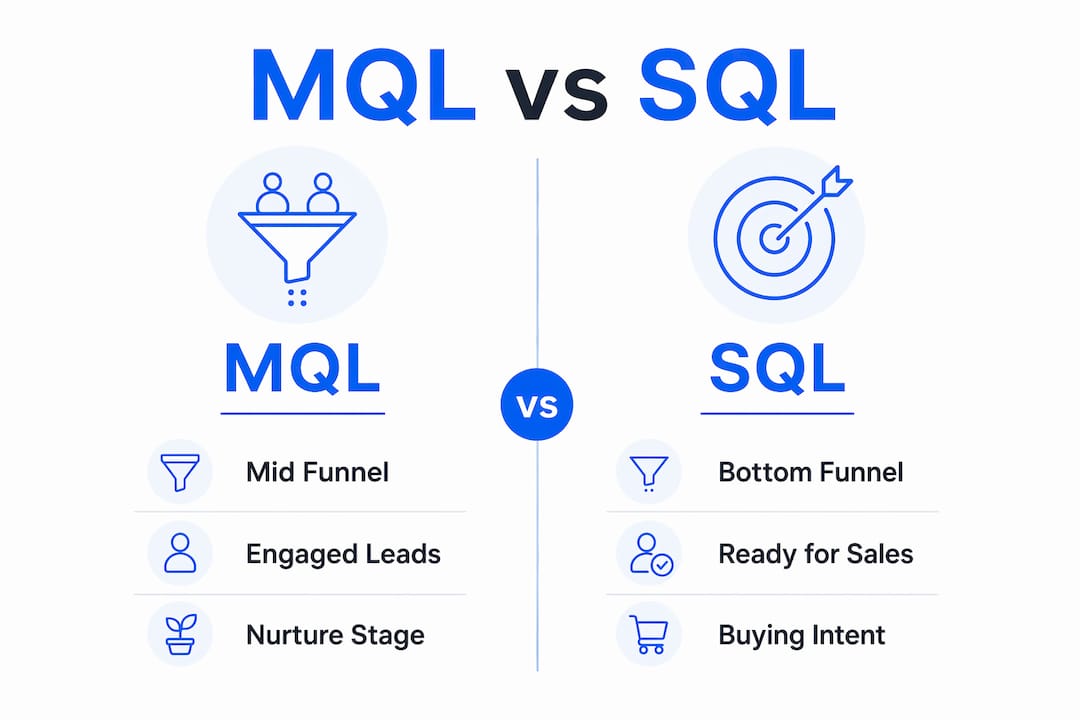
The table below shows the practical differences across five dimensions:
| Dimension | MQL | SAL | SQL |
|---|---|---|---|
| Stage in funnel | Mid-funnel, nurture | Handoff gate | Bottom-funnel, sales-ready |
| Who acts | Marketing | Sales reviews | Sales rep engages |
| Readiness signals | Content downloads, webinar attendance, email opens | Meets minimum fit criteria | Demo request, pricing inquiry, trial signup, named budget/timeline |
| Typical next action | Nurture sequence, retargeting | Accept or reject within SLA | Discovery call, demo, proposal |
| Routing priority | Low to medium | Pending | High — contact within SLA |
According to Zendesk, an SQL is distinguished from an MQL by readiness for a direct sales conversation. MQLs are in research or education mode; SQLs have crossed into active buying behavior.
Actions that typically promote a lead from MQL to SQL:
- Requesting a live product demo or a personalized walkthrough
- Visiting the pricing page multiple times within a short window
- Starting a free trial and completing a core workflow
- Responding to a nurture email with a specific question about implementation or pricing
- Booking a call directly through a scheduling link
A note on SAL: Not every team uses the SAL stage formally, but it pays off when sales and marketing are misaligned on what “qualified” means. The SAL window forces sales to make an explicit accept/reject decision rather than letting leads sit untouched. Every rejection logged with a reason code gives marketing the data it needs to refine targeting.
What criteria actually qualify a lead as an SQL?
The Salesforce definition frames SQL criteria around two categories: fit (does the prospect resemble accounts you win?) and intent (are they ready to buy now?). Both must be present.
Fit signals (ICP match):
- Company size falls within your target range
- Industry or vertical matches your addressable market
- The contact holds a title with purchase authority or influence (VP, Director, Manager, Owner)
- Tech stack signals compatibility (e.g., they use Salesforce or HubSpot, which your product integrates with)
- Geography and compliance requirements align with your offering
Intent signals:
- Submitted a demo request or booked a meeting directly
- Visited the pricing page, especially multiple times
- Signed up for a free trial and activated a key feature
- Asked a specific question about implementation, contract terms, or onboarding
- Explicitly stated a buying timeline or budget in a form field or conversation
Behavioral signals like product demos or usage workflows are stronger SQL indicators than one-off content downloads. A whitepaper download is curiosity; a pricing-page visit followed by a trial signup is intent.
B.A.N.T. applied selectively:
B.A.N.T. (Budget, Authority, Need, Timing) remains a useful framework, but treat it as a verification tool, not a rigid checklist. Confirm budget range and decision-making authority early in the first outreach call rather than requiring it before routing. Blocking a high-intent lead because budget is unconfirmed is a common and costly mistake.
Verification questions for the first outreach:
- “What’s driving the interest in solving this now?”
- “Who else is involved in evaluating solutions like ours?”
- “What does your timeline look like for making a decision?”
- “Do you have a budget range allocated for this?”
Pro Tip: Build your SQL gate from closed-won data. Pull the last 20 deals you won and identify the three or four signals they all had in common before the first sales call. Those signals become your gate criteria.

How do you qualify and hand off leads in practice?
A qualification process that lives only in someone’s head breaks the moment that person is out sick. Document it, automate the repetitive parts, and give every rep the same minimum data set before they pick up the phone.
Step-by-step handoff process:
- Enrich the record. Before routing, auto-enrich the lead with company size, industry, and tech stack data using tools like Clay, Clearbit, or Apollo. Reps should not waste the first call gathering information a tool can pull in seconds.
- Score against fit criteria. Apply your lead-scoring model to confirm the prospect meets ICP thresholds. Score is an input, not the decision.
- Check intent signals. Verify that at least one high-intent behavior is present (demo request, pricing visit, trial activation). If none exists, return the lead to nurture.
- Route to the SAL queue. Notify the assigned rep or SDR via CRM task and email. Include the full lead record with all required fields populated.
- Accept or reject within the SLA window. Sales has a defined window (commonly 4–8 business hours) to accept the lead or reject it with a reason code.
- Log the outcome. Whether accepted or rejected, the decision and its reason go into the CRM. Rejection codes feed back to marketing for ICP refinement.
SLA example (minimum viable):
- Notification: Immediate, via CRM task + email alert
- Acceptance window: a few business hours
- Required fields before routing: company name, contact title, intent signal, company size, source
- Rejection reason codes: Wrong ICP, No budget, No authority, Timing not right, Duplicate record
SmartBug Media notes that before adding complex scoring, teams should document the handoff process and required lead information to ensure quick action. Routing rules and required lead fields are often simpler and lower-maintenance than elaborate scoring models.
For teams ready to automate this process, AI lead capture setup guides cover how to configure routing rules and notifications without building a custom integration from scratch. The lead response management process from The Lead Lab also provides practical SLA templates teams can adapt directly.
How does automation improve SQL verification and speed?
Speed is not a nice-to-have in lead qualification. The faster a rep contacts a high-intent prospect, the higher the probability of conversion. Mediabloom’s approach centers on sub-60-second response for inbound leads, and the operational case for that standard is well-established across B2B sales.
Where automation belongs:
- Enrichment: Auto-populate company size, industry, and tech stack the moment a form is submitted. No rep should open a blank record.
- Scoring: Apply fit and intent rules automatically as behavior data arrives. Flag records that cross the SQL threshold without waiting for a manual review.
- Routing: Assign the lead to the correct rep or team based on territory, vertical, or product line. Trigger the CRM task and notification instantly.
- Initial outreach: AI voice agents or chatbots in the sales pipeline can make first contact within seconds of a form submission, confirm basic fit criteria, and book a discovery call before a human rep is even available.
Where human vetting is still required:
Automation handles volume and speed. It cannot replace the judgment call a rep makes when a prospect’s answers reveal a misaligned use case, a budget that does not fit, or a timeline that is 18 months out. The Zendesk guidance is clear: a lead remains a high-intent prospect until a rep confirms status. Qualification is a filtering process, not just an automated label.
Implementation tips:
- Start with one automation: instant routing notification. Measure time-to-first-contact before and after.
- Add enrichment next. Track how often reps reject leads due to missing data — that number should drop.
- Build feedback loops. Every rejection reason code should trigger a review of the lead source that produced it.
Pro Tip: For financial services teams, speed-to-lead AI can cut time-to-first-contact from hours to under a minute — a difference that compounds across hundreds of inbound leads per month.
Mediabloom’s clients, including Miracle Ear and 1-800 Accountant, have used this approach to generate thousands of monthly leads with automated routing and qualification built into the intake flow.
What metrics should you track for SQLs?
Tracking the right metrics turns SQL qualification from a gut-feel process into a measurable revenue function. These are the numbers that matter.

Core SQL metrics:
| Metric | What it measures | Why it matters |
|---|---|---|
| SQL-to-opportunity rate | % of SQLs that become active deals | Indicates quality of the SQL gate |
| SQL-to-close rate | % of SQLs that result in closed-won | Measures end-to-end qualification accuracy |
| Time-to-first-contact | Minutes/hours from SQL creation to rep outreach | Directly affects conversion probability |
| Cost per SQL | Total marketing spend ÷ number of SQLs | Benchmarks efficiency of lead generation |
| Speed-to-lead | Time from form submission to first contact | Tracks automation and routing performance |
| Rejection rate by source | % of SQLs rejected, broken out by lead source | Identifies which channels produce poor-fit leads |
A simple pipeline value estimate:
To calculate the expected pipeline value of a single SQL, use this formula:
Expected pipeline value per SQL = Average deal size × SQL-to-close rate
Example: If your average deal size and SQL-to-close rate are known, you can estimate the expected pipeline value per SQL. Tracking cost per SQL alongside this figure helps measure ROI. The return on each qualified lead is substantial — and tracking that ratio tells you exactly how much you can afford to spend acquiring more of them.
Industry benchmarks for cost per qualified lead vary significantly by sector, so use your own closed-won data to set internal targets rather than relying on cross-industry averages as absolutes.
Metric that demands a fast feedback loop: Rejection rate by source. If sales is rejecting 40% of SQLs from a specific channel, marketing is wasting budget on that channel. Rejection reason codes make this visible within days, not quarters.
What mistakes undermine SQL quality — and how do you fix them?
The most common qualification failure is conflating engagement volume with buying intent. A prospect who has opened six emails and attended two webinars is engaged. They are not necessarily an SQL. Clay’s lead qualification guide identifies this as the primary cause of friction between sales and marketing: no shared, agreed-upon definition of “qualified” derived from closed-won data.
Top mistakes to eliminate:
- Treating any engagement as intent (downloads, opens, page views without high-intent actions)
- Routing leads to sales without a confirmed fit signal (wrong ICP, wrong title, wrong company size)
- Skipping the SAL stage so rejections go unlogged and unanalyzed
- Defining the SQL gate informally, in someone’s head, with no documentation
- Never updating the gate criteria as the ICP evolves
Do’s and don’ts for maintaining the SQL gate:
- Do build the gate from closed-won data and review it quarterly.
- Do require rejection reason codes for every SAL that sales declines.
- Don’t let the gate expand to include leads that “feel close” without meeting criteria.
- Don’t skip the minimum data set requirement — incomplete records slow reps and inflate rejection rates.
A minimal sales-marketing alignment agenda (monthly, 30 minutes):
- Review SQL volume and rejection rate by source (5 minutes)
- Audit the top three rejection reason codes and identify the lead-gen change needed (10 minutes)
- Confirm ICP criteria are still accurate based on recent closed-won and closed-lost data (10 minutes)
- Agree on one adjustment to the gate or scoring model for the next 30 days (5 minutes)
Red flags that your SQL definition is failing:
- Sales is rejecting a significant portion of routed leads
- Reps are creating their own informal filters before working a lead
- Marketing and sales disagree on which leads “count” as qualified
- Time-to-close for SQLs is trending longer without a clear cause
For a practical B2B perspective on defining qualified leads, The Lead Lab’s B2B guide covers how to align qualification criteria with LinkedIn prospecting and outbound workflows.
SQL templates: scoring rubric, checklist, and verification script
These artifacts are designed to be copied directly into your CRM or used in SDR training. Adapt the point values to your business.
Lead-scoring rubric (fit + intent):
| Criterion | Signal | Points |
|---|---|---|
| Company size match | Within ICP range | 20 |
| Industry match | Target vertical | — |
| Title/role match | Decision-maker or influencer | 20 |
| Tech stack match | Uses compatible tools | 10 |
| Demo request | Submitted demo form | 30 |
| Pricing page visit | Multiple visits within a short period | 20 |
| Trial activation | Completed core workflow | 25 |
| Explicit timeline | Stated buying window | — |
| SQL threshold | Pass gate at: | ≥ 75 points |
A lead that scores 75 or above AND has at least one intent signal (demo, pricing, trial) passes the SQL gate. Fit-only leads above 75 points go back to nurture until an intent signal appears.
SQL gating checklist (CRM fieldset):
- Company name and size confirmed
- Contact title verified as decision-maker or influencer
- At least one high-intent action logged (demo, pricing, trial)
- Budget range confirmed or flagged for first-call verification
- Buying timeline stated or flagged for first-call verification
- Lead source and campaign recorded
- Enrichment data populated (industry, tech stack, employee count)
5-question SDR verification script:
- “What prompted you to reach out / request a demo today?”
- “What problem are you trying to solve, and how urgent is it?”
- “Who else on your team would be involved in evaluating a solution like ours?”
- “Do you have a budget set aside for this, or is that still being determined?”
- “What does your timeline look like — are you looking to have something in place by a specific date?”
These five questions confirm need, authority, budget, and timing without sounding like an interrogation. Tools like LinkedIn Sales Navigator can pre-populate authority and company data before the call, so reps spend the conversation on intent and timing rather than basic firmographic research.
Key Takeaways
A sales qualified lead requires confirmed fit against your ICP and at least one concrete buying-intent signal before it is routed to a rep — scoring alone is never sufficient to make that call.
| Point | Details |
|---|---|
| SQL = fit + intent | A prospect must match your ICP and show a concrete buying signal (demo, pricing, trial) to qualify. |
| Gate beats score | Lead scoring ranks leads; the SQL gate makes the binary routing decision. Both are needed. |
| SLA and rejection codes | Define an acceptance window and require rejection reason codes to create a marketing feedback loop. |
| Track cost per SQL | Divide total marketing spend by SQLs generated; multiply by close rate to estimate pipeline value per lead. |
| Mediabloom accelerates routing | Mediabloom’s AI platform automates enrichment, scoring, and routing to reduce time-to-first-contact to under 60 seconds. |
The case for treating SQL qualification as a revenue system, not a label
The conventional wisdom treats SQL status as a milestone — a badge a lead earns when it hits a score threshold. That framing misses the point. An SQL is not a label; it is a decision with a cost attached. Every lead you route to sales that does not belong there costs a rep time, erodes trust between teams, and inflates your cost per SQL. Every lead you hold in nurture that should have been routed costs you pipeline and, eventually, the deal.
The teams that get this right treat the SQL gate as a living system. They build it from closed-won data, instrument it with rejection codes, and review it monthly. They do not set it once and forget it. When the ICP shifts — because the market shifts, because the product expands, because a new segment starts converting — the gate shifts with it.
Speed matters more than most teams admit. The difference between contacting a high-intent prospect within five minutes versus five hours is not marginal. It is often the difference between a booked meeting and a lost lead who found a competitor first. Automation does not replace the rep’s judgment in that conversation, but it gets the rep there while the prospect’s intent is still hot.
The pilot approach works: pick one lead source, define the gate criteria for it, set a 30-day SLA experiment, and measure rejection rate and SQL-to-opportunity rate before and after. The data from that pilot will tell you more about your qualification process than any industry benchmark.
How Mediabloom cuts time-to-SQL and automates routing
Most revenue teams lose qualified leads not because the leads are bad, but because the response is slow. A prospect who requests a demo at 2 PM on a Tuesday and hears back the next morning has already moved on mentally — or found a competitor.
Mediabloom’s AI platform is built to close that gap. Voice agents and chatbots make first contact within seconds of a form submission, confirm basic fit criteria, and book discovery calls automatically — before a human rep is available. Enrichment runs in the background, so when the rep does engage, the record is complete.
Two use cases show the impact directly. For a high-volume inbound operation like Miracle Ear, automated routing and qualification handled over 10,000 monthly leads without adding headcount. For a real estate team, AI speed-to-lead reduced time-to-first-contact from hours to under a minute, increasing the percentage of inbound leads that converted to booked appointments. The case studies detail the mechanics and outcomes across verticals.
If your team is ready to see the system in action, watch the AI voice agent demo to understand how automated qualification and routing work end-to-end.
Useful sources and further reading
These sources cover the definition, qualification criteria, handoff mechanics, and implementation guidance referenced throughout this article.
- Sales Qualified Lead (SQL) — Gartner: Authoritative glossary definition from Gartner; useful for establishing the standard industry term.
- What Is a Sales Qualified Lead (SQL)? — Salesforce: Covers fit and intent criteria, B.A.N.T. framework application, and what distinguishes an SQL from earlier funnel stages.
- Sales Qualified Lead (SQL) definition — TechTarget: Detailed definition with common qualification signals including demo requests and pricing-page visits.
- The Complete Guide to Lead Qualification — Clay: Explains the gate vs. score concept and why a shared ICP definition reduces sales-marketing friction.
- What Is a Sales Qualified Lead (SQL)? — Zendesk: Covers MQL vs. SQL differences and the role of human verification in the qualification process.
- What Is a Sales Qualified Lead (SQL)? — CUFinder: Practical guidance on SAL stage mechanics, acceptance windows, and rejection reason codes.
- Handing Leads Off to Sales — SmartBug Media: SLA templates and required lead fields for a documented handoff process.
- MQL vs. SQL — Amplitude: Signal hierarchy and examples of high-intent behavioral triggers for SQL classification.
- What Is a Sales-Qualified Lead (SQL)? — LinkedIn Business: Concrete examples and verification questions for operationalizing the SQL definition.
- Average Cost Per Qualified Lead — Focus Digital: Industry benchmarks for cost per qualified lead; useful as a starting point for ROI calculations.
- AI Lead Generation and Appointment Setting — Mediabloom: Mediabloom’s platform overview covering speed-to-lead, enrichment, and automated routing for SQL verification.
FAQ
What is an example of a sales qualified lead?
A VP of Operations at a mid-sized manufacturing company who submits a demo request, confirms a budget window, and names herself as the decision-maker is a textbook SQL. She meets ICP fit criteria and has taken a high-intent action that signals active buying.
What is the difference between an MQL and an SQL?
An MQL (Marketing Qualified Lead) has engaged enough to warrant nurture but is still in research mode. An SQL is ready for a direct sales conversation, confirmed by a concrete buying signal like a demo request, pricing inquiry, or trial activation.
How much is a qualified lead worth?
Multiply your average deal size by your SQL-to-close rate to estimate expected pipeline value per SQL. Track cost per SQL alongside this figure to measure ROI.
What is the difference between a lead and a qualified lead?
A raw lead is any contact captured through a form, ad, or event — no fit or intent confirmed. A qualified lead has been vetted against ICP criteria and shows at least one buying-intent signal, making it worth a rep’s time to engage directly.
Does Mediabloom help with SQL routing and verification?
Yes. Mediabloom’s platform automates enrichment, scoring, and routing so leads are contacted within seconds of a form submission. AI voice agents confirm basic fit criteria and book discovery calls automatically, reducing time-to-first-contact and increasing SQL conversion rates.