Conversational Appointment Booking: A Decision-Maker’s Guide
Conversational appointment booking is an AI-driven scheduling experience that lets customers book, reschedule, or cancel appointments through natural language across voice, chat, and SMS — and writes the result directly to live calendars and CRMs. If your team loses leads after hours, burns staff time on phone tag, or watches prospects drop off a static booking form, this is the operational lever worth understanding.
TL;DR:
- Business value: Automated scheduling can recover a large portion of scheduling time and deliver a noticeable lift in booking conversion for revenue teams.
- Technical requirement: Real-time, two-way calendar and CRM integration is non-negotiable. Single-direction sync creates double-bookings and extra staff work.
- Risk control: Design for 80% automation with an explicit human fallback for the remaining 20%. Pair that with TCPA consent controls for voice and SMS, and HIPAA-ready data handling for healthcare.
This guide is built for appointment-driven teams: sales organizations running demo pipelines, healthcare clinics managing patient intake, home-services companies capturing after-hours leads, and professional services firms handling new-client intake. Mediabloom deploys this exact model for clients across these verticals, with compliance readiness across TCPA, SOC 2, and HIPAA-ready environments.
Table of Contents
- What Is Conversational Appointment Booking, and How Does It Work?
- What business benefits and use cases justify the investment?
- What do you need in place before you start?
- How do you set up conversational booking step by step?
- How should you configure prompts and calendar rules to maximize bookings?
- What are the most common implementation pitfalls, and how do you avoid them?
- How do you measure whether conversational booking is working?
- What U.S. privacy and compliance requirements apply?
- What do real deployments look like? Case studies and outcomes
- How do you evaluate and select the right solution?
- Key Takeaways
- The soft side of conversational booking is where most projects win or lose
- Mediabloom deploys conversational booking for appointment-driven businesses
- Useful sources and further reading
- FAQ
What Is Conversational Appointment Booking, and How Does It Work?
Conversational booking is an approach where users schedule through natural language rather than navigating a calendar grid or filling out a form. The interaction happens wherever the customer already is: a website chat widget, an SMS thread, a phone call, or a messaging app. The AI handles the back-and-forth, checks live availability, and confirms the slot, all without a human receptionist in the loop.

Modern systems use large language models (LLMs) to understand context and intent, not just keyword matching. Conversational AI powered by LLMs can interpret vague requests like “sometime Thursday afternoon” or “after 3 PM next week” and translate them into specific slot proposals. That capability is what separates today’s tools from the rule-based chatbots of five years ago.
The end-to-end flow
The orchestration behind a single booking involves several coordinated layers:
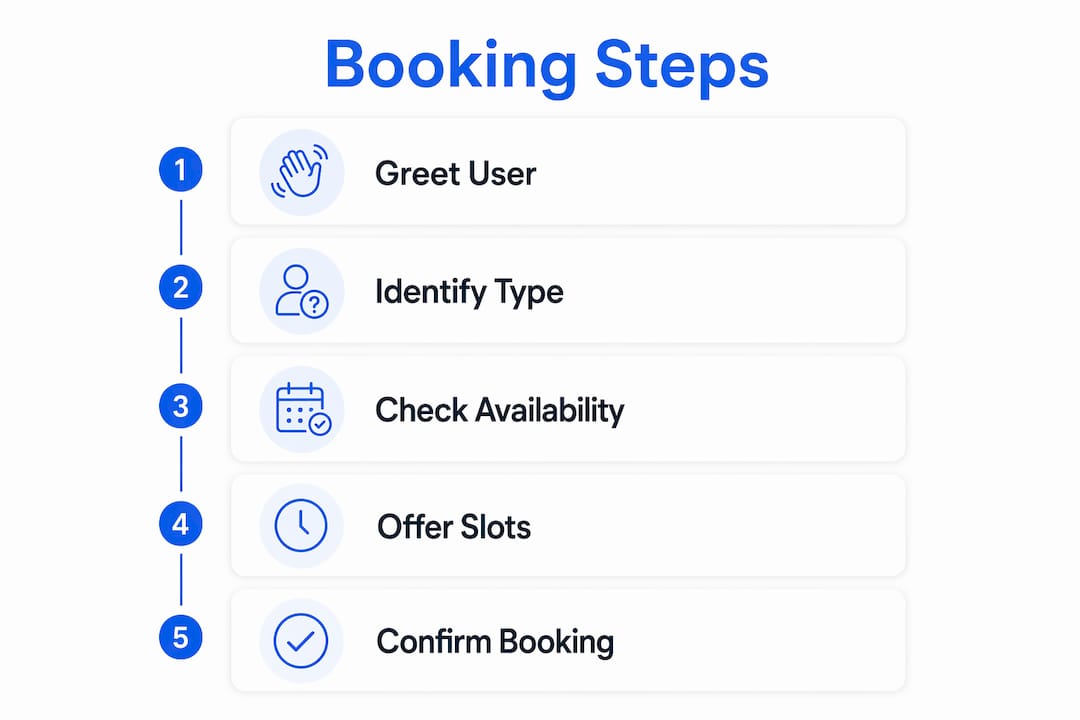
- Intent capture: The user expresses a need (“I’d like to schedule a consultation”) via voice, chat, or SMS.
- Intent classification and slot-filling: The NLU/LLM layer identifies the appointment type, extracts relevant details (service, provider preference, location), and flags any missing fields.
- Availability check: The calendar connector queries live free/busy data across one or more provider calendars, applying business rules (buffer times, durations, approval gates).
- Slot presentation and selection: The system surfaces 3–5 options in natural language and waits for confirmation.
- Booking confirmation: The confirmed slot is written to the calendar, a calendar invite is sent to both parties, and the CRM or EHR record is updated.
- Reminders and follow-up: The notification engine sends confirmation emails, SMS reminders, and pre-appointment intake links on a configured schedule.
- Human escalation: If the conversation hits an edge case (complex multi-party scheduling, clinical triage, payment disputes), the system routes to a live agent with full conversation context.
Channel differences that matter operationally
Voice, web chat, and SMS each behave differently. Voice requires lower latency and cannot display a visual slot picker, so the AI must read options aloud and handle spoken confirmations. Web chat supports buttons and quick-reply chips, which reduce friction and lift completion rates. SMS is asynchronous and character-constrained, so prompts must be shorter and confirmations simpler.

Integration architecture matters just as much as channel choice. Two-way, near-real-time sync with your CRM or EHR is the foundation. Systems that sit outside core records create double-entry, conflicts, and extra work for staff — the exact problems you are trying to eliminate.
Pro Tip: Design your escalation rules before you configure anything else. Define the specific triggers (unrecognized intent, payment questions, clinical triage flags) that hand off to a human, and make sure the handoff carries full conversation context. A clean escalation path is what keeps customer satisfaction high when the AI reaches its limits.
What business benefits and use cases justify the investment?
The operational case for automated appointment scheduling comes down to four measurable outcomes: faster response, higher conversion, reduced labor, and extended coverage.
- Speed to lead: AI scheduling can reduce response latency from a median of roughly 4 hours 18 minutes (typical human response) to under 90 seconds for inbound requests. In B2B sales, that gap directly affects whether a prospect books with you or a competitor.
- Higher booking conversion: A well-sequenced booking conversation produces 70%+ completion rates when it greets quickly, qualifies with one question, presents 3–5 live slots, and collects contact details after time selection.
- Reduced front-desk labor: Automating routine scheduling frees staff for higher-value interactions — clinical assessments, complex sales conversations, and exception handling.
- 24/7 capture: After-hours and weekend inbound requests are handled without staffing costs. For home-services companies, this is often where the highest-intent leads arrive.
Industry use cases
Healthcare clinics: Patient scheduling requires HIPAA-ready conversational AI integrated with practice management or EHR systems so bookings appear in the clinical record and respect triage and intake rules. A front-desk AI that books a patient but fails to write to the EHR creates a dangerous gap. Mediabloom’s healthcare chatbot solution is built with this integration requirement as a baseline.
B2B inbound sales: The highest-ROI use case is automated handling of inbound meeting requests where the AI reads context from prior touchpoints, negotiates availability, and drops a confirmed meeting on an account executive’s calendar. No back-and-forth email chains, no scheduling links that expire.
Home services: After-hours capture is the primary driver. A homeowner searching for an HVAC repair at 9 PM will book with whoever responds first. Mediabloom’s home-services AI handles exactly this scenario, qualifying the lead and confirming the appointment before a competitor’s voicemail even picks up.
Professional services intake: Law firms, accounting practices, and financial advisors use conversational booking to qualify new clients during the intake conversation, collect required fields, and schedule the initial consultation — all before a human attorney or advisor is involved.
Scheduling time recovered through AI automation is significant. Booking conversion lift for revenue teams is meaningful. These are reported ranges across deployments, not single-point guarantees, but they represent the performance envelope decision-makers should use for ROI modeling.
What do you need in place before you start?
Skipping the prerequisites phase is the single most common reason conversational booking projects underdeliver. The technology works. The integration and operational readiness are where projects stall.
Technical prerequisites
- Real-time calendar read/write access: OAuth-based integration with Google Workspace or Microsoft 365 is the standard. The AI must read free/busy data and write confirmed bookings in the same transaction.
- CRM or EHR integration: Two-way sync so every booking creates or updates a record. For calendar integration across distributed teams, multi-calendar orchestration requires a clear conflict-resolution rule when two calendars show the same slot as available.
- Telephony or SMS gateway: For voice and text channels, you need a compliant gateway with TCPA opt-in and opt-out handling built in.
- Secure hosting and data controls: SOC 2 Type II certification for the platform vendor, HIPAA Business Associate Agreement (BAA) for healthcare deployments, and encrypted transmission for all PHI.
- Identity and timezone handling: The system must detect or ask for the user’s timezone and store it with the booking record. Daylight saving transitions are a known failure point.
Operational prerequisites
- Defined appointment types with durations, buffer times, and cancellation policies documented before configuration begins.
- Escalation paths mapped: who receives the handoff, through which channel, and what context transfers with it.
- A staff training plan that frames the AI as a tool that removes repetitive tasks, not a replacement for the team.
- Change management communications drafted for both staff and customers before go-live.
Data prerequisites
- Required intake fields identified and prioritized (only collect what is necessary before slot selection).
- TCPA opt-in consent capture configured for any voice or SMS outreach.
- Audit logging enabled from day one for compliance and debugging.
Pro Tip: Build your “must-have” list for IT and procurement sign-off before you evaluate vendors. If a vendor cannot provide a SOC 2 report, a BAA for healthcare use, and evidence of two-way calendar sync, remove them from consideration immediately. These are not negotiable items to revisit post-contract.
How do you set up conversational booking step by step?
A phased rollout reduces risk and gives you clean data for the go/no-go decision before full deployment.
- Define minimum viable scope. Choose one channel (web chat is lowest friction to start), two to three appointment types, and three KPIs for the pilot: booking conversion rate, response latency, and human escalation rate.
- Map appointment types to calendar pools. Assign each appointment type to the correct provider group, duration, and buffer rules. Document which calendar owns each type.
- Configure intake fields and business rules. Set required fields per appointment type, approval gates (if any), and timezone defaults. Connect your CRM or EHR and verify write-through with a test record.
- Build confirmation and reminder templates. Draft confirmation messages for each channel (email, SMS, voice readback). Include reschedule and cancel links. Set reminder timing (24 hours and 2 hours before is a common default).
- Run the testing checklist:
- Connectivity test: confirm the calendar connector reads and writes correctly.
- Double-booking simulation: attempt to book the same slot simultaneously from two sessions.
- Timezone and daylight-saving check: test bookings across at least two U.S. time zones.
- Multi-party scheduling test: verify that all required attendees are blocked.
- Escalation test: trigger each defined escalation condition and confirm the handoff works.
- Confirmation and reminder test: verify all notification templates fire on schedule.
- Soft-launch to a subset of inbound traffic. Route 20–30% of inbound requests through the AI while the rest go to your existing process. Compare KPIs weekly.
- Iterate and expand. Use front-desk and staff feedback to refine prompts and escalation rules. Add channels and appointment types in phases once the pilot KPIs hit target.
Pro Tip: Keep the pilot to one channel and two appointment types for the first 30 days. A narrow scope gives you clean signal on what is working. Expanding too fast before the prompts and calendar rules are tuned produces noisy data and frustrated staff.
How should you configure prompts and calendar rules to maximize bookings?
The difference between a 45% completion rate and a 70%+ completion rate usually comes down to prompt design and calendar configuration, not the underlying AI model.
Prompt design rules
- Ask only what you need before showing slots. Every additional question before time selection increases drop-off. Collect service type and provider preference first, then show slots, then collect contact details.
- Limit slot options to 3–5. More than five options creates decision fatigue. Fewer than three signals scarcity and may push users to call instead.
- Use natural language time expressions. “Tuesday at 2:00 PM Eastern” is clearer than “2026-06-09T14:00:00-05:00.” Confirm the timezone explicitly in the confirmation message.
- Confirm before writing. Always present a summary (“I have you down for Tuesday, June 10 at 2:00 PM Eastern with Dr. Chen — does that work?”) before writing to the calendar.
Calendar configuration rules
- Buffer times are mandatory. A 15-minute buffer between appointments prevents cascading delays. Configure this at the appointment-type level, not manually per booking.
- Cross-calendar blocking: If a provider has multiple calendars (personal, work, clinical), the system must check all of them before offering a slot. Time zone coordination across distributed teams adds another layer: always resolve to the provider’s local timezone when writing the event.
- Tentative vs. confirmed slots: Hold a slot as tentative for no more than 5 minutes during the conversation. If the user does not confirm, release it. Holding slots indefinitely causes phantom unavailability.
- Avoid double-booking with write-locking: The calendar write must be atomic. If two sessions attempt to book the same slot simultaneously, only one should succeed; the other should receive an alternative immediately.
Pro Tip: Voice prompts need to be shorter and more directive than text prompts. On voice, say “I have Tuesday at 2 PM or Wednesday at 10 AM — which works better?” rather than listing five options. Fewer choices, spoken clearly, produce faster confirmations and lower abandonment on phone channels.
What are the most common implementation pitfalls, and how do you avoid them?
Most conversational booking failures are predictable. Here are the ones that appear most often, and the fixes that work.
- Double-booking from unsynced calendars. Cause: single-direction sync or a polling interval that is too slow. Fix: require atomic write-through and real-time two-way sync as a vendor contract term. Test with simultaneous booking simulations before go-live.
- Poor prompt design that confuses users. Cause: prompts written like form labels (“Please select appointment type”) rather than natural conversation. Fix: write prompts as a receptionist would speak them, test with real users, and iterate based on escalation rate data.
- Over-automating complex bookings. Cause: trying to automate multi-provider, multi-location, or clinically complex scheduling in the first phase. Fix: start with your simplest, highest-volume appointment type. Reserve complex flows for phase two after the baseline is stable.
- Insufficient staff buy-in. Rollouts commonly fail on the soft side — staff resistance and integration gaps — rather than on raw AI capability. Fix: frame the AI as a tool that removes repetitive scheduling calls from staff workloads. Involve front-desk staff in prompt review and testing.
- Weak consent handling for voice and SMS. Cause: TCPA opt-in not captured or not documented before outbound contact. Fix: build consent capture into the intake flow, log it with a timestamp, and confirm opt-out processing works before launch. See the compliance section below for specifics.
- Common scheduling problems](https://www.qminder.com/blog/challenges-in-appointment-scheduling/) like high no-show rates are not solved by automation alone. Pair the booking system with automated reminders at 24 hours and 2 hours before the appointment to reduce no-shows measurably.
How do you measure whether conversational booking is working?
Vanity metrics like “conversations started” tell you nothing about business impact. Focus on these.
Primary KPIs
| KPI | What it measures | Target range |
|---|---|---|
| Booking conversion rate | Inbound interactions that result in a confirmed booking | Benchmark: 70%+ with optimized flow |
| Response latency | Time from first user message to confirmed booking | Target: under 90 seconds for automated flows |
| No-show rate | Confirmed bookings where the customer does not appear | Track week-over-week; reminders should reduce this |
| Bookings per staff-hour saved | Volume of bookings handled without human involvement | Baseline against pre-deployment manual volume |
| Revenue per available hour | Revenue generated per schedulable hour across providers | Tracks slot utilization improvement |
Operational KPIs
- Human escalation rate: Should decrease over time as prompts improve. A persistently high rate (above 30%) signals a prompt or integration problem.
- Error rate (failed conversations): Conversations that ended without a booking or escalation. Investigate these for NLU gaps.
- Calendar conflicts avoided: Measure double-booking incidents before and after deployment.
- Customer satisfaction scores: Post-booking survey (one question: “How easy was it to book?”) gives a clean signal.
Measure these weekly for the first 90 days. A/B test prompt variations and confirmation wording to find the highest-converting sequences. Attribution mapping (which channel and source drove each booking) is critical for understanding where to invest next.
What U.S. privacy and compliance requirements apply?
Compliance is not optional, and the requirements differ by channel and industry. Here is what U.S. businesses need to address before deployment.
- TCPA (Telephone Consumer Protection Act): Any automated voice call or SMS to a consumer requires prior express written consent. This applies to both outbound appointment reminders and inbound AI voice agents that call back. Document consent with a timestamp and the specific disclosure language used. Opt-out requests must be honored immediately and logged.
- HIPAA: Healthcare scheduling that involves protected health information (PHI) requires a signed BAA with every vendor in the data path. HIPAA-ready conversational scheduling means the AI platform, the calendar connector, and the CRM or EHR integration all operate under HIPAA controls. PHI must be encrypted in transit and at rest, and access must be role-limited.
- SOC 2 Type II: For non-healthcare deployments, SOC 2 Type II certification from the platform vendor is the baseline security assurance. Request the report, not just a checkbox on a vendor questionnaire.
Operational controls checklist
- Consent capture integrated into the booking flow, with timestamp and disclosure text logged.
- Encrypted transmission for all booking data (TLS 1.2 minimum).
- Role-based access controls on calendar and CRM integrations.
- Audit logging enabled for all booking events, modifications, and cancellations.
- Vendor BAA in place for any healthcare deployment.
- Breach response plan documented and tested before go-live.
Pro Tip: Store consent records in your CRM, not just in the conversational AI platform. If you switch vendors, you need portable proof of consent. A consent record that lives only in a vendor’s proprietary system is a liability.
This article is general information, not legal advice. Confirm your specific compliance obligations with qualified legal counsel before deployment.
What do real deployments look like? Case studies and outcomes
The proof of conversational booking is in production results, not demos. Here are two deployment patterns with documented outcomes.
B2B professional services: legal intake automation
Mediabloom deployed AI voice agents and chatbots for legal services clients including My Legal Coach and Vision Law. The challenge in both cases was the same: high inbound inquiry volume, slow manual intake, and leads going cold before a consultation was scheduled. The AI handled initial qualification, collected intake fields, and confirmed consultation appointments without attorney involvement. The result was faster lead-to-consultation conversion and measurable reduction in front-desk scheduling load.
Multi-vertical scale: Miracle Ear and 1-800 Accountant
Mediabloom’s platform generates over 10,000 monthly leads for clients including Miracle Ear and 1-800 Accountant, combining AI voice agents, chatbots, and multi-channel automation across voice, SMS, and chat. These deployments operate across inbound and outbound channels with CRM integrations across 600+ platforms, TCPA-compliant consent handling, and done-for-you setup and ongoing optimization.
| Deployment metric | Reported outcome |
|---|---|
| Monthly leads generated | 10,000+ across Mediabloom client base |
| Scheduling time recovery | 70%+ (industry benchmark range) |
| Booking conversion lift | 8–15% (industry benchmark range) |
| Response latency (AI vs. human) | Under 90 seconds vs. ~4 hours 18 minutes median |
For full case study details and implementation notes, see Mediabloom’s case studies hub.
How do you evaluate and select the right solution?
Procurement decisions in this category are frequently made on demo quality rather than integration depth. That is the wrong filter.
Vendor checklist
- Two-way real-time calendar sync: Confirm this is write-through, not polling. Ask for a live double-booking test during the evaluation.
- CRM and EHR integration depth: Native integrations are more reliable than generic webhook connectors. Verify the specific CRM or EHR your team uses is on the supported list.
- Multi-channel support: Voice, web chat, and SMS should be available from day one, not on a roadmap.
- SLA on latency and uptime: Get specific commitments in writing. “99.9% uptime” means different things depending on how downtime is calculated.
- Security certifications: SOC 2 Type II report (not just a claim), BAA availability for healthcare, and TCPA compliance documentation.
- Reporting and analytics: Booking conversion, escalation rate, and channel attribution should be available in a dashboard, not just via data export.
- Human fallback architecture: Ask specifically how escalation works, what context transfers, and how the handoff is logged.
Red flags
- Single-direction calendar sync only.
- No documented escalation path or human fallback.
- Missing TCPA or HIPAA controls for the channels you plan to use.
- Opaque analytics with no booking-level attribution.
- No data portability clause in the contract.
For the go/no-go decision after a pilot, use these thresholds: booking conversion rate above 60%, human escalation rate below 25%, and zero double-booking incidents in 30 days. If any of these miss, diagnose before expanding.
Key Takeaways
Conversational appointment booking delivers measurable ROI when it is built on real-time two-way calendar sync, compliant consent handling, and an explicit human fallback for the 20% of interactions that exceed automation scope.
| Point | Details |
|---|---|
| Define scope before configuring | Start with one channel and two appointment types; expand only after pilot KPIs hit target. |
| Two-way sync is non-negotiable | Single-direction calendar sync causes double-bookings and staff rework — verify write-through before signing a contract. |
| Compliance first | TCPA consent must be captured and logged before any voice or SMS outreach; HIPAA BAA required for healthcare. |
| Measure what matters | Track booking conversion rate, response latency, and human escalation rate weekly for the first 90 days. |
| Mediabloom as your deployment partner | Mediabloom provides done-for-you AI voice agents, chatbots, and multi-channel automation with TCPA, SOC 2, and HIPAA-ready compliance across 600+ CRM integrations. |
The soft side of conversational booking is where most projects win or lose
The technology behind conversational appointment booking is mature. LLMs understand context, calendar connectors are reliable, and multi-channel delivery is table-stakes for any credible platform. What separates deployments that deliver ROI from those that stall is almost never the AI layer. It is the organizational layer.
Staff resistance is the most underestimated risk. When a front-desk team hears “AI is handling scheduling,” the instinctive reaction is defensive. The framing that works is specific and honest: the AI handles the repetitive, interruptive calls that fragment the team’s day. The staff handles the conversations that actually require judgment. That is not a platitude. It is a real division of labor that most appointment-driven teams will recognize as accurate once they see it in practice.
The governance question that most implementation guides skip is: who owns the prompt rules after go-live? Prompts degrade. Appointment types change. New providers join. Someone needs to own the configuration and review it on a defined cadence. Without that ownership, the system drifts and escalation rates climb quietly until someone notices the booking conversion numbers.
One more thing worth saying plainly: measuring bookings is necessary but not sufficient. The metric that actually matters to a revenue team is revenue per booked hour, not bookings per day. A system that books more appointments but fills them with unqualified leads or no-shows is not a win. Build qualification logic into the intake flow from the start, and track meeting quality alongside meeting volume.
Mediabloom deploys conversational booking for appointment-driven businesses
Businesses that run on appointments — clinics, law firms, home-services companies, B2B sales teams — share a common problem: leads arrive at all hours, staff bandwidth is finite, and every missed booking is lost revenue. Mediabloom’s all-in-one platform addresses this directly with AI voice agents, chatbots, and multi-channel automation that qualify leads and confirm appointments across voice, SMS, email, and chat.
The platform integrates with 600+ CRM and EHR systems, handles TCPA-compliant consent capture, and is HIPAA-ready for healthcare deployments. Setup is done-for-you: Mediabloom’s team manages onboarding, integrations, and ongoing prompt optimization so your team focuses on the appointments, not the configuration. Clients like Miracle Ear and 1-800 Accountant have scaled to over 10,000 monthly leads on this model.
If you are ready to see what a scoped pilot looks like for your business, watch a live AI voice agent demo or request a technical assessment to define your deployment scope and expected KPIs.
Useful sources and further reading
These resources support the implementation, compliance, and technical guidance in this article. Consult qualified legal counsel for binding compliance advice specific to your deployment.
- AI Meeting Scheduling Automation in 2026 — Darwin AI: Benchmarks on scheduling time recovery and conversion lift; useful for ROI modeling and KPI targets.
- AI-Powered Appointment Scheduling: Best Practices — VAIU AI: Integration requirements, staff buy-in guidance, and the 80/20 automation rule for escalation design.
- Chatbot Appointment Booking: 5 Proven Steps — BotHero: Conversation sequencing and UI patterns for 70%+ booking completion rates.
- What Is Conversational Booking? — SchedulingKit: Definition and channel-specific benefits for web chat, SMS, and voice.
- What Is Conversational AI? — AWS: Technical explainer on LLM-based conversational AI and its capabilities versus rule-based systems.
- AI Appointment Scheduling for Healthcare — Neuwark: Healthcare-specific setup guide covering HIPAA requirements and EHR integration.
- 5 Common Challenges in Appointment Scheduling — Qminder: Overview of double-booking, no-show, and call-volume problems that conversational booking addresses.
- Mediabloom case studies: Deployment outcomes and implementation notes from Mediabloom client engagements across multiple verticals.
For questions about deploying conversational booking for your organization, contact Mediabloom directly at mediabloom.us/contact-us.
FAQ
What is conversational appointment booking?
Conversational appointment booking is an AI-driven scheduling process where customers book, reschedule, or cancel appointments through natural language across voice, chat, or SMS, with the confirmed slot written directly to a live calendar and CRM.
How do you book an appointment through a conversational AI?
The AI greets the user, identifies the appointment type, checks real-time availability, presents 3–5 slot options, confirms the selection, and sends a calendar invite and reminder — typically completing the full flow in under 90 seconds for automated cases.
What are the most common problems with appointment schedulers?
Common scheduling problems include double-booking from unsynced calendars, high no-show rates, inefficient slot allocation, and high call volume for routine bookings. Conversational booking with two-way calendar sync and automated reminders directly addresses all four.
What is the difference between an appointment and a booking?
An appointment is the confirmed, calendar-written event with a specific time, provider, and attendee. A booking is the act or record of reserving that slot. In conversational scheduling, the booking is the transaction; the appointment is the outcome written to the calendar.
Are conversational booking tools TCPA and HIPAA compliant?
Compliance depends on the platform and how it is configured. TCPA requires documented prior express written consent for automated voice and SMS outreach. HIPAA requires a signed BAA with every vendor handling PHI. Mediabloom’s platform is built with TCPA consent handling, SOC 2 certification, and HIPAA-ready controls for healthcare deployments.