A self-service AI portal is a secure, centralized digital hub where customers independently access account information, perform transactions, and book appointments using generative AI connected to your CRM and backend systems. For lead generation and appointment setting, the payoff is direct: the portal captures and qualifies intent 24/7, without a human agent on standby. According to Salesforce, many service professionals report time savings after adopting AI self-service tools. Mediabloom builds exactly this kind of omnichannel AI platform, and clients like Miracle Ear and 1-800 Accountant have used it to generate over 10,000 monthly leads.
- Customers search, get direct answers, qualify themselves, and book appointments without waiting on hold.
- The AI reads live CRM data to personalize every interaction, not just serve generic FAQ links.
- Omnichannel access means the portal works across chat, SMS, email, and voice from one connected system.
Table of Contents
- What is a self-service AI portal and how does it work?
- How does a self-service AI portal benefit lead generation?
- What does it take to run a self-service AI portal reliably?
- What does a typical rollout look like, and what drives costs?
- Which KPIs should you track to measure ROI?
- When should you adopt a portal versus keeping live agents?
- Key Takeaways
- Mediabloom’s take on what actually moves the needle
- Mediabloom delivers AI-driven lead generation and appointment setting
- Useful sources
- FAQ
What is a self-service AI portal and how does it work?
The architecture has five layers working in sequence. The portal UI is the customer-facing surface: a chat widget, voice interface, or branded web page. Behind it sits a generative AI agent that interprets natural language and formulates direct answers. That agent draws from a knowledge base structured around real customer problems, not internal documentation. An orchestration layer routes requests, triggers automations, and enforces escalation rules. Finally, integrations connect the portal to your CRM, marketing automation stack, calendar, and telephony systems so the AI can read account data and write outcomes like booked appointments or new lead records.
Typical user workflow for lead capture and booking
- A prospect lands on a product page and opens the chat widget.
- The AI agent reads the page context and opens with a relevant prompt, not a generic greeting.
- The visitor asks a qualifying question; the agent answers using grounded business data.
- The agent collects contact details and qualifies the lead against your defined criteria.
- If the lead meets the threshold, the agent offers available calendar slots and confirms the booking.
- The lead record and appointment are written directly to your CRM in real time.
Pro Tip: Deploy a page-aware AI agent that knows which product or service page the visitor is on. A generic chat widget that answers identically on every page misses the context that turns browsers into booked appointments.
| Task | AI self-service role | Human agent role |
|---|---|---|
| Answer common product questions | Handles end-to-end, 24/7 | Handles only when AI confidence is low |
| Qualify a lead | Collects data, scores against criteria | Reviews edge cases and high-value accounts |
| Book an appointment | Confirms slot, writes to calendar | Manages rescheduling for complex cases |
| Escalate a complex issue | Attaches full conversation context, routes to agent | Picks up with full history, no repeat questions |

How does a self-service AI portal benefit lead generation?
The business case is concrete. Intelligent AI self-service reduces operational costs while enabling 24/7 resolution, which means your pipeline never stops filling just because your team is offline.
- Higher capture rate: The portal engages every visitor the moment intent appears, not just during business hours.
- Faster scheduling: Automated calendar access cuts the time from first contact to confirmed appointment from days to minutes.
- Better-qualified leads: The AI screens against your criteria before a human ever gets involved, so your sales team works a cleaner list.
- Lower cost per lead: Automating tier-1 qualification reduces the labor cost attached to each lead in the funnel.
- Improved resolution rate: When the AI answers accurately and completely, visitors convert rather than bounce.
Mediabloom’s clients in industries from hearing care to accounting have used this model to scale lead volume without scaling headcount. The AI appointment setting results across Mediabloom’s case studies show what consistent omnichannel coverage actually produces.
What does it take to run a self-service AI portal reliably?
Reliable performance comes down to five operational disciplines.
- Ground the AI in current business data. Connect it to your CRM, product catalog, and pricing so answers reflect reality, not a stale knowledge base snapshot.
- Structure your knowledge base around customer problems, not internal processes. A disorganized knowledge base is the most common reason portals underperform.
- Design clear escalation paths. The AI should hand off to a human with the full conversation attached so the agent never asks the customer to repeat themselves.
- Enforce access controls and audit logs. Role-based permissions, data minimization, and session logging are baseline requirements, especially for portals handling personal or financial data.
- Build a feedback loop. Log every escalation, flag low-confidence responses, and run a monthly knowledge-base review to close gaps.
The goal of an AI self-service portal is to increase resolution rates, not merely deflect tickets. Deflection without resolution just moves frustration from the phone queue to the chat window. Design the bot to attempt a complete answer for every repetitive, knowable question, and attach full conversation context when it escalates so human agents can reply faster.
Pro Tip: Track “resolved without escalation” as your primary success metric, not “deflected.” The distinction tells you whether the AI is actually helping customers or just blocking them from reaching a person.
What does a typical rollout look like, and what drives costs?
Rollout phases
- Discovery and audit (weeks 1–3): Map your highest-volume inquiry types, audit the knowledge base, and identify the two or three workflows (lead capture, appointment booking, FAQ) that will anchor the pilot.
- Pilot on one or two channels (weeks 4–8): Deploy on your highest-traffic surface, typically web chat or SMS. Set gating criteria: resolution rate above 60%, at least 50 qualified leads or appointments captured.
- Scale to additional channels (weeks 9–16): Add voice, email, or additional web surfaces once pilot KPIs are met.
- Optimization (ongoing): Monthly KB reviews, A/B tests on conversation flows, and model retraining based on escalation logs.
Cost drivers to plan for:
- Integration complexity with existing CRM and telephony systems
- Number of channels deployed simultaneously
- Volume and quality of grounding sources (knowledge base, product data)
- Customization of conversation flows and qualification logic
- SLA requirements for uptime and response latency
No-code and low-code tooling for AI self-service has significantly reduced implementation time, letting support and growth teams iterate without heavy engineering cycles.
Pro Tip: Start the pilot on the single channel where your highest-intent visitors already arrive. Proving lead capture and appointment booking on one surface in 30–45 days gives you the data to justify broader rollout.
Which KPIs should you track to measure ROI?
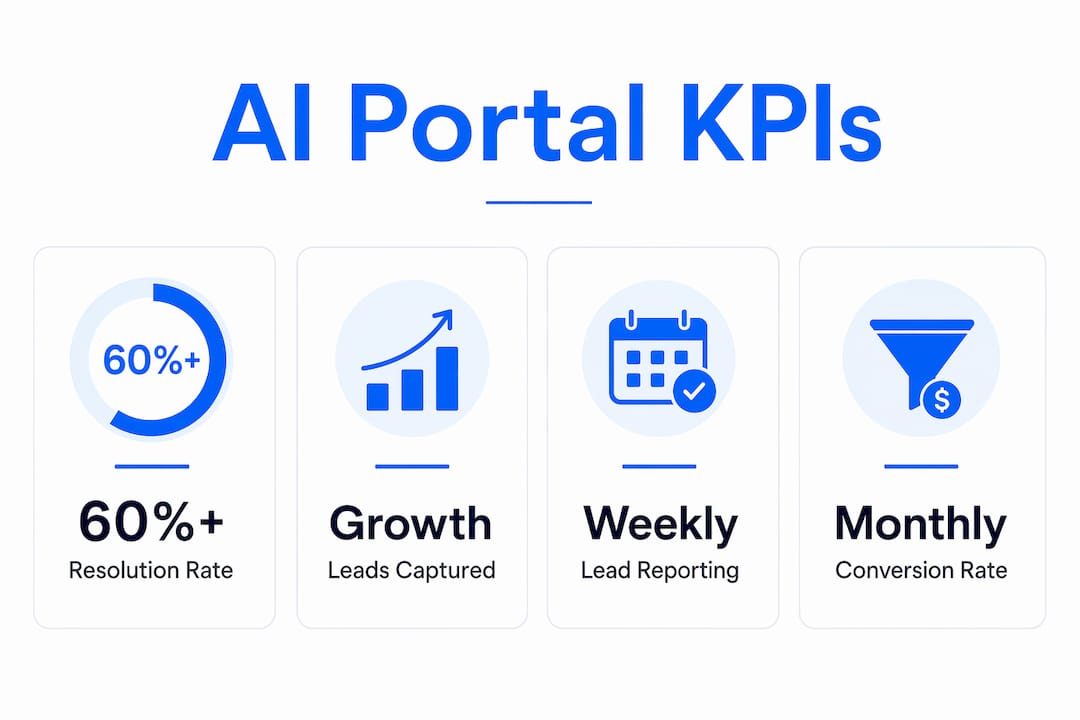
| KPI | What it measures | Suggested benchmark |
|---|---|---|
| Resolution rate | % of sessions fully resolved by AI | 60%+ for a healthy pilot |
| Ticket deflection | % of inquiries that never reach a human | 60% |
| Leads captured | New qualified leads logged to CRM per period | Baseline from current volume |
| Appointments booked | Confirmed bookings attributed to portal | Track week-over-week growth |
| Lead-to-appointment conversion | % of captured leads that become bookings | Compare to pre-portal baseline |
| Cost per lead | Total portal cost divided by leads captured | Target reduction vs. prior channel |
| Average handle time saved | Time per inquiry before vs. after AI | Measure in agent hours per month |
Report resolution rate and leads captured weekly during the pilot. Cost per lead and conversion rate are monthly metrics that reveal whether the portal is producing pipeline, not just activity. A pilot is performing when resolution rate exceeds 60% and lead volume is trending upward by week four.
When should you adopt a portal versus keeping live agents?
Adopt a self-service AI portal now if:
- You receive high volumes of repetitive inquiries (pricing, availability, scheduling).
- Appointment booking is a primary conversion action in your funnel.
- Your team is losing leads to slow response times outside business hours.
- Your CRM is already structured well enough to feed the AI accurate data.
Delay or use a hybrid approach if:
- Inquiry volume is low and each case requires significant human judgment.
- Your knowledge base is disorganized and would need a full audit first.
- Regulatory requirements in your vertical demand human review of every interaction.
For most U.S. businesses with appointment-heavy or lead-intensive workflows, a hybrid model works well at launch: the AI handles qualification and booking, and humans handle exceptions. Run a 30-day cohort test comparing conversion rates from AI-assisted sessions versus unassisted ones to validate impact before full deployment.
Readiness checklist:
- CRM is populated with accurate account and calendar data.
- Top 20 customer inquiry types are documented and answerable.
- Escalation routing and handoff protocols are defined.
- A team member owns knowledge-base hygiene on an ongoing basis.
Key Takeaways
A self-service AI portal drives measurable lead generation and appointment-setting results when it is grounded in live CRM data, deployed with clear escalation paths, and measured by resolution rate rather than deflection alone.
| Point | Details |
|---|---|
| Core definition | A self-service AI portal connects generative AI to your CRM and channels to qualify leads and book appointments 24/7. |
| Top benefit | Portals capture and qualify intent around the clock, reducing cost per lead and accelerating time to booked appointment. |
| Pilot approach | Launch on one high-traffic channel, target 60%+ resolution rate, and validate lead volume within 30–45 days. |
| Primary KPIs | Track resolution rate, leads captured, appointments booked, and cost per lead every week during the pilot. |
| Mediabloom | Mediabloom’s omnichannel AI platform integrates voice agents, chatbots, and CRM automation to deliver over 10,000 monthly leads for clients like Miracle Ear and 1-800 Accountant. |
Mediabloom’s take on what actually moves the needle
Most businesses evaluating AI portals focus on the wrong metric first. Deflection numbers look impressive in a vendor deck, but they tell you nothing about whether a customer got what they needed. The portals that actually drive revenue are the ones built around resolution: the AI attempts a complete, grounded answer every time, and when it cannot, it hands off with full context so the human agent closes the loop in one exchange.
The second thing most evaluations underweight is omnichannel consistency. A portal that works well on web chat but drops the thread when a lead calls in is not a revenue engine. It is a gap in your funnel. The businesses generating the most consistent pipeline from AI portals are the ones that have unified voice, chat, and SMS under a single data layer so the AI knows the full history regardless of channel.
Pilots succeed when the scope is narrow and the success criteria are specific. One channel, two or three core workflows, a 30-day window, and a clear answer to “did we capture more qualified leads?” That is the test worth running.
Mediabloom delivers AI-driven lead generation and appointment setting
Businesses that need qualified leads and booked appointments at scale, without expanding headcount, get the most from Mediabloom’s all-in-one AI platform. It combines AI voice agents, chat automation, and CRM-connected appointment setting into a single system that runs across every channel your prospects already use.
Clients like Miracle Ear and 1-800 Accountant have used Mediabloom to generate over 10,000 monthly leads by deploying AI across omnichannel surfaces. The Vision Law case study shows how a focused deployment translates into measurable booking outcomes. For businesses in home services, insurance, or SaaS, Mediabloom’s vertical-specific configurations mean the AI is grounded in your workflows from day one.
Ready to see it in action? Watch the AI voice agent demo or review the full appointment setting case studies to evaluate fit for your pipeline.
Useful sources
- What Is AI Self-Service? Benefits and How It Works — Salesforce overview of AI self-service architecture and the 93% time-savings figure.
- AI Customer Self-Service: How to Build One That Actually Resolves — Practical guidance on grounding, escalation design, and resolution-first metrics.
- Build a Self-Service Customer Support Portal: A Guide — Page-aware context and portal architecture best practices.
- AI Self-Service — IBM’s analysis of cost reduction, 24/7 resolution, and no-code implementation.
- Customer Support Portal: What It Is and How to Build One — Knowledge base structure, content audits, and agent grounding.
- Mediabloom AI Lead Generation and Appointment Setting — Platform overview, client outcomes, and demo resources.
- Mediabloom Case Studies — Appointment-setting results across verticals.
FAQ
What is a self-service AI portal in simple terms?
A self-service AI portal is a digital platform where customers get direct, personalized answers and complete actions like booking appointments without speaking to a human agent. It connects generative AI to your CRM and knowledge base to deliver accurate, context-aware responses 24/7.
How does a self-service AI portal help with lead generation?
The portal engages visitors the moment they show intent, qualifies them against your criteria, and logs new leads directly to your CRM, including outside business hours. This continuous capture reduces the leads lost to slow response times or missed calls.
What KPIs indicate a successful AI portal pilot?
A resolution rate above 60% and consistent week-over-week growth in leads captured or appointments booked are the clearest signals that a pilot is working. Cost per lead trending downward by the end of 30 days confirms the ROI case.
How long does it take to deploy a self-service AI portal?
A focused pilot on one channel typically takes 4–8 weeks from discovery to live deployment, with full multi-channel rollout completing in 9–16 weeks depending on integration complexity and knowledge-base readiness.
Can Mediabloom’s platform handle both chat and voice for appointment booking?
Yes. Mediabloom’s platform integrates AI voice agents and chatbots under a single CRM-connected system, so leads and appointments captured across chat, SMS, and voice all flow into the same pipeline without manual reconciliation.