
AI lead capture is the practice of deploying automated systems that identify, qualify, and route prospects without manual intervention. Done right, it shifts your sales team away from data entry and toward closing. This guide covers every step to set up AI lead capture effectively: the tools you need, how to configure qualification logic, how to automate outreach, and how to avoid the pitfalls that derail most deployments. Tools like Apollo.io, OpenAI, Make.com, and Airtable form the core stack for most teams building this in 2026.
What does it take to set up AI lead capture?
Before you write a single automation, three things must be in place: clean data, a defined Ideal Customer Profile, and the right tool stack. Skip any one of these and your AI system will produce noise, not pipeline.
Define your Ideal Customer Profile first
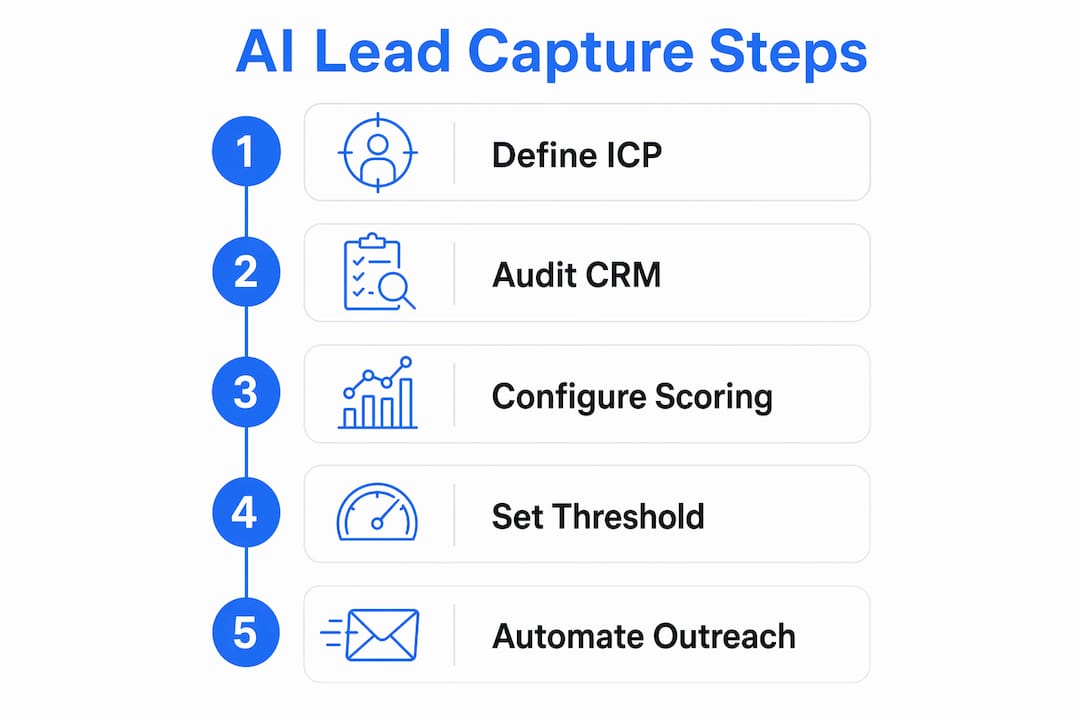
Expert marketers confirm that defining a precise Ideal Customer Profile using historical data is the single most important step before deploying any AI lead capture system. Your ICP should include firmographics (company size, industry, revenue), behavioral signals (content downloads, demo requests), and trigger events (funding rounds, hiring surges). Without this definition, your AI has no criteria to score against. Every qualification decision becomes a guess.
Audit your CRM before you connect anything
Inconsistent CRM data fields disrupt AI predictive scoring models directly. Fields like “lead stage” and “industry” must be standardized before you connect any AI layer. Run a full audit: identify blank fields, duplicate records, and inconsistent naming conventions. A CRM with messy data produces a lead scoring model with messy outputs.

The core tool stack for 2026
Popular AI lead capture tools in 2026 include Apollo.io for prospect data, OpenAI for qualification logic, Make.com for workflow automation, and Airtable or a CRM for structured storage. These tools connect via APIs and require no custom coding for most configurations. Here is what each component does:
- Apollo.io: Sources prospect data including contact details, company firmographics, and buying signals
- OpenAI: Runs qualification prompts against incoming lead data and returns structured scores
- Make.com: Connects triggers, AI modules, and storage in a visual workflow builder
- Airtable or CRM: Stores qualified leads, scores, and routing decisions in structured records
- Clay: Enriches lead records with additional data points before scoring
| Component | Primary Function | Typical Cost |
|---|---|---|
| Apollo.io | Prospect sourcing and data enrichment | Paid tiers from $49/month |
| OpenAI API | AI qualification and prompt execution | Pay-per-token usage |
| Make.com | Workflow automation and integrations | Free tier available |
| Airtable | Lead storage and record management | Free tier available |
| Clay | Data enrichment and lead research | Paid tiers from $149/month |
Pro Tip: Set up a dedicated API key for each tool integration. Shared keys make debugging nearly impossible when a workflow breaks.
How to configure AI lead qualification and scoring workflows
Qualification scoring is where AI lead capture delivers its clearest return. The goal is to assign every inbound lead a numeric score, then route only the highest-intent prospects to your sales calendar.
Build the qualification prompt
Your OpenAI prompt is the engine of the entire system. Feed it five data points for every lead: name, email, problem description, urgency level, and budget range. AI chatbot systems effectively extract these data points in 5–8 messages, then output structured JSON for CRM integration. The prompt should instruct the model to return a score on a 0–10 scale along with a one-sentence rationale. That rationale matters. It gives your sales team context when they review a routed lead.
Set your routing threshold
Using an AI lead scoring threshold of 7+ increases close rates from 3% to 12% by concentrating effort on qualified leads. Set your Make.com workflow to route leads scoring 7 or above directly to your sales calendar or CRM pipeline. Leads scoring below 7 enter a nurture sequence instead. This binary routing keeps your sales team focused and prevents low-intent leads from clogging the calendar.
Here is the step-by-step configuration sequence:
- Create the intake form or chatbot: Collect name, email, company, problem description, urgency (1–5 scale), and budget range
- Connect the form to Make.com: Use a webhook trigger to fire the workflow on every new submission
- Pass data to OpenAI module: Format the five data points into a structured prompt requesting a qualification score and rationale
- Parse the JSON response: Extract the score and rationale fields from the OpenAI output
- Apply the routing filter: If score is 7 or above, push to CRM as “Sales Ready.” If below 7, add to nurture sequence
- Update the CRM record: Write the score, rationale, and all lead data fields to the CRM in a single structured update
Pro Tip: Store the raw OpenAI response alongside the parsed score in your CRM. When you refine your prompt later, you will want the original outputs for comparison.
Comparison: manual scoring vs. AI scoring
| Criteria | Manual Scoring | AI Scoring |
|---|---|---|
| Speed | Hours to days | Seconds |
| Consistency | Varies by rep | Uniform criteria |
| Scalability | Limited by headcount | Unlimited volume |
| Cost per lead scored | High (labor) | Low (API tokens) |
| Rationale documentation | Rarely captured | Automatic |
How to automate personalized outreach and follow-up with AI
Automated outreach is the highest-leverage part of an AI lead generation setup. It is also the easiest to get wrong.
Generate personalized emails with AI
Feed your AI model the qualified lead’s company name, role, stated problem, and urgency score. Instruct it to produce a short cold email (under 150 words) that references the specific problem and proposes a concrete next step. The output will be far more relevant than a generic template. Relevance drives reply rates.
The most effective outreach sequences for AI-generated emails follow this structure:
- Email 1 (Day 1): Problem acknowledgment and a single, specific value proposition
- Email 2 (Day 3): A brief case study or proof point relevant to the lead’s industry
- Email 3 (Day 7): A direct ask for a 15-minute call with a calendar link
- Email 4 (Day 14): A low-friction breakup email that leaves the door open
Keep humans in the review loop
Successful AI lead capture workflows keep humans in the loop for reviewing outreach drafts before sending. AI handles research and draft creation. A human approves the final message. This prevents hallucinations (AI-invented facts about the prospect) and preserves brand voice. Full automation of outbound sending without review is the most common mistake teams make when deploying this type of system.
Pro Tip: Review the first 50 AI-generated emails manually before switching to spot-check review. Patterns in errors become obvious fast, and you can fix the prompt once rather than correcting individual emails indefinitely.
Sending domain setup
Using a secondary sending domain protects your primary domain reputation when testing AI-driven outbound. Register a domain variant (yourcompany-mail.com or mail.yourcompany.com), warm it up over 4–6 weeks, and send all AI-generated outreach from that domain. Recovering a damaged primary domain reputation takes weeks and directly impacts deliverability across your entire organization.
What are the most common AI lead capture setup problems?
Most AI lead capture deployments fail not because of bad tools but because of bad data and skipped prerequisites. These are the four problems that appear most often.
-
Incomplete CRM fields at launch: Leads enter the scoring model with missing urgency or budget data. The AI assigns arbitrary scores. Fix this by making all five data fields required in your intake form before connecting the AI module.
-
Prompt drift over time: Your qualification prompt was written for your ICP six months ago. Your ICP has shifted. The AI is still scoring against old criteria. Schedule a monthly prompt review tied to your ICP documentation.
-
Domain reputation damage: Teams skip the secondary domain step and send high-volume AI outreach from their primary domain. Deliverability drops within weeks. Set up the secondary domain before sending a single AI-generated email.
-
No monitoring on sequence performance: AI-generated sequences go live and no one checks reply rates or unsubscribe rates for weeks. Set a weekly review cadence for the first 90 days. If reply rates fall below 2%, the sequence needs revision.
Auditing your CRM fields and defining your ICP are not optional preparatory steps. They are the foundation the entire AI system runs on. Deploy without them and you are scoring noise.
AI lead capture tools compared: which one fits your setup?
Choosing the right combination of tools depends on your team’s technical comfort, budget, and the volume of leads you process monthly.
| Tool | Best For | Ease of Setup | Pricing Model | Key Limitation |
|---|---|---|---|---|
| Apollo.io | Prospect sourcing at scale | Moderate | Subscription | Data accuracy varies by region |
| OpenAI API | Custom qualification logic | Moderate | Pay-per-use | Requires prompt engineering skill |
| Make.com | No-code workflow automation | Easy | Freemium | Complex logic needs paid tiers |
| Airtable | Structured lead storage | Easy | Freemium | Not a full CRM replacement |
| Clay | Deep data enrichment | Moderate | Subscription | Higher cost for small teams |
Teams with limited technical resources should start with Make.com as the automation layer. It connects Apollo.io, OpenAI, and Airtable without writing code. Teams with a dedicated RevOps function can build more complex multi-agent architectures. An AI lead generation pipeline typically includes three agents: a trigger researcher, a lead qualifier, and an outreach drafter, chained together with a human checkpoint between drafting and sending. That architecture scales from 50 leads per month to 5,000 without changing the core logic.
For teams exploring intent-based lead generation, layering buying signal detection on top of this stack adds another qualification dimension. Leads who show active research behavior score higher and convert faster than cold outbound contacts.
Key Takeaways
Effective AI lead capture requires clean CRM data, a defined ICP, and a three-layer stack of sourcing, qualification, and automation tools working in sequence.
| Point | Details |
|---|---|
| ICP definition comes first | Define firmographics and trigger events before configuring any AI scoring logic. |
| Scoring threshold drives results | A 7+ qualification threshold focuses sales effort on leads most likely to close. |
| Human review prevents errors | AI drafts outreach; a human approves before sending to prevent hallucinations. |
| Secondary domain protects reputation | Route all AI outbound through a separate domain to protect primary deliverability. |
| CRM hygiene is non-negotiable | Audit and standardize CRM fields before connecting any AI qualification layer. |
The real lesson from deploying AI lead capture at scale
The teams that get the most from AI lead capture are not the ones with the most sophisticated tech stack. They are the ones who did the boring work first: cleaning their CRM, writing a precise ICP, and testing their qualification prompt against real historical leads before going live.
The most common mistake I see is teams treating the AI as a shortcut around the fundamentals. They connect Apollo.io to OpenAI, set a threshold, and expect qualified pipeline to appear. What they get instead is a fast machine producing fast garbage. The AI scores what you give it. If your intake form does not capture urgency and budget, the model is guessing on two of the five most predictive variables.
AI lead capture does not replace salespeople. It reallocates their time. The reps who used to spend three hours a day researching prospects and writing first-touch emails now spend that time on calls with leads who already meet the ICP criteria and have expressed a specific problem. That shift is where the real return shows up, not in the automation itself.
The human review checkpoint is not a concession to imperfect AI. It is a deliberate design choice. Automating cold outreach sending without human approval produces hallucinations and voice inconsistencies that damage relationships before they start. Keep the checkpoint. The time saved in research more than covers the time spent reviewing drafts.
One more thing: monitor your qualification model every month. Your ICP will drift. Your market will shift. The prompt you wrote in january will be wrong by april if you do not revisit it. Build the review into your calendar the same day you go live.
— Mediabloom
See how Mediabloom deploys AI lead capture for real businesses
Mediabloom builds and deploys AI lead generation systems that integrate voice agents, chatbots, and sales automation into a single platform. Clients like Miracle Ear and 1-800 Accountant use Mediabloom’s system to generate over 10,000 monthly leads across SMS, email, and chat channels. The platform handles qualification, routing, and appointment booking without requiring your team to manage multiple disconnected tools. Explore Mediabloom’s AI lead generation solutions or review the AI appointment setting case studies to see qualification and outreach results from real deployments.
FAQ
What is AI lead capture?
AI lead capture is an automated system that collects, qualifies, and routes prospects using artificial intelligence without manual review. It typically combines a data source, an AI qualification layer, and a CRM or storage tool.
What tools do I need to set up AI lead capture?
The core stack includes Apollo.io for prospect data, OpenAI for qualification logic, Make.com for workflow automation, and Airtable or a CRM for storage. These tools connect via APIs and require no custom coding for standard configurations.
What qualification score threshold should I use?
A threshold of 7 or above on a 0–10 scale is the standard starting point. This threshold has been shown to increase close rates from 3% to 12% by filtering out low-intent leads before they reach the sales calendar.
How do I protect my email reputation when sending AI-generated outreach?
Register a secondary sending domain and warm it up over 4–6 weeks before sending any AI-generated emails. A damaged primary domain can take weeks to recover and affects deliverability across your entire organization.
Should AI fully automate outreach sending?
No. AI should draft outreach and automate research, but a human should approve each message before it sends. This prevents hallucinations and keeps brand voice consistent across all prospect communications.


