Automation accelerates time-to-value, eliminates manual errors, and scales onboarding without proportional headcount growth. The best first move is to run a focused pilot that automates coordination, triggers, and basic verification before layering predictive AI on top. IBM’s research on onboarding automation confirms that consistent, auditable workflows are the foundation, and Gartner’s analysis of AI use cases positions onboarding automation among the highest-value service investments a company can make. Mediabloom’s clients have seen this play out directly, generating many monthly leads through AI-driven omnichannel flows that begin at the very first customer touchpoint.
Table of Contents
- Core components that make automated onboarding work
- KPIs and metrics to measure onboarding automation success
- Common risks, compliance pitfalls, and what U.S. teams must know
- ROI drivers, cost components, and building the business case
- Key Takeaways
- The case for going slower before you go faster
- Mediabloom gives revenue teams a faster path to automated onboarding
- Useful sources and further reading
- FAQ
Core components that make automated onboarding work
A well-built automated onboarding stack has seven functional layers. Each one handles a distinct job, and the value multiplies when they share data cleanly.
- Conversational assistants: AI chatbots and voice agents that answer common questions, collect information, and guide customers through steps without requiring a live agent. Mediabloom’s AI chatbot platform handles this layer across web, SMS, and voice channels simultaneously.
- Rules engine and decisioning: — Logic that determines which path a customer takes based on segment, product, risk level, or behavior.
When selecting technologies, prioritize open APIs, bidirectional data flow, and vendor support for your compliance requirements. A conversational AI platform that cannot push data back to your CRM creates a silo that breaks the audit trail. Integration depth matters more than feature count.
KPIs and metrics to measure onboarding automation success
| Metric | Definition | Illustrative Target |
|---|---|---|
| Time-to-value (TTV) | Days from contract to first key customer action | Under 14 days for SMB; under 30 for enterprise |
| Onboarding completion rate | % of customers who complete all required steps | Majority of customers complete onboarding within a month |
| Activation rate | % of customers who reach the first meaningful product milestone | Majority complete onboarding within a month |
| Time to first key action | Hours/days from account creation to first meaningful product use | Under 48 hours for self-serve |
| 90-day churn rate | % of customers who cancel within the first 90 days | Below 5% for established products |
| CSAT/NPS at onboarding close | Customer satisfaction score collected at end of onboarding | CSAT above 4.2/5; NPS above 40 |
| Cost per onboarding | Total onboarding labor and tooling cost divided by customers onboarded | Benchmark against pre-automation baseline |
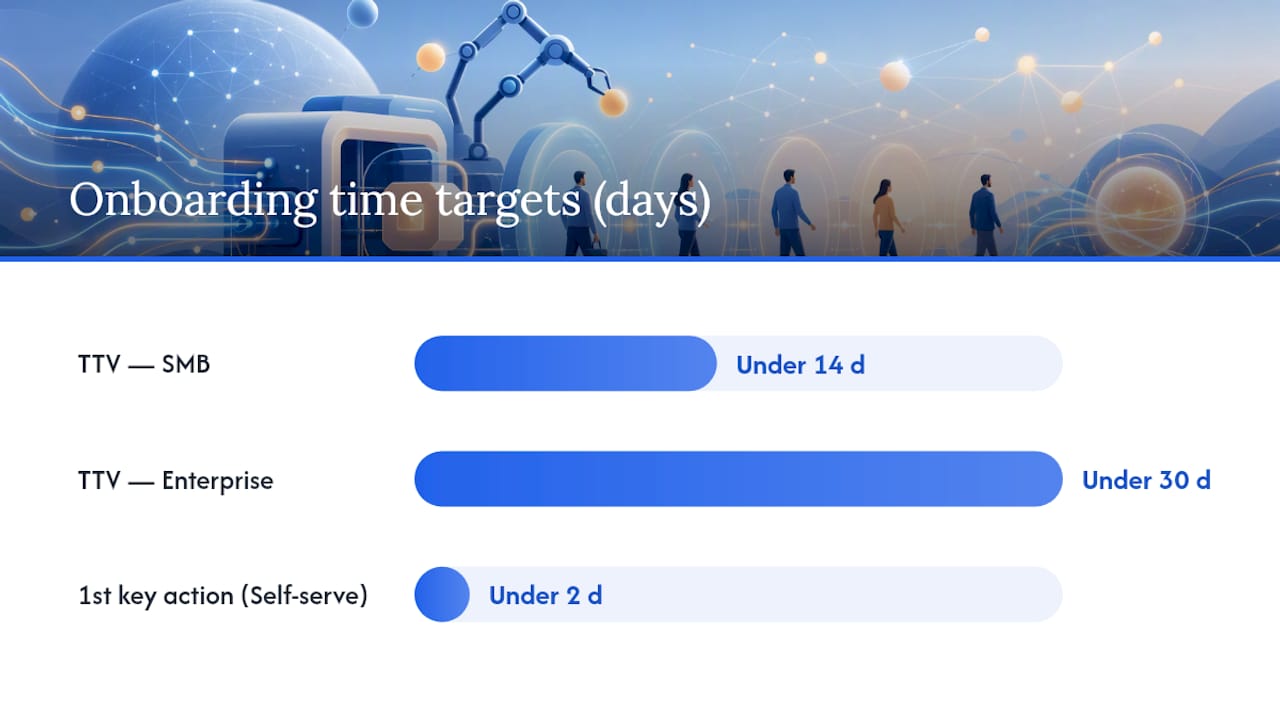
The targets above are illustrative goals. Your baseline will differ based on product complexity, customer segment, and current process maturity. The goal is to establish a pre-automation baseline, then measure improvement after each automation layer is added.
IBM’s AI onboarding research specifically highlights time-to-value and activation rate as the metrics most directly affected by intelligent automation. Track those two first. They move fastest and tell the clearest story to executives.
Metric to watch: Onboarding completion rate is the single best leading indicator of long-term retention. A customer who completes every onboarding step is far more likely to renew than one who skips configuration or training.
Common risks, compliance pitfalls, and what U.S. teams must know
The most common failure mode is automating a process that was never well-defined. Automation does not fix unclear ownership or inconsistent steps. It locks them in at scale.
Operational pitfalls to avoid:
- Automating noisy processes: If your manual onboarding has 12 variations depending on who handles it, standardize first. Automate the canonical version.
- Missing escalation ownership: Every automated flow needs a named human owner for exceptions. “The system will handle it” is not an escalation plan.
- Data silos that break handoffs: If your onboarding tool and CRM do not sync bidirectionally, data errors compound. One stale field can trigger the wrong sequence for a customer.
- Over-automation of high-judgment steps: Contract negotiations, pricing exceptions, and complex technical configurations need human judgment. Automating them creates errors and damages trust.
U.S. compliance checkpoints every team should review:
- TCPA: The Telephone Consumer Protection Act governs automated calls and texts. Before any automated SMS or voice outreach in your onboarding flow, confirm you have proper consent. Violations carry per-message penalties.
- HIPAA: For healthcare clients or any workflow touching protected health information, HIPAA-ready infrastructure is not optional. Audit trails, access controls, and data handling agreements must be in place.
- OFAC screening: For financial services, payments, or any onboarding that involves business verification, OFAC’s sanctions lists must be checked. This is a federal requirement, not a best practice.
- IRS documentation: Certain onboarding workflows require tax form collection (W-9, W-8BEN). IRS guidance governs which forms apply and how they must be stored.
Mitigation checklist:
- Define clear escalation triggers and name a human owner for each exception type
- Maintain a full audit trail for every automated action, especially in regulated industries
- Run a data privacy mapping exercise before launch to identify what personal data flows where
- Review TCPA consent language with legal before activating any automated SMS or voice sequences
Pro Tip: Build your escalation rules before you build your automation rules. Knowing exactly when the system should hand off to a human is more important than knowing what the system will do when everything goes right.
ROI drivers, cost components, and building the business case
Automation’s financial return comes from four sources: reduced manual labor hours, fewer errors requiring rework, faster time-to-revenue, and lower support volume during the onboarding period.
Where the savings come from:
- CSM and ops time freed from scheduling, reminders, and data entry
- Fewer onboarding errors that require correction calls or re-sent documents
- Customers reaching their first value milestone faster, which accelerates renewal conversations
- Reduced inbound support tickets during onboarding because customers receive proactive guidance automatically
Cost drivers to budget for:
- Integration effort: connecting your CRM, document tools, and communication channels takes engineering time upfront
- License fees: workflow tools, conversational AI platforms, and analytics dashboards each carry recurring costs
- Data migration: moving historical onboarding data into new systems requires planning and validation
- Staff training: your CSMs and ops team need to understand what the automation does and when to intervene
- Ongoing maintenance: rules need updating as your product and customer base evolve
A simple ROI structure:
Calculate your current fully-loaded cost per onboarding (CSM hours × hourly rate + tooling + error correction time). Then model the post-automation cost using your target completion rate and reduced manual hours. The difference, multiplied by your monthly onboarding volume, is your monthly savings.
A typical pilot-to-scale timeline runs 6–12 weeks for the pilot phase, with payback on integration costs often visible within the first quarter of full deployment. SHRM’s documentation of automation savings in administrative workflows supports the pattern: the biggest gains come from eliminating repetitive, rules-based tasks first.
Key Takeaways
Automation accelerates time-to-value, reduces cost per onboarding, and scales customer success without linear headcount growth, but only when built on a standardized process with clear escalation rules.
| Point | Details |
|---|---|
| Standardize before automating | Document the canonical onboarding path before building any automation; messy processes become fast, messy automations. |
| Pilot coordination first | Automate reminders, task creation, and progress updates first — these pay back fastest and generate the behavioral data predictive AI needs. |
| Track two KPIs from day one | Time-to-value and onboarding completion rate are the clearest leading indicators of retention and ROI. |
| U.S. compliance is non-optional | Review TCPA consent, HIPAA applicability, and OFAC screening requirements before activating any automated outreach or verification steps. |
| Mediabloom for done-for-you deployment | Mediabloom’s AI voice agents, chatbots, and omnichannel orchestration deliver a managed onboarding automation engine with TCPA, SOC 2, and HIPAA-ready compliance built in. |
The case for going slower before you go faster
The most expensive mistake in onboarding automation is not moving too slowly. It is moving fast on the wrong foundation.
Teams that automate before they standardize end up with fast, consistent delivery of a broken experience. Every customer gets the wrong sequence at scale. One client in a financial services context automated their invoice and notification workflow before completing their rules documentation. The result: hundreds of customers received incorrect billing notifications in the first week, requiring a manual correction campaign that cost more in CSM time than the automation had saved.
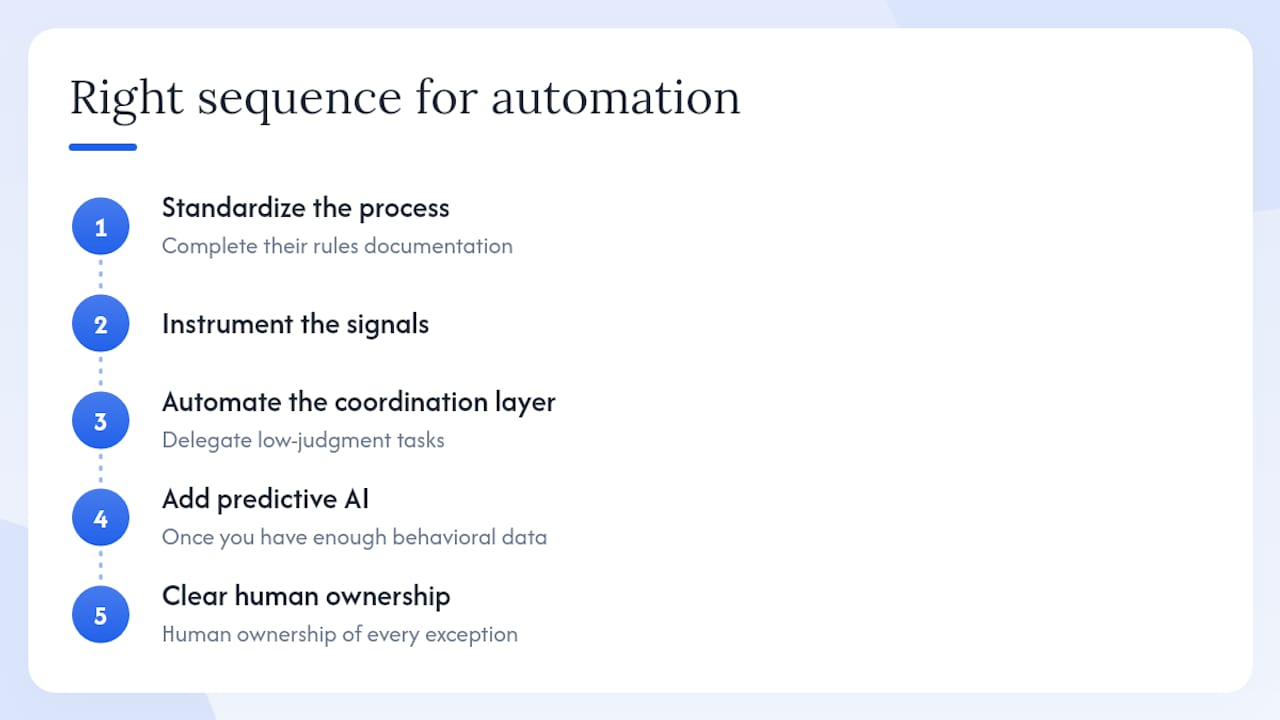
The right sequence is always: standardize the process, instrument the signals, automate the coordination layer, then add predictive AI once you have enough behavioral data to make accurate predictions. IBM’s perspective on automation augmenting human teams reinforces this: automation should delegate low-judgment tasks so your CSMs can focus on consultative work, not replace the human judgment that complex onboarding genuinely requires.
The teams that get the most from onboarding automation are not the ones who automate the most. They are the ones who automate the right things, in the right order, with clear human ownership of every exception.
Mediabloom gives revenue teams a faster path to automated onboarding
Most teams that want to automate onboarding face the same problem: the technology exists, but building, integrating, and maintaining it requires engineering resources they do not have. Mediabloom solves that with a done-for-you AI platform that deploys AI voice agents, chatbots, and omnichannel automation without a long internal build cycle.
For revenue and customer success leaders, the value is concrete: faster time-to-value for customers, fewer manual hours per onboarding, and compliance-ready infrastructure (TCPA, SOC 2, HIPAA-ready) that holds up in regulated industries. The platform integrates with 600+ CRMs and communication tools, so your existing stack stays intact. Clients like Miracle Ear and 1-800 Accountant have used this infrastructure to generate over 10,000 monthly leads while maintaining high customer satisfaction scores.
Watch a live demo of Mediabloom’s AI voice agents to see how the platform handles onboarding coordination, qualification, and follow-up across voice, SMS, and chat in a single flow.
Useful sources and further reading
- Customer Onboarding Automation: Streamlining the Onboarding Journey | IBM
- Accelerate the Customer Onboarding Process with AI | IBM
- Gartner says the most valuable AI use cases for customer service and support fall into four areas
- ofac.treasury.gov
- irs.gov
- shrm.org
- Automating Customer Onboarding for Faster CX
FAQ
What is the role of automation in customer onboarding?
Automation handles repetitive onboarding tasks, including data capture, document verification, scheduling, and notifications, so human teams can focus on complex, high-judgment interactions. The result is faster time-to-value, fewer errors, and consistent customer experiences at scale.
Where should you start when automating the onboarding process?
Start with coordination automations: reminders, task assignments, and progress updates. These deliver the fastest ROI and generate the behavioral data you need before adding predictive AI or complex decisioning logic.
Which U.S. compliance rules apply to automated onboarding?
TCPA governs automated SMS and voice outreach and requires proper consent before activation. HIPAA applies to any workflow touching protected health information. OFAC sanctions screening is required for financial services and business verification onboarding.
How do you measure onboarding automation success?
Track time-to-value, onboarding completion rate, and 90-day churn as your primary KPIs. Activation rate and cost per onboarding also matter; aim for a majority of customers to complete onboarding within a month for a strong retention signal.
How does Mediabloom support automated customer onboarding?
Mediabloom provides a done-for-you AI platform combining voice agents, chatbots, and omnichannel orchestration with integrations across 600+ CRM and communication platforms, plus built-in TCPA, SOC 2, and HIPAA-ready compliance for regulated industries.