
A customer service knowledge base AI is an intelligent system that uses natural language processing (NLP) and large language models (LLMs) to understand customer queries, retrieve relevant content from your support documentation, and generate direct answers rather than lists of articles. The industry term for this category is AI knowledge management, though “customer service knowledge base AI” accurately describes how most teams deploy it. Unlike a traditional help center search bar, this technology synthesizes answers from multiple sources, delivering a single, context-aware response. For customer service managers and business leaders, that shift from article retrieval to answer generation is the defining difference. It reduces handle time, improves self-service resolution, and raises the ceiling on what automated support can accomplish.
What is a customer service knowledge base AI?
A customer service knowledge base AI is defined as a system that ingests your existing support content, indexes it, and uses generative AI to produce direct answers at query time. The process has four distinct stages, and understanding each one helps you evaluate vendors and build reliable systems.
How content ingestion and indexing work
The system starts by pulling in your help articles, FAQs, product documentation, and policy pages. It breaks that content into smaller chunks, typically a few hundred words each, and stores them in a vector database alongside metadata like publication date, product category, and content owner. That metadata is not decorative. It tells the AI which chunks are current and which belong to specific product lines, so retrieval stays accurate as your catalog grows.

How retrieval-augmented generation powers answers
When a customer submits a question, the AI does not search by keyword. It converts the query into a mathematical representation and finds the chunks most semantically similar to that query. Retrieval-augmented generation (RAG) then feeds those chunks into an LLM, which synthesizes a single, coherent answer grounded in your actual documentation. RAG is the reason AI knowledge bases can answer questions your team never explicitly wrote an FAQ for. The LLM connects related concepts across multiple documents and produces a response that reads like a human wrote it.
Delivery channels and confidence thresholds
The synthesized answer reaches customers through chatbots, help center widgets, AI agent interfaces, or email automation. Most enterprise systems attach citations to every answer, showing which source documents the AI used. Confidence thresholds add a second layer of reliability. When the system’s certainty about an answer falls below a set level, it refuses to respond and routes the customer to a human agent instead. That combination of citation-based retrieval and confidence scoring is what separates a trustworthy AI knowledge system from a chatbot that confidently says the wrong thing.
- Ingest content from help articles, FAQs, policy documents, and product guides.
- Chunk and index content into a vector database with freshness and ownership metadata.
- Retrieve relevant chunks at query time using semantic similarity, not keyword matching.
- Generate a synthesized answer using an LLM grounded in retrieved documents.
- Deliver with citations and apply confidence thresholds before surfacing the response.
Pro Tip: Set your confidence threshold conservatively at first. A system that occasionally says “I don’t know” and escalates builds more customer trust than one that answers every question with false certainty.
What sets AI knowledge bases apart from traditional tools?
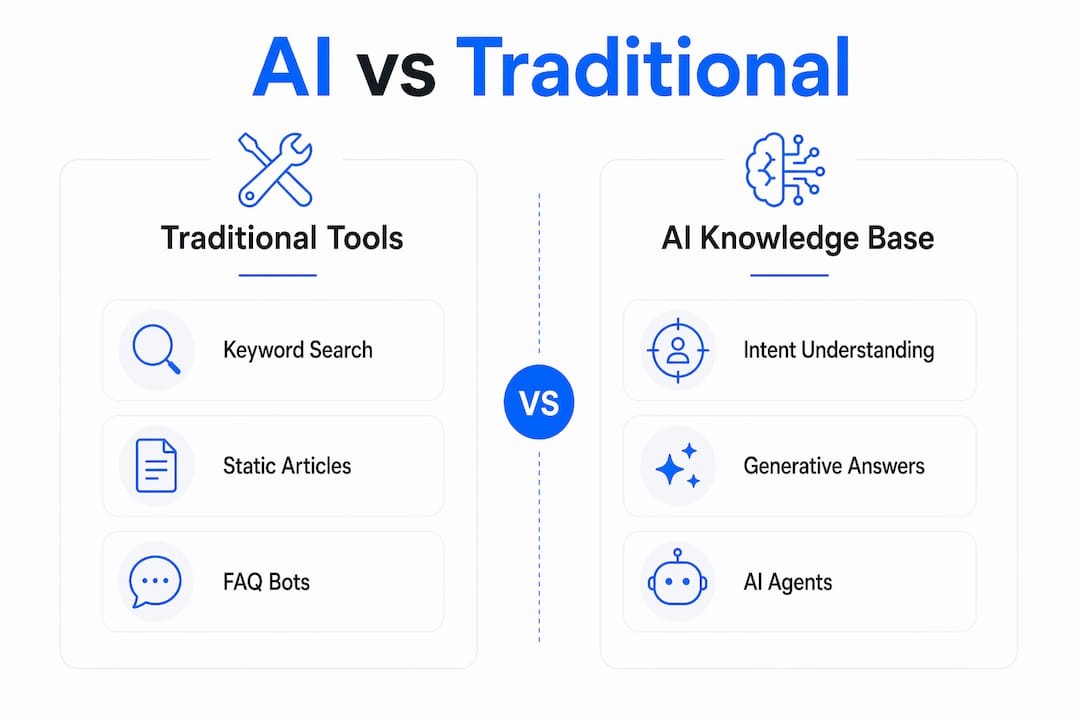
The gap between a traditional knowledge base and an AI-powered one is not incremental. It is architectural. Traditional systems match keywords to article titles. AI systems understand intent and generate answers. That distinction changes the entire support experience.
Keyword search vs. intent understanding
A traditional knowledge base returns a list of articles when a customer types “refund.” An AI knowledge base understands that “I bought the wrong size and need my money back” is a refund request, even without the word “refund.” AI knowledge bases move from keyword searches to intent-based answer synthesis, pulling from multiple source documents to build one complete response. Customers get answers, not homework.
Static article lists vs. generative answers
Traditional chatbots surface FAQ articles. They are fast but shallow. A customer still has to read the article, find the relevant paragraph, and apply it to their situation. AI knowledge bases do that work for the customer. Zendesk describes this distinction as the difference between bots that surface articles and AI agents that summarize, synthesize, and act. The practical result is higher self-service resolution rates and fewer tickets escalated to human agents.
AI agents vs. basic FAQ bots
AI agents go further than answering questions. They can check order status, trigger refund workflows, update account details, and hand off to a human agent with full conversation context preserved. AI agents orchestrate workflows and backend actions that a basic FAQ bot cannot touch. For a customer service manager, that means AI handles tier-1 and many tier-2 issues end to end, freeing your team for genuinely complex cases.
| Feature | Traditional knowledge base | AI knowledge base |
|---|---|---|
| Search method | Keyword matching | Semantic intent understanding |
| Output format | Article list | Synthesized, direct answer |
| Personalization | None | Context-aware responses |
| Workflow integration | None | Backend actions and escalation |
| Confidence handling | N/A | Thresholds and fallback routing |
| Citation support | N/A | Source-linked answers |
- Traditional systems require customers to self-navigate articles after retrieval.
- AI systems generate one answer from multiple sources without customer effort.
- Basic bots answer questions. AI agents resolve issues and trigger actions.
- Context preservation across a conversation is an AI capability, not a chatbot feature.
What are the main challenges with AI knowledge bases?
The technology works. The failure mode is almost always the content underneath it. An AI knowledge base is only as accurate as the documentation it retrieves from, and most organizations underestimate how quickly that documentation goes stale.
The hallucination risk from stale content
Google research shows that hallucination rates rise from 10.2% to 66.1% when AI systems retrieve outdated context instead of current information. That is a sixfold increase in wrong answers, and most of those wrong answers are delivered with full confidence. Customers do not know the AI is working from a policy document that was updated six months ago. They act on the answer, then contact support again when it fails. The result is higher ticket volume, not lower.
Documentation debt compounds the problem
Documentation debt is the accumulated backlog of articles that are outdated, incomplete, or missing entirely. Every gap in your knowledge corpus is a gap in your AI’s ability to answer accurately. Treating the knowledge base as a dynamic answer system rather than a static library requires assigning ownership to every content chunk, setting review triggers tied to product releases, and retiring outdated articles on a schedule. Most teams do not do this until after a high-profile AI error forces the issue.
Operational safeguards that reduce risk
The right technical guardrails make AI knowledge bases defensible even when content has gaps.
- Confidence thresholds: Refuse to answer when retrieval confidence falls below a defined score and route to a human agent instead.
- Citation grounding: Surface source citations with every answer so customers and agents can verify the information.
- Audit trails: Log every query, retrieved chunk, and generated answer for review and compliance.
- Fallback escalation: Route unresolved queries to human agents with full conversation context attached.
- Chain-of-thought reasoning: Require the AI to show its reasoning steps, making errors easier to detect and correct.
Pro Tip: Assign a content owner to every article in your knowledge base before you connect it to an AI system. Ownership without a review schedule is still documentation debt. Set calendar-based review triggers tied to product update cycles.
How can businesses implement AI knowledge bases successfully?
Deployment succeeds when AI is treated as a layer on top of existing support operations, not a replacement for them. The teams that get the most value from AI knowledge bases are the ones that integrate tightly with their current help desk, monitor performance continuously, and keep humans in the loop for edge cases.
-
Audit your existing content first. Before connecting any AI system, identify outdated articles, content gaps, and orphaned documentation. The AI will retrieve and use whatever you give it. Starting with clean, current content cuts hallucination risk from day one.
-
Integrate with your help desk and ticketing system. AI knowledge bases deliver the most value when they connect to platforms like Zendesk, Intercom, or Salesforce Service Cloud. Intercom’s approach combines AI and human agents with full context preservation, so when a ticket escalates, the human agent sees the entire conversation history and the sources the AI cited.
-
Deploy across multiple channels. Customers contact support through chat, email, SMS, and web portals. An AI knowledge base should deliver consistent answers across all of those surfaces. Multi-channel deployment also gives you richer data on where customers struggle most, which informs future content improvements.
-
Set escalation rules before launch. Define which query types always route to a human agent regardless of AI confidence. Legal questions, billing disputes, and safety-related issues typically require human judgment. Hard-coding those escalation rules protects both customers and your organization.
-
Monitor answer quality with structured feedback. Collect thumbs-up/thumbs-down ratings on every AI response. Review low-rated answers weekly and trace them back to the source documents that generated them. That feedback loop is how you improve content quality and AI accuracy simultaneously.
-
Choose between vendor platforms and custom builds deliberately. Vendor platforms like those offered through Mediabloom’s AI solutions deploy faster and require less engineering overhead. Custom AI development gives you tighter control over retrieval logic, confidence thresholds, and integration depth. The right choice depends on your team’s technical capacity and the complexity of your support workflows.
Successful implementation also requires cross-functional alignment. Your content team owns documentation quality. Your engineering team owns retrieval configuration and integration. Your support operations team owns escalation rules and feedback review. When those three functions operate without coordination, documentation debt accumulates and AI performance degrades quietly until a customer escalation makes it visible.
Key takeaways
A customer service knowledge base AI delivers accurate, context-aware answers only when the underlying documentation is current, the retrieval system is properly configured, and human oversight remains part of the workflow.
| Point | Details |
|---|---|
| AI generates answers, not article lists | RAG technology synthesizes direct responses from multiple source documents at query time. |
| Stale content causes most AI failures | Hallucination rates increase sixfold when AI retrieves outdated documentation instead of current content. |
| Confidence thresholds are non-negotiable | Systems must refuse low-confidence answers and route customers to human agents to stay trustworthy. |
| Integration depth determines ROI | Connecting AI to your help desk, ticketing system, and backend workflows unlocks tier-1 and tier-2 resolution. |
| Content ownership drives long-term accuracy | Assigning review ownership to every article prevents documentation debt from degrading AI performance over time. |
Mediabloom’s take on where AI knowledge bases are headed
The organizations winning with AI knowledge bases right now are not the ones with the most sophisticated models. They are the ones that treat their knowledge corpus as a living product. That means content operations and engineering sit in the same planning cycle, not separate silos. It means every product release triggers a documentation review, not a documentation scramble six weeks later.
The uncomfortable truth is that most AI knowledge base failures are content failures, not technology failures. The model is doing exactly what it was designed to do: retrieve the most relevant available content and generate an answer. When that answer is wrong, the problem is almost always that the most relevant available content was outdated, incomplete, or missing. The technology gets blamed. The content backlog is the actual culprit.
What we find consistently is that teams underestimate the operational discipline required to keep an AI knowledge base performing well. Deploying the system is the easy part. Maintaining the content quality that makes the system trustworthy is the ongoing work. The teams that build content review into their standard operating procedures, rather than treating it as a cleanup task, are the ones that see sustained improvement in self-service resolution rates and customer satisfaction scores.
The future of AI in customer service is not a fully autonomous system that never needs human input. It is a tightly integrated collaboration where AI handles volume and humans handle judgment. The knowledge base is the foundation of that collaboration. Build it well, maintain it actively, and the AI on top of it will perform well. Neglect it, and no amount of model sophistication will compensate.
— Mediabloom
Mediabloom’s AI-powered customer service tools
Mediabloom builds AI systems that resolve tier-1 support issues end to end, 24 hours a day, across chat, SMS, email, and voice. The platform integrates directly with your existing help desk and ticketing workflows, so escalations reach human agents with full context intact.
Companies like Miracle Ear and 1-800 Accountant have deployed Mediabloom’s AI to generate over 10,000 monthly leads while maintaining high customer satisfaction. If you are evaluating AI for customer support, the customer service AI solution page outlines the full capability set, from knowledge retrieval to workflow automation. For teams with complex or non-standard support workflows, custom AI development delivers purpose-built agents configured to your exact escalation rules and integration requirements. Review the case studies to see how Mediabloom has deployed these systems across different industries.
FAQ
What is a customer service knowledge base AI?
A customer service knowledge base AI is a system that uses NLP and LLMs to understand customer queries, retrieve relevant content from support documentation, and generate direct answers. It differs from traditional search by synthesizing responses rather than returning article lists.
How does retrieval-augmented generation work in support AI?
RAG retrieves relevant document chunks from your knowledge base at query time and feeds them into an LLM to generate a grounded answer. This approach reduces hallucinations by anchoring responses in your actual documentation rather than the model’s training data alone.
Why do AI knowledge bases give wrong answers?
Wrong answers most often result from stale or incomplete documentation in the knowledge corpus. Research shows hallucination rates increase from 10.2% to 66.1% when AI retrieves outdated content, making regular content review the most effective way to maintain accuracy.
What is the difference between an AI knowledge base and a chatbot?
A traditional chatbot surfaces FAQ articles based on keyword matching. An AI knowledge base generates synthesized, context-aware answers and can integrate with backend workflows to resolve issues rather than just answer questions.
How do I prevent AI hallucinations in my support system?
Apply confidence thresholds so the system refuses low-certainty answers, require citations on every response, and maintain an audit trail of all queries and retrieved sources. Pair those technical controls with a content review schedule tied to your product release cycle.


