A lead qualification chatbot workflow is an automated conversational sequence that screens prospects, scores their fit, and routes them to the right sales action without human intervention. Sales teams that build lead qualification chatbot workflows consistently outperform those relying on static forms. Chat-based qualification delivers 2x to 4x higher completion rates compared to traditional forms, which top out at 10–20% completion. That gap is not a minor efficiency gain. It represents a structural advantage in how fast and accurately your pipeline fills.
What do you need before you build a lead qualification chatbot workflow?
The industry term for this practice is conversational lead qualification, and it sits at the intersection of chatbot workflow design and sales automation. Before writing a single question, you need three things in place: a chatbot platform, a qualification framework, and a CRM integration plan.
Choosing your platform and qualification framework
Chatbot platforms fall into two broad categories. No-code builders let marketing teams deploy flows without developer support, using drag-and-drop logic trees. AI-powered platforms go further, reading conversation context to score leads dynamically rather than following rigid rules. For most sales teams starting out, a no-code platform with conditional logic is sufficient. AI scoring becomes valuable once you have enough conversation data to train on.

The most widely used qualification framework is BANT: Budget, Authority, Need, and Timeline. BANT gives you four clean dimensions to assess whether a prospect is worth a sales call. You can customize the criteria to match your ideal customer profile (ICP), but the structure holds. Proper CRM integration with structured data fields is what converts chatbot conversations into actual pipeline. Without it, qualified leads sit in a chat log and never reach a rep.
Chatbot toolkit categories
| Category | What it covers | Examples |
|---|---|---|
| Conversational platform | Flow builder, logic branching, channel deployment | No-code builders, AI-native platforms |
| Qualification framework | Criteria for fit scoring | BANT, custom ICP scoring |
| CRM integration | Data sync, lead routing, deal creation | Native connectors, Zapier, Make.com |
| AI scoring layer | Intent detection, lead categorization | NLU models, confidence thresholds |
| Analytics | Drop-off tracking, funnel metrics | Built-in dashboards, third-party BI tools |
Embedding chatbots on high-intent pages like pricing or demo pages increases qualified lead conversion by roughly 35%. Page placement is a prerequisite decision, not an afterthought. Decide where your chatbot lives before you design the flow.
How do you design and build an effective chatbot flow step by step?
Designing a chatbot flow is a sequencing problem. The order of your questions determines whether prospects stay or leave. The logic behind your routing determines whether the right leads reach the right reps.
Step 1: Define your qualification outcomes
Start by mapping three buckets: qualified now, nurture, and disqualified. Every lead that enters your chatbot must exit into one of these categories. “Qualified now” triggers an immediate handoff or calendar booking. “Nurture” enters an automated follow-up sequence. “Disqualified” receives a polite close. Without these buckets defined upfront, your routing logic has nowhere to send people.
Step 2: Design your opening question
Leading with curiosity-driven questions rather than data requests reduces drop-off significantly. “What brings you here today?” outperforms “What’s your company size?” as an opener, according to Harvard Business Review research. The reason is simple. Prospects want to feel heard before they share data. An exploratory opener signals that the conversation is about their problem, not your form.
Step 3: Use progressive qualification
Successful chatbot flows mimic top salespeople by asking exploratory questions early and qualifying progressively. The recommended sequence is: context-setting opener, problem question, size qualifier, timeline urgency, and permission ask to move to next steps. Each question earns the right to ask the next one. Drop a micro-value statement between questions when you can. For example, after a prospect describes their challenge, acknowledge it briefly before asking about budget. That acknowledgment keeps engagement high.
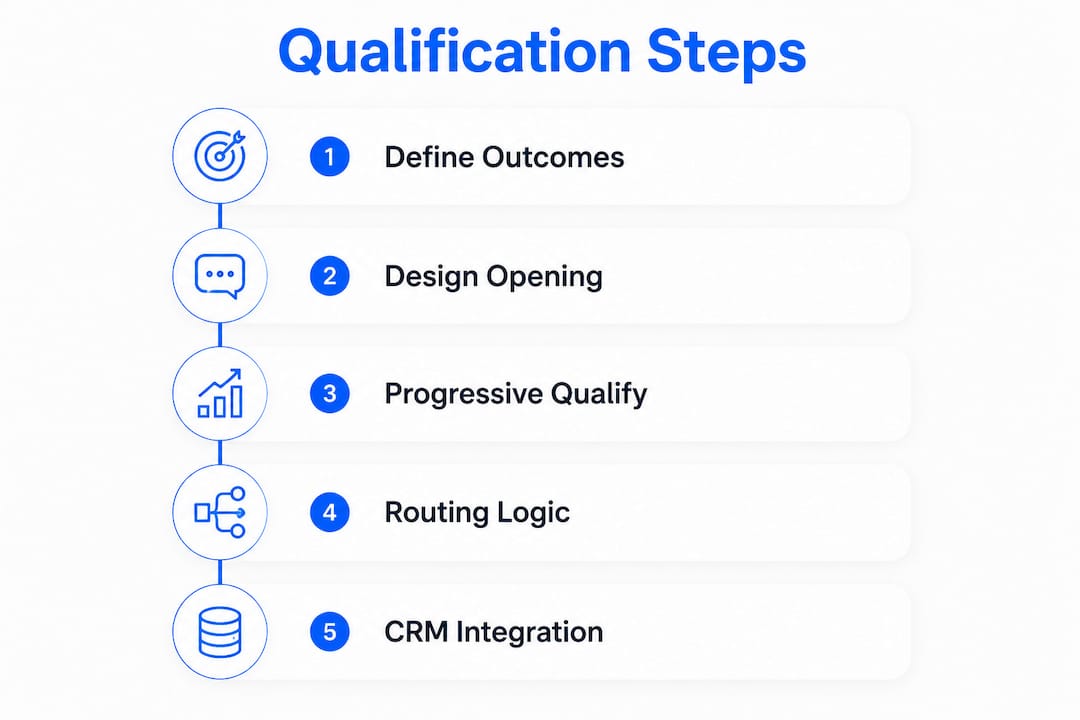
Step 4: Implement routing and handoff logic
Automated chatbot handoffs need clearly defined triggers based on lead fit and urgency. A prospect who says they need a solution within 30 days and has a defined budget should trigger an immediate rep notification or calendar link. A prospect still in research mode should enter a nurture sequence. Build your routing rules around two axes: fit score and urgency. High fit plus high urgency equals live handoff. High fit plus low urgency equals nurture. Low fit equals a polite close.
Step 5: Integrate with your CRM
Map every chatbot answer to a structured CRM field before you go live. Company size, budget range, timeline, and use case should each populate a specific field. This makes filtering, follow-up, and performance reporting possible. Testing a simple 4-question BANT-style sequence with diverse lead scenarios before launch catches routing errors that would otherwise send hot leads to the wrong rep or the wrong bucket.
Pro Tip: Keep your initial flow to five questions or fewer. Flows with more than 5–7 questions see abandonment rates increase by up to 50%. Launch lean, measure, then add questions only where data shows they improve routing accuracy.
What metrics reveal whether your chatbot workflow is performing?
Measuring chatbot performance requires stage-by-stage funnel analysis, not just total lead count. Three metrics matter most: qualification completion rate, handoff rate, and rep response time.
Core performance benchmarks
Measuring stage-by-stage funnel metrics reveals exactly where your flow breaks down. A completion rate below 40% signals drop-off somewhere in the flow. A handoff rate below 25% suggests your ICP criteria are too strict or your routing logic has errors. Rep response time above five minutes on hot leads measurably reduces conversion.
Key metrics to track:
- Qualification completion rate: The percentage of prospects who finish the full flow. Target above 40%.
- Handoff rate: The percentage of completions that trigger a sales handoff. Target 25–50% depending on your ICP strictness.
- Drop-off by question: Which specific question causes the most exits. This is your primary optimization signal.
- Rep response time: How fast a rep contacts a routed lead. Speed directly affects close rates.
- Lead quality score: Whether routed leads actually convert downstream. Volume without quality is noise.
Diagnosing common errors
| Problem | Likely cause | Fix |
|---|---|---|
| Completion rate below 40% | Too many questions or wrong opener | Cut questions, test curiosity-driven opener |
| Handoff rate below 25% | ICP criteria too narrow or routing errors | Loosen one qualifier, audit routing logic |
| High drop-off at question 3 | Question is too personal or confusing | Reword or reorder; add a micro-value statement |
| Slow rep response | No real-time notification system | Add Slack or SMS alerts for hot lead triggers |
| Low downstream conversion | Chatbot is routing wrong leads | Tighten ICP criteria; add AI scoring layer |
A/B testing qualification question order and timing improves completion and hot lead rates by up to 20%. Swap the timeline question before the budget question and measure the difference over two weeks. Small sequence changes produce measurable results.
Pro Tip: Measuring granular drop-off by question step pinpoints exactly which question causes abandonment. Most platforms show this in their conversation analytics. Check it weekly during the first month after launch.
How do you scale your chatbot workflow across channels and use cases?
A single web chatbot is a starting point, not a ceiling. Scaling means deploying the same qualification logic across multiple channels while keeping data centralized.
Multi-channel deployment priorities:
- Web chat on high-intent pages: Pricing, demo request, and contact pages produce the highest-quality leads. Deploy here first.
- WhatsApp and SMS: Prospects who prefer messaging apps convert at higher rates when you meet them there. Use the same qualification sequence adapted for a messaging format.
- Social media chatbots: Facebook Messenger and Instagram DM bots capture leads from paid social campaigns before they reach your website.
- Email-triggered flows: A prospect who clicks a pricing link in an email can trigger a chatbot sequence via SMS or web overlay.
AI-powered chatbots score leads based on conversation context, detecting intent signals, competitor mentions, and project scale to assign hot, warm, or cold categories. This goes beyond rule-based scoring. An AI layer reads what a prospect says, not just which button they clicked. AI scoring must include a confidence threshold to route uncertain cases to humans, preserving accuracy and rep trust in the system.
Automation tools like Zapier and Make.com connect your chatbot platform to your CRM, Slack, email, and calendar systems without custom code. A qualified lead can trigger a CRM deal creation, a rep Slack notification, and a calendar invite in under 30 seconds. For non-ready leads, build a nurture sequence that re-engages them at 7, 14, and 30 days with relevant content. Data hygiene matters at scale. Audit your CRM fields quarterly to remove duplicates and fix mapping errors before they corrupt your lead quality reporting.
Mediabloom’s B2B chatbot solutions show how multi-channel qualification flows operate across web, SMS, and voice in a single platform, which is the architecture most enterprise teams need when scaling beyond a single channel.
Key Takeaways
A well-built lead qualification chatbot workflow outperforms static forms on every measurable dimension, from completion rate to routing accuracy, when you keep flows short, start with curiosity, and integrate tightly with your CRM.
| Point | Details |
|---|---|
| Chat outperforms forms | Chatbot flows achieve 2x to 4x higher completion rates than static lead forms. |
| Start with BANT, keep it short | Use a 4–5 question BANT sequence and expand only after measuring drop-off data. |
| Routing logic drives revenue | Define qualified, nurture, and disqualified buckets before writing a single question. |
| Metrics reveal the real problem | Track completion rate, handoff rate, and drop-off by question step weekly. |
| Scale with AI and automation | Add AI scoring and tools like Zapier to route and follow up across channels without manual work. |
What we’ve learned from building qualification flows at scale
The most common mistake sales teams make is building a 12-question chatbot before they’ve tested a 4-question one. Over-engineering a flow before you understand your prospects’ actual drop-off points wastes weeks of setup time and produces worse results than a simpler version would have. Start with the minimum viable qualification sequence. Get data. Then add complexity where the data tells you to.
The second pattern worth naming is the automation-versus-human-touch tension. High-value enterprise leads often disengage from fully automated flows. They want a signal that a real person is on the other end. The fix is not to remove automation. It is to design a handoff that feels fast and personal. A rep who responds within two minutes of a hot lead trigger creates a better experience than a bot that runs 20 questions. Automation qualifies. Humans close.
The future of conversational lead qualification is AI that reads intent, not just answers. A prospect who says “we’ve been evaluating options for six months” is signaling something very different from one who says “we need this deployed by next quarter.” Rule-based systems treat both answers the same. AI-powered flows catch the difference and route accordingly. That gap in routing accuracy is where the next generation of chatbot workflows will win or lose.
The teams that iterate fastest will build the best-performing flows. Test one variable at a time, measure for two weeks, and move on. Chatbot optimization is not a launch event. It is a continuous process.
— Mediabloom
Mediabloom’s AI-powered chatbot platform for lead qualification
Mediabloom integrates AI chatbots, voice agents, and sales automation into a single platform built for lead qualification at scale. Clients like Miracle Ear and 1-800 Accountant generate over 10,000 monthly leads through Mediabloom’s omnichannel system, which connects web chat, SMS, and voice into one qualification engine. Whether you need a SaaS lead qualification chatbot or a full AI lead generation system, Mediabloom’s team builds and deploys custom workflows tailored to your ICP and sales process. Request a demo to see the qualification flow in action and review case studies showing real pipeline outcomes.
FAQ
What is a lead qualification chatbot workflow?
A lead qualification chatbot workflow is an automated conversational sequence that asks prospects structured questions, scores their fit against your ICP, and routes them to the correct sales action. It replaces static forms with a dynamic, branching conversation.
How many questions should a lead qualification chatbot ask?
Keep the flow to five questions or fewer at launch. Flows with more than 5–7 questions see abandonment rates increase by up to 50%, so start lean and add questions only when data supports it.
What is the BANT framework in chatbot qualification?
BANT stands for Budget, Authority, Need, and Timeline. It is the most widely used qualification framework for chatbot flows, giving sales teams four structured dimensions to assess whether a prospect is ready for a sales conversation.
How do I measure whether my chatbot workflow is working?
Track three core metrics: qualification completion rate (target above 40%), handoff rate (target 25–50%), and drop-off by question step. A completion rate below 40% signals a flow design problem that needs immediate attention.
Can a chatbot qualify leads across multiple channels?
Yes. The same qualification logic can run on web chat, WhatsApp, SMS, and social media messaging. Automation tools like Zapier and Make.com connect these channels to your CRM, keeping all lead data centralized regardless of where the conversation starts.