Yes — modern, HIPAA-ready AI can capture, qualify, and confirm patient appointment requests after clinic hours, then write bookings back to your EHR or queue them for next-day staff review. The technology is mature, the compliance frameworks exist, and the operational case is strong.
Your two immediate next steps:
- Evaluate must-have capabilities before any demo. Confirm HIPAA readiness (signed BAA, encrypted PHI transport and storage, audit logs), EHR read/write vs. read-only behavior, and escalation rules for urgent or clinical situations. Involve your IT lead, privacy officer, and scheduling manager in that review.
- Configure a 2–3 week pilot on a narrow scope. Pick one or two appointment types (new patient bookings and reschedules work well), map the EHR fields the agent needs to read, define your escalation triggers, and measure capture rate and booking accuracy from day one.
Pro Tip: Before your first vendor demo, document exactly which EHR fields a confirmed booking requires. Vendors who cannot map to those fields in a sandbox environment during the demo are not ready for your environment.
Federal workforce supply projections from HRSA show a widening gap between clinician supply and patient demand, making automation of routine administrative tasks one of the most defensible investments a clinic can make right now.
Key Takeaways
After-hours AI appointment capture is a proven, deployable strategy for U.S. clinics facing staffing pressure and rising patient expectations for 24/7 access.
| Point | Details |
|---|---|
| Start with a narrow pilot | Test 1–2 appointment types (new bookings, reschedules) for 2–3 weeks before expanding scope. |
| Compliance is non-negotiable | Require a signed BAA, encrypted PHI handling, and audit logs from every vendor before go-live. |
| EHR integration determines value | Confirm read/write capability and test field mapping in a sandbox before contract signing. |
| Track capture rate and accuracy | Target 60–75% booking conversion and 98% booking accuracy as your pilot success benchmarks. |
| Mediabloom accelerates deployment | Done-for-you setup, 600+ integrations, and HIPAA-ready controls reduce time-to-live to 2–3 weeks for a pilot scope. |
Table of Contents
- What is after-hours AI answering, and how does it differ from voicemail?
- Why capturing after-hours appointments matters for your clinic
- How AI captures after-hours appointments: the end-to-end workflow
- Which clinic workflows are the best fit for after-hours AI?
- How to evaluate vendors and implement after-hours AI
- Compliance and patient safety: what your clinic must get right
- How to measure whether your after-hours AI is working
- Mediabloom in action: what an AI after-hours deployment delivers
- Why clinic leaders cannot afford to wait on this
- Mediabloom delivers after-hours capture from day one
- Sources
- FAQ
What is after-hours AI answering, and how does it differ from voicemail?
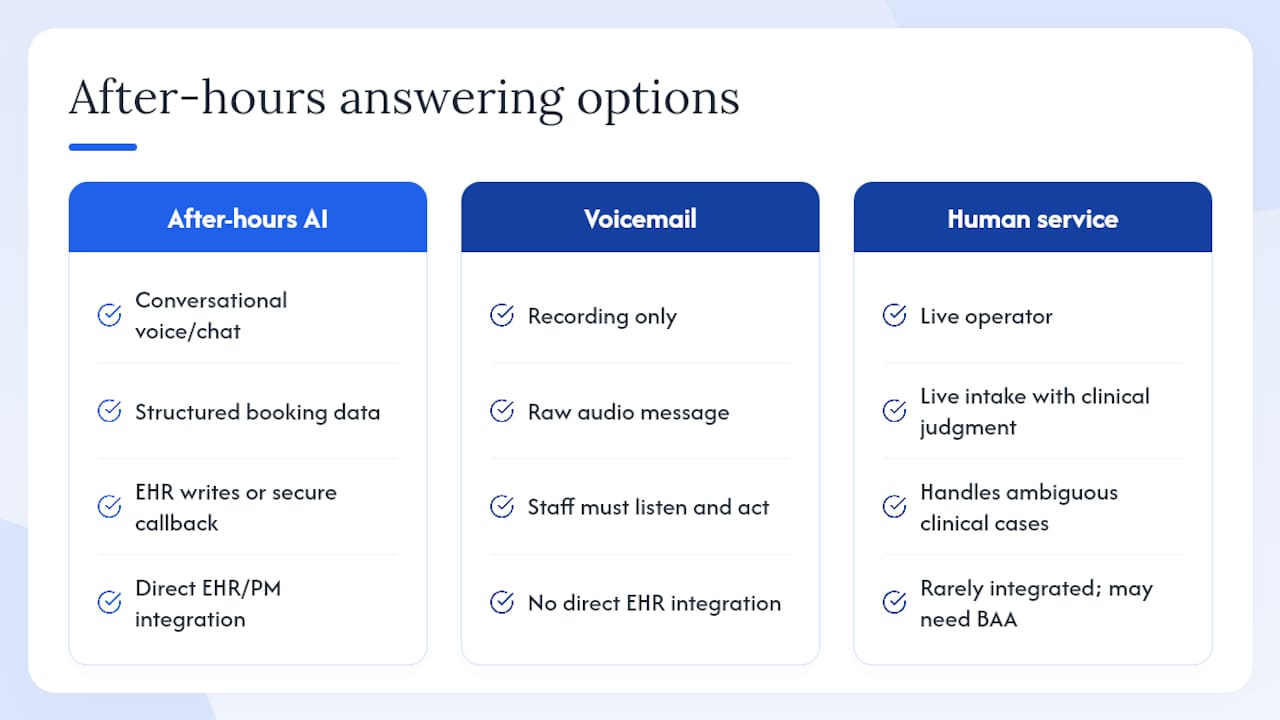
After-hours AI answering is conversational AI, delivered via voice agent or web chat, that collects structured booking intent from patients, confirms availability rules, and either writes a confirmed appointment to your EHR/PM system or creates a secure callback task for next-day staff. It is not a recording. It is not a live operator. It is a purpose-built intake workflow that runs without a human in the loop.
The distinction from voicemail is operational, not cosmetic. Voicemail captures audio. After-hours AI captures structured data: patient name, date-of-birth verification, appointment type, preferred time, insurance details, and reason for visit. That data can trigger an EHR write, a scheduling queue entry, or an escalation alert, depending on what the patient says. A voicemail requires a staff member to listen, interpret, and act. The AI removes that step entirely for routine bookings.
Human answering services sit between the two. They offer live interaction and clinical judgment, but they are expensive at scale, inconsistent across agents, and rarely integrated directly with your EHR. They also require a BAA if they handle PHI, just as AI does. The key tradeoff: a human answering service can handle genuinely ambiguous clinical situations better than AI, but it cannot match AI on cost per interaction, consistency, or 24/7 availability. For routine scheduling, reschedules, and intake collection, AI handles the volume; human services or on-call clinicians handle the exceptions.
AI-assisted live chat support follows the same intake logic across the chat channel, giving clinics a consistent experience whether a patient calls or messages through your website.
Why capturing after-hours appointments matters for your clinic
The revenue case is direct. Every unanswered after-hours call that does not result in a booking is a lost appointment. For a clinic with an average visit value of $150–$200 and even modest after-hours call volume, the monthly revenue leak is measurable.
Beyond revenue, the operational benefits compound quickly:
- Reduced front-desk call volume. Patients who book after hours do not call back the next morning to schedule, which compresses the morning call surge.
- Lower staff burnout. Consulting analyses from Grant Thornton identify automation and workflow redesign as direct levers for reducing clinician and administrative burnout, not just efficiency gains.
- Stabilized revenue retention. Captured bookings that would otherwise be lost to competitors or simply abandoned represent recoverable revenue with no additional marketing spend.
- Faster patient access. Patients who can book at 10 PM do not wait until 8 AM, which improves satisfaction and reduces the likelihood they seek care elsewhere.
Industry case evidence suggests that EHR- and CRM-integrated AI scheduling, combined with automated reminders, can reduce no-shows significantly and increase appointment attendance notably. These figures come from vendor and industry case material rather than peer-reviewed trials, so treat them as directional targets rather than guaranteed outcomes.
Digital tools and telehealth channels are associated with improved access and patient satisfaction across reviewed studies, reinforcing that digital intake is a safe supplement to in-person scheduling, not a risk to patient experience.
How AI captures after-hours appointments: the end-to-end workflow
When a patient contacts your clinic after hours, the AI agent handles a defined sequence of steps. Understanding each one helps IT and operations teams identify integration touchpoints before deployment.
Inbound contact and identity verification. The agent answers via voice, SMS, or web chat. It collects enough information to verify the patient (name, date of birth, or a callback number) without capturing more PHI than the task requires. PHI minimization at intake is a compliance requirement, not just a best practice.
Intent classification and decision logic. The agent determines what the patient needs: a new appointment, a reschedule, a prescription refill follow-up, or something that requires immediate clinical attention. This classification drives the next action. Routine bookings proceed to scheduling. Urgent or ambiguous situations trigger escalation to an on-call clinician or a next-business-day priority callback.
EHR/PM interaction. This is where read-only vs. read/write configuration matters most. A read-only integration lets the agent check provider availability and confirm appointment slots without writing to the EHR. A read/write integration lets the agent create or update the appointment record directly. Read/write requires more rigorous API permissioning, audit logging, and error-handling configuration, but it eliminates the manual step of a staff member entering the booking the next morning.
Escalation and handoff logging. Every escalation, whether to an on-call clinician or a next-day callback queue, must be logged with a timestamp, the patient’s stated reason, and the action taken. That log is the audit trail your privacy officer needs.
The IT integration checklist before go-live:
| Checklist Item | What to Confirm |
|---|---|
| Signed BAA | Vendor provides a Business Associate Agreement covering all PHI handling |
| API support | Your EHR/PM exposes a supported API (HL7 FHIR, proprietary REST) the vendor can connect to |
| Read vs. write scope | Confirm which EHR fields the agent reads and which it writes; document permissions |
| Supported EHR adapters | Vendor lists your specific EHR/PM as a tested, supported integration |
| Audit logs | Every patient interaction is logged with timestamps and accessible for review |
| Encrypted transport | All PHI in transit uses TLS 1.2 or higher; storage encryption confirmed |
| Escalation routing | On-call and next-day escalation paths are configured and tested before go-live |
A phased approach recommended by practitioners starts with after-hours inbound scheduling, validates containment and compliance, then expands to reminders and more complex intake workflows.
Which clinic workflows are the best fit for after-hours AI?
Not every patient interaction belongs in an automated after-hours workflow. Matching use cases to automation scope is where pilots succeed or fail.
High-fit use cases (can be automated end-to-end):
- New patient appointment bookings for standard visit types
- Reschedules and cancellations for existing appointments
- Prescription refill requests that require scheduling a follow-up visit (not clinical authorization)
- Patient intake data collection for first visits (demographics, insurance, reason for visit)
- Appointment confirmations and automated reminders for next-day schedules
Use cases requiring immediate human handoff:
- Any patient describing symptoms that suggest a medical emergency
- Complex triage situations where clinical judgment is required
- Requests involving controlled substances or sensitive clinical decisions
- Situations where the patient is distressed or the interaction is ambiguous
Market reviews on platforms like Capterra confirm that after-hours capture, intake collection, and reschedule capabilities are standard features in current scheduling solutions, which means your vendor shortlist should include all three as baseline requirements, not differentiators.
For a pilot, start with one or two appointment types. New patient bookings and reschedules are the most common starting point because they have clear decision rules, defined EHR fields, and low clinical risk. Expand to intake collection and refill-related scheduling once the pilot data confirms accuracy and compliance.
How to evaluate vendors and implement after-hours AI
Vendor selection for after-hours AI is a compliance and integration decision as much as a product decision. A strong demo means nothing if the vendor cannot sign your BAA or connect to your EHR.
Vendor evaluation criteria
Prioritize these in order:
- HIPAA-ready controls. Signed BAA, encrypted PHI handling, role-based access, audit logs, and data residency documentation.
- EHR/PM integrations. Confirm your specific system is on the vendor’s tested integration list. Ask whether the connection is read-only or read/write and what the error-handling behavior is if the EHR is unavailable.
- Escalation and on-call routing. The vendor must support configurable escalation rules, not just a generic “transfer to operator” fallback.
- Script and clinical rule customization. Your intake questions, appointment types, and escalation triggers are not generic. The vendor must allow you to configure them.
- Reporting and analytics. Capture rate, booking conversion, escalation volume, and error rate should be available in a dashboard your team can access without vendor involvement.
- SOC 2 and TCPA posture. SOC 2 Type II certification and documented TCPA compliance for any outbound automation features.
Must-ask questions for vendor demos
- Which EHR/PM systems do you have tested, production integrations with?
- Can your agent write confirmed bookings directly to our EHR, or does it create a task for staff review?
- Will you sign our BAA before we access a test environment?
- Is a sandbox or test environment available before contract signing?
- What is your escalation SLA for urgent patient contacts?
- How does the agent handle an EHR timeout or API error mid-interaction?
- What audit log format do you provide, and how long is data retained?
Implementation timeline
End-to-end deployments typically run 6–12 weeks, with after-hours scheduling often activated within the first 2–3 weeks of a phased rollout.
| Phase | Duration | Key Activities |
|---|---|---|
| Evaluation and vendor selection | Weeks 1–2 | Demo, BAA review, EHR integration confirmation |
| Configuration and EHR mapping | Weeks 3–4 | Script build, field mapping, escalation rule setup |
| QA and soft launch | Weeks 5–6 | Internal testing, sandbox validation, staff training |
| Pilot go-live (narrow scope) | Weeks 7–9 | Live traffic on 1–2 appointment types, daily KPI review |
| Full rollout | Weeks 10–12 | Expand scope, add channels, optimize based on pilot data |
Integration challenges in AI customer service are most often EHR field-mapping issues discovered late. Resolve them in the sandbox phase, not after go-live.
Compliance and patient safety: what your clinic must get right
Compliance is not a checklist item to complete once. It is an ongoing operational posture.
Non-negotiable compliance requirements:
- Signed BAA with every vendor that touches PHI, including the AI platform, any CRM it writes to, and any telephony provider in the chain
- Encrypted PHI transport (TLS 1.2 or higher) and encrypted storage at rest
- Audit logs for every patient interaction, including timestamp, channel, action taken, and escalation status
- Role-based access controls so only authorized staff can view interaction logs and patient data
- Data retention policies aligned with your state’s medical records requirements
TCPA considerations for outbound automation. If your after-hours AI places outbound calls or sends SMS reminders, TCPA consent requirements apply. Patients must have provided prior express written consent for automated outbound contacts. This is a separate consent workflow from your standard intake consent and must be documented. Appointment reminder calls to existing patients generally fall under an established business relationship, but confirm with legal counsel for your specific use case.
Clinical safety limits. Automated triage can collect symptoms and classify urgency, but it cannot diagnose or provide clinical advice. Every deployment must include mandatory escalation triggers for: chest pain, difficulty breathing, altered mental status, suicidal ideation, and any situation the patient describes as an emergency. These triggers must route to an on-call clinician or 911 guidance immediately, with no delay for data collection.
Pro Tip: Run a tabletop exercise with your on-call clinician and scheduling lead before go-live. Walk through five escalation scenarios and confirm the routing works as configured. Document the results as part of your compliance record.
Peer-reviewed literature supports digital triage and automated systems as workforce relief tools that improve access to care, but the evidence consistently emphasizes retained escalation paths as the safety condition for automation to work.
How to measure whether your after-hours AI is working
Measuring performance starts before go-live. Establish baseline figures for after-hours call volume, missed contacts, and next-morning callback volume during the two weeks before activation. Without a baseline, your pilot data has no reference point.
Primary KPIs to track:
| KPI | Definition | Realistic Pilot Target |
|---|---|---|
| After-hours capture rate | % of after-hours contacts that reach a completed AI interaction | 70–85% of eligible contacts |
| Booking conversion rate | % of completed interactions that result in a confirmed or queued booking | 60–75% for suitable appointment types |
| Booking accuracy | % of AI-created bookings that require no staff correction | very high |
| Average time-to-confirmation | Time from patient contact to booking confirmation or callback task creation | Under 5 minutes |
| No-show delta | Change in no-show rate after adding automated reminders | Directional improvement within a few weeks |
| Staff hours saved | Front-desk time freed from next-morning callback processing | Measurable within the first pilot week |
A simple ROI calculation. If your clinic’s average visit value is $175 and your after-hours AI captures 40 additional bookings per month that would otherwise have been missed, that is $7,000 in monthly recovered revenue before accounting for no-show reduction or staff time savings. The math scales directly with your visit volume and average value.
AI-driven productivity gains follow a similar pattern across industries: the ROI compounds when automation handles volume that previously required manual effort at every step.
Mediabloom in action: what an AI after-hours deployment delivers
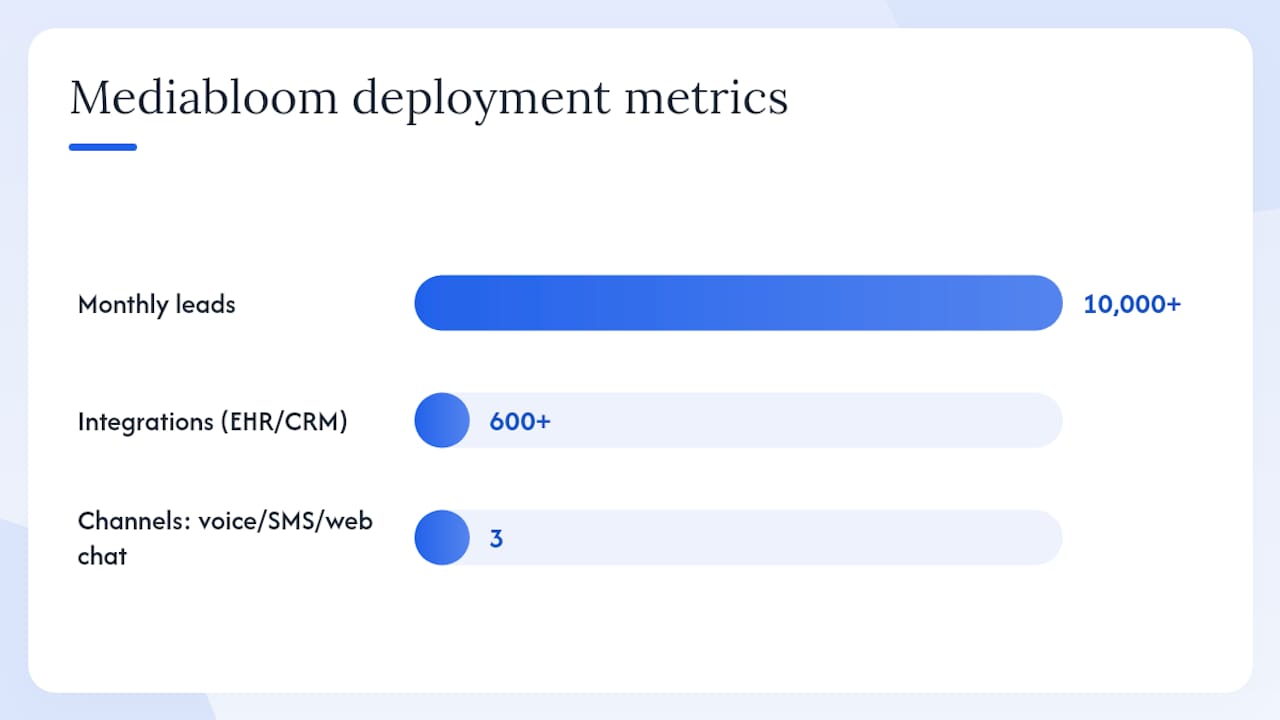
Mediabloom’s platform deploys AI voice agents, chatbots, and multi-channel automation across voice, SMS, and web chat, with integrations to 600+ CRM and EHR/PM platforms. For clinics, that means a single platform handles inbound after-hours calls, web chat intake, and outbound appointment reminders without requiring separate tools for each channel.
Key deployment highlights from Mediabloom’s healthcare and service-sector work:
- Omnichannel intake. Voice agents handle phone calls; chatbots handle web and SMS contacts. Both capture structured data and route to the same scheduling queue or EHR write-back workflow.
- Done-for-you setup. Mediabloom’s team configures scripts, EHR field mappings, escalation rules, and reporting dashboards, reducing the internal IT burden during rollout.
- HIPAA-ready posture. The platform is built with HIPAA-ready controls, including BAA availability, encrypted PHI handling, audit logging, and role-based access.
- 600+ integrations. The platform connects to major EHR, PM, and CRM systems, covering the majority of ambulatory clinic environments in the U.S.
- Measurable outcomes. Clients including Miracle Ear and 1-800 Accountant have deployed Mediabloom’s platform at scale, generating over 10,000 monthly leads through automated intake and appointment capture workflows.
For clinics evaluating after-hours AI, Mediabloom’s AI appointment setting case studies show the deployment scope, integration detail, and outcome metrics from real activations. The AI chatbot for medical and healthcare websites product page covers the chat-channel configuration specifically for clinic environments.
Why clinic leaders cannot afford to wait on this
The workforce pressure driving after-hours AI adoption is not a temporary condition. HRSA’s federal workforce projections show a structural supply-demand imbalance that will persist for years. Clinics that rely on front-desk staff to handle every patient contact are building on a foundation that is already under strain.
Patient expectations have shifted just as durably. Patients now expect the same 24/7 booking access from their clinic that they get from every other service in their lives. A clinic that routes after-hours callers to voicemail is not just losing bookings. It is signaling that the patient’s time is less important than the clinic’s operating hours.
The clinics that move first on after-hours AI capture a compounding advantage: recovered revenue, lower staff burnout, and patient retention that compounds over time. The technology is ready. The compliance frameworks are in place. The remaining question is execution speed.
Mediabloom delivers after-hours capture from day one
Clinics that need after-hours appointment capture without a long integration project have a direct path with Mediabloom. The platform combines AI voice agents, web chatbots, and multi-channel automation in a single HIPAA-ready deployment, with done-for-you configuration that covers EHR field mapping, escalation rules, and reporting setup. You define the appointment types and clinical guardrails; Mediabloom’s team builds and activates the workflow.
A pilot covers 2–3 appointment types, activates within 2–3 weeks, and tracks capture rate, booking conversion, and booking accuracy from the first day of live traffic. The AI voice agent demo shows exactly how the intake workflow runs, from the patient’s first word to the confirmed booking in your system. Book the demo, define your pilot scope, and have measurable data within a month.
Sources
The claims in this article draw on the following sources. Each is worth reviewing directly if you are preparing a vendor evaluation or compliance review.
This article is general information, not a substitute for advice from a qualified doctor. Consult a qualified healthcare professional about your own circumstances before acting on anything here.
FAQ
Can AI book appointments directly into my EHR?
Yes, when configured with read/write API access and a tested integration for your specific EHR. Read-only configurations check availability but require staff to confirm the booking; read/write configurations create the appointment record automatically.
What are the TCPA requirements for after-hours AI calls?
Outbound automated calls and SMS require prior express written consent from the patient. Inbound AI answering does not trigger TCPA, but any proactive outbound reminder or callback automation does. Confirm your consent documentation with legal counsel before activating outbound features.
How quickly can a clinic pilot after-hours AI?
A narrow pilot covering 1–2 appointment types can go live within 2–3 weeks, assuming the BAA is signed, EHR field mapping is confirmed in a sandbox, and escalation rules are configured and tested. Full rollout across all channels and appointment types typically takes 6–12 weeks.
What are the three most effective ways to remind patients of appointments?
Automated SMS reminders, outbound AI voice calls, and email confirmations are the three most common methods. When integrated with your EHR and timed appropriately before the appointment, automated reminders consistently reduce no-show rates across clinic types.
Can AI handle urgent patient calls after hours?
AI can classify urgency and route urgent contacts to an on-call clinician or provide 911 guidance, but it cannot provide clinical advice or diagnose. Every deployment must include mandatory escalation triggers for emergencies, with no delay for data collection once an urgent situation is identified.